Steps to install DeskTrack App on MAC machine:
- Log in to DeskTrack admin panel
- Create User Profiles i.e. Employee DeskTrack profiles (ignore if already created)
- Download the application : https://www.dropbox.com/scl/fi/p1vn8xeizuq0cld0v9m6b/SWT.pkg?rlkey=ov5wa81krws4jtapi74mln2fm&st=3r4e9cup&dl=1
- After downloading the setup double click on it will give you a popup and you have to click on Done
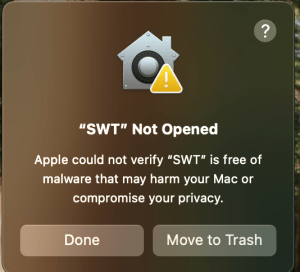
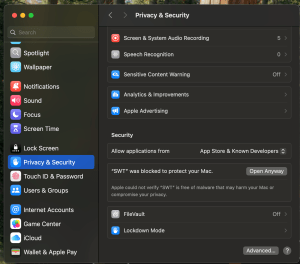
- Now Go to System Preferences and do the following configuration
System Preferences–> Security and Privacy –> General –> Unblock the DeskTrack Application by clicking on
Open Anyway
- Install the app and log in with Employee DeskTrack profiles (DeskTrack Id and password)
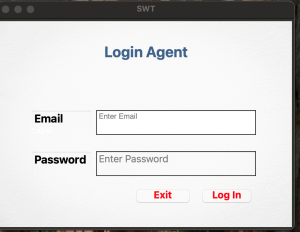
NOTE: A popup will appear in Mac Mojave / Catalina / Big Sur and the user has to click OK to run the application. Because the latest Mac OS does not allow any app to track system activity.
- Go to system settings :
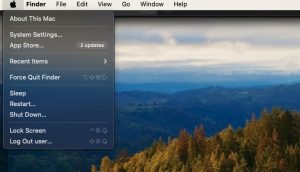
2 Go to Security and privacy:
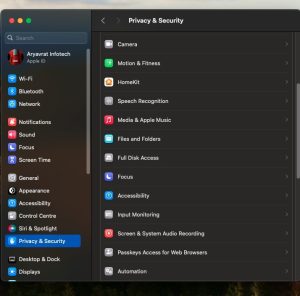
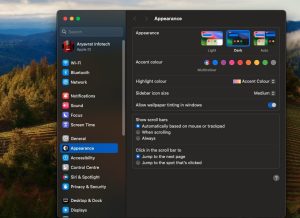
3. Go to Appearance.
- Go to screen & system audio recording.
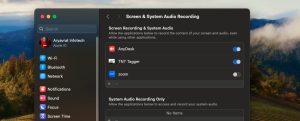
- Add our TNT application in Screen recording And Accessibility