Your HR manager spends 3 hours every Monday manually updating attendance records. Your payroll team chases timesheets via email. And your leadership team makes hiring decisions based on gut feeling not data.
Sound familiar?
This is the reality for thousands of businesses still running HR on spreadsheets and outdated tools. And in 2026, it’s costing them in time, money, and talent.
The good news? Human resource management software has evolved to solve exactly these problems. From automating payroll to tracking employee productivity in real time, today’s HRMS platforms are doing the heavy lifting so your HR team can focus on what actually matters: people.
In this guide, you’ll get everything you need to know what HRMS is, why you need it, what features to look for, and how DeskTrack stands out as a complete HR management solution.
What Is Human Resource Management Software?
Human resource management software (also called HRMS or HRM software) is a digital system that automates, organizes, and manages your company’s core HR functions from a single platform.
Instead of juggling multiple tools and spreadsheets, HR teams can handle everything attendance, payroll, leave requests, onboarding, performance reviews, and more in one place.
Modern human resource management system software typically covers:
- Employee data and records management
- Attendance management system and time tracking
- Payroll management system
- Leave management software
- Performance tracking and reviews
- Recruitment and onboarding
- Workforce scheduling and planning
- Compliance and reporting
Quick Fact: Companies using HRMS report up to 90% reduction in administrative time and significantly fewer payroll errors. (SHRM Research)
Common HR Challenges That Are Costing Businesses (And How to Fix Them)

Before we dive into features, let’s talk about the real problems HR teams face every day without dedicated hr software.
1. Manual Data Entry Is a Time Trap
HR teams waste hours entering, updating, and correcting employee data. One wrong digit in a spreadsheet can create a payroll disaster.
2. Attendance Tracking Is Unreliable
Paper sign-in sheets and honor-system remote check-ins leave massive gaps in accountability. You often don’t know who’s actually working or when.
3. Leave Management Creates Confusion
When leave requests are handled via WhatsApp or email chains, approvals slip through the cracks and scheduling becomes a guessing game.
4. Payroll Is Slow and Error-Prone
Without automation, payroll processing is slow, inconsistent, and stressful especially as your team grows.
5. No Visibility Into Workforce Productivity
Without a proper human resource tracking system, managers have no clear picture of who’s doing what, and whether projects are on track.
6. Compliance Is a Moving Target
Labor laws change. Without a system tracking hours, overtime, and leave entitlements, compliance risk is real.
This ensures a balance between accountability and privacy.
See DeskTrack in Action — Live Demo➡
How Human Resource Management Software Solves These Problems
| HR Challenge | HRMS Solution |
|---|---|
| Manual data entry | Automated employee records & self-service portals |
| Unreliable attendance | Biometric & digital HR tracking software |
| Leave confusion | Automated leave request, approval & balance tracking |
| Payroll errors | Rule-based payroll automation with compliance checks |
| No productivity visibility | Real-time dashboards & productivity tracking software |
| Compliance risk | Audit-ready reporting and policy enforcement |
Why Businesses Need HR Software in 2026 (More Than Ever)
The workplace in 2026 looks very different from even five years ago. Remote work is mainstream. Hybrid teams span time zones. And employees expect digital-first HR experiences.
Here’s why software for human resource management isn’t optional anymore:
1. Remote & Hybrid Work Is the Norm You can’t manage a distributed team on spreadsheets. You need tools built for asynchronous, location-independent work.
2. Employee Experience Is a Competitive Advantage Companies with strong HR systems see 21% higher profitability, according to Gallup’s research on employee engagement. Better tools = better employee experience.
3. Data-Driven HR Is Replacing Gut Feel Modern human resource management tools give you real workforce analytics who’s performing, where bottlenecks are, and where attrition risk is highest.
4. Compliance Complexity Is Growing Labor laws, data privacy regulations, and tax codes are getting more complex. Automated compliance tools reduce legal risk significantly.
5. Talent Retention Depends on Operational Efficiency Employees don’t stay in environments with chaotic HR processes. Timely payroll, fair leave policies, and transparent performance systems matter.
According to Forbes, businesses that invest in HR technology see up to 40% improvement in workforce productivity within the first year.
Key Features to Look for in Human Resource Management Software
When evaluating any human resource management tool, here’s a comprehensive feature checklist:
Core HR Features
- Centralized employee database
- Digital onboarding workflows
- Document management and e-signatures
- Role-based access control
Time & Attendance
- Time tracking software with auto-clock in/out
- Attendance management system with biometric/GPS support
- Overtime and idle time tracking
- Shift scheduling and swap management
Leave & Payroll
- Leave management software with custom leave types
- Automated payroll calculation
- Tax compliance and deduction management
- Payslip generation and employee self-service
Performance & Productivity
- Goal setting and OKR tracking
- Productivity tracking software with app/URL monitoring
- HR task management with assignment and deadline tracking
- Performance review templates and 360° feedback
Reporting & Compliance
- Real-time workforce analytics dashboards
- Custom report generation
- Audit trail and compliance logging
- Integration with accounting and project tools
Still managing HR on spreadsheets in 2026?
DeskTrack automates attendance, payroll, leave & productivity tracking all in one place.
Top 5 Benefits of Using Human Resource Management Software
1. Save Time — Up to 90% Less Admin Work
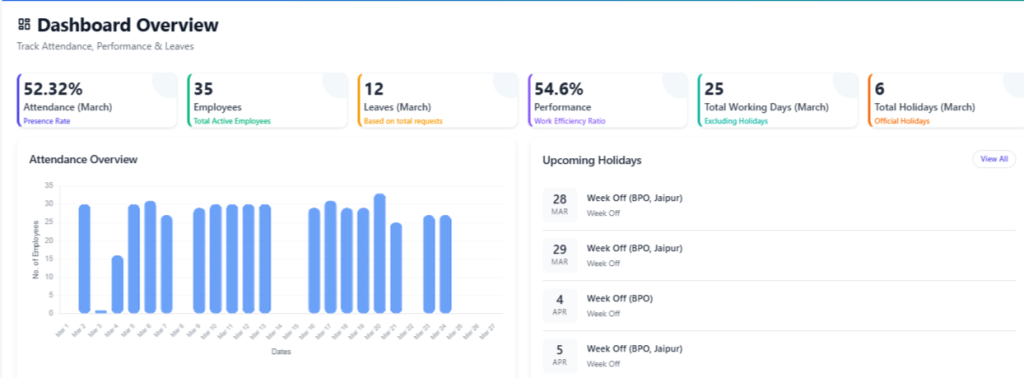
Automation eliminates the repetitive manual tasks that eat your HR team’s day. Payroll runs itself. Attendance is recorded automatically. Leave balances update in real time.
2. Reduce Costs
Fewer errors = fewer expensive corrections. A proper payroll management system alone can save companies thousands annually in compliance penalties and manual processing costs.
3. Improve Employee Experience
When employees can check their payslips, apply for leave, and track their goals on a self-service portal they feel trusted and empowered. That directly improves retention.
4. Make Smarter Workforce Decisions
With a proper human resource management system software in place, you’re not guessing about headcount, overtime, or productivity. You have real data to act on.
5. Scale Without Chaos
Whether you’re managing 10 employees or 1,000, the right workforce management software grows with you without adding overhead.
Real-World Use Cases: HR Software in Action
Use Case 1 — Remote IT Company (50 employees) A SaaS company was struggling with attendance tracking across time zones. After implementing DeskTrack’s employee monitoring software and automated timesheets, they reduced payroll errors by 80% and gained complete visibility into remote work hours.
Use Case 2 — Retail Chain (200+ staff) A retail business with multiple branches was managing leaves via WhatsApp. Switching to a centralized staff management system cut leave-related conflicts by 60% and reduced HR manager workload significantly.
Use Case 3 — Consulting Firm (Project-Based Work) A consulting firm needed to track time spent per client and project. Using DeskTrack’s HR task management and time tracking features, they improved billing accuracy and project profitability.
How to Choose the Right HR Software: 5 Steps
Step 1: Audit Your Current HR Pain Points: List every HR task that causes friction slow approvals, payroll errors, attendance disputes. These become your must-have features.
Step 2: Define Your Team Size & Structure: Remote, hybrid, in-office, or field-based? Your team structure determines which features you’ll rely on most.
Step 3: Prioritize Integration Needs: Does the tool connect with your accounting software, project management platform, or communication tools? Seamless integration prevents data silos.
Step 4: Evaluate Ease of Use: The best human resource management tools are the ones your team actually uses. Look for intuitive UI and strong mobile support.
Step 5: Test Before You Commit: Always take a free trial or live demo. A tool that looks great on paper should also feel great in practice.
Why DeskTrack is the Best HR Software for Businesses in 2026
DeskTrack isn’t just another HRMS. It’s a complete human resource process management software built for modern businesses that need both people management and productivity intelligence in one platform.
Here’s what makes DeskTrack different:
| Feature | DeskTrack |
|---|---|
| Attendance Tracking | Auto clock-in, biometric & GPS support |
| Leave Management | Custom leave types, multi-level approvals |
| Payroll | Automated, tax-compliant payroll processing |
| Productivity Monitoring | App/URL tracking, idle time detection |
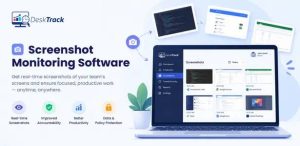
| Screenshot Monitoring | Periodic screenshots for remote accountability |
| HR Task Management | Project-wise task assignment & tracking |
| Employee Self-Service | Portal for payslips, leaves & goals |
| Reporting | 50+ custom reports & compliance dashboards |
DeskTrack is trusted by 500+ businesses across IT, BPO, consulting, retail, and professional services industries.
Unlike standalone employee management system tools, DeskTrack combines workforce management with deep productivity analytics giving HR teams and managers a 360° view of their people.
Whether you’re managing a remote team in Jaipur or a hybrid workforce across multiple cities, DeskTrack gives you the control and clarity you need.
Implementation Tips: Getting Started with HR Software
Starting with a new HRMS can feel overwhelming. Here’s how to make the transition smooth:
- Start with a data audit — Clean your existing employee records before migrating.
- Involve HR + IT from day one — Adoption is faster when both teams are aligned.
- Run a pilot with one department — Test workflows before rolling out company-wide.
- Train your team thoroughly — Most HRMS failures are adoption failures, not software failures.
- Track ROI from month one — Measure time saved, errors reduced, and employee satisfaction scores.
For deeper implementation guidance, HubSpot’s HR Technology Guide offers excellent frameworks for onboarding new tools.
This ensures a balance between accountability and privacy.
Try DeskTrack Free for 15 Days➡
Conclusion
HR management isn’t getting simpler teams are more distributed, compliance requirements are stricter, and employees expect more. The businesses that win are the ones investing in the right human resource management software now.
From automating payroll and tracking attendance to managing leaves and monitoring productivity, a modern HRMS like DeskTrack transforms HR from a cost center into a strategic advantage.
If you’re still running HR on spreadsheets in 2026, you’re not just inefficient you’re behind. Now is the time to change that.
Frequently Asked Questions
Ans. Both terms refer to the same category — digital platforms that manage HR functions. HRMS (Human Resource Management System) is the more technical term, while HRM software is the common usage. They include tools for payroll, attendance, leave, and performance management. Ans. Absolutely, Many HRMS platforms, including DeskTrack, offer plans designed specifically for small and growing businesses. The ROI is often faster for smaller teams because the time savings are more immediately visible. Ans. By automating routine tasks, providing real-time attendance and activity data, and reducing administrative bottlenecks, HR tracking software frees up both HR managers and employees to focus on meaningful work. Ans. Yes. DeskTrack integrates with popular project management, payroll, and communication tools — ensuring your HR data flows seamlessly across your business systems. Ans. According to research from McKinsey & Company, companies with digitized HR processes see up to 40% improvement in workforce productivity and significantly lower employee turnover rates. human-resource-management