Employee monitoring means using software or systems to track how employees spend their working hours from time on tasks and application usage to screen activity and productivity levels. What started as a niche IT practice has now become mainstream: a large majority of U.S. employers today use some form of digital employee monitoring, and adoption has climbed sharply since remote and hybrid work became standard practice.
But monitoring of employees isn’t a simple win for every organization. It comes with real advantages for productivity, security, and accountability and equally real risks around trust, morale, and privacy. This guide breaks down the complete pros and cons of employee monitoring, answers whether it actually increases productivity, and shows how to implement it responsibly.
What is Employee Monitoring Software?
Employee monitoring software is a category of workplace tools that track how employees use their work time and devices. It typically includes:
- Time tracking — logging hours worked, breaks, and idle time
- Activity and application tracking — recording which apps, websites, and files employees use
- Screen and screenshot monitoring — periodic or continuous screen capture
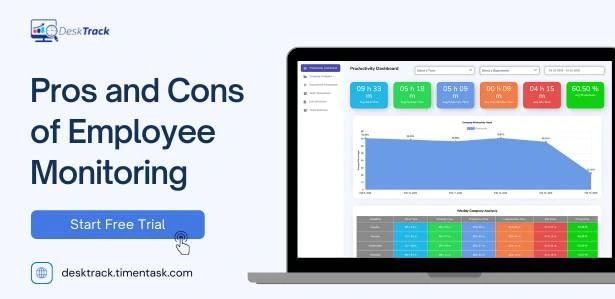
- Productivity analytics — classifying activity as productive or unproductive
- Project and task tracking — mapping time spent to specific projects or clients
Modern platforms increasingly combine several of these into a single dashboard, often layering in AI-based analytics to detect patterns automatically rather than relying on raw screen recordings.
Advantages of Employee Monitoring Software
1. Improved Productivity and Accountability
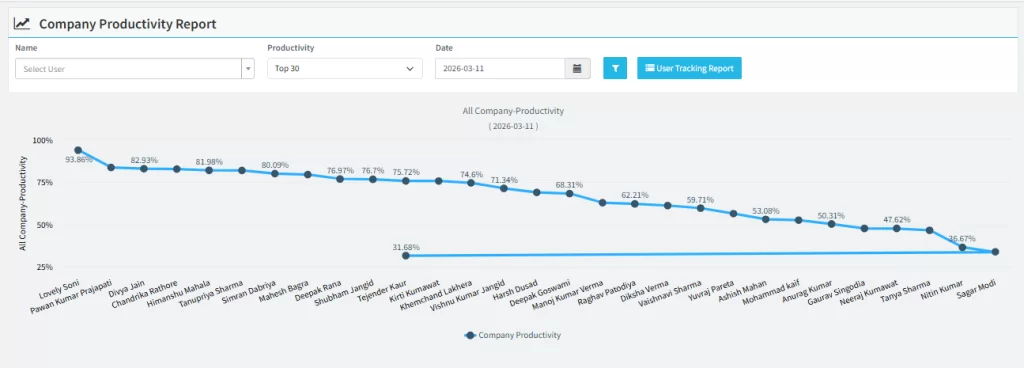
Monitoring tools give managers visibility into how work time is actually spent, which helps surface bottlenecks, reduce distractions, and hold teams accountable to deadlines. A large share of employers say they monitor specifically to understand how employees spend their time on the job, making this the single most common reason companies adopt monitoring software.
2. Accurate Time Tracking and Payroll Data
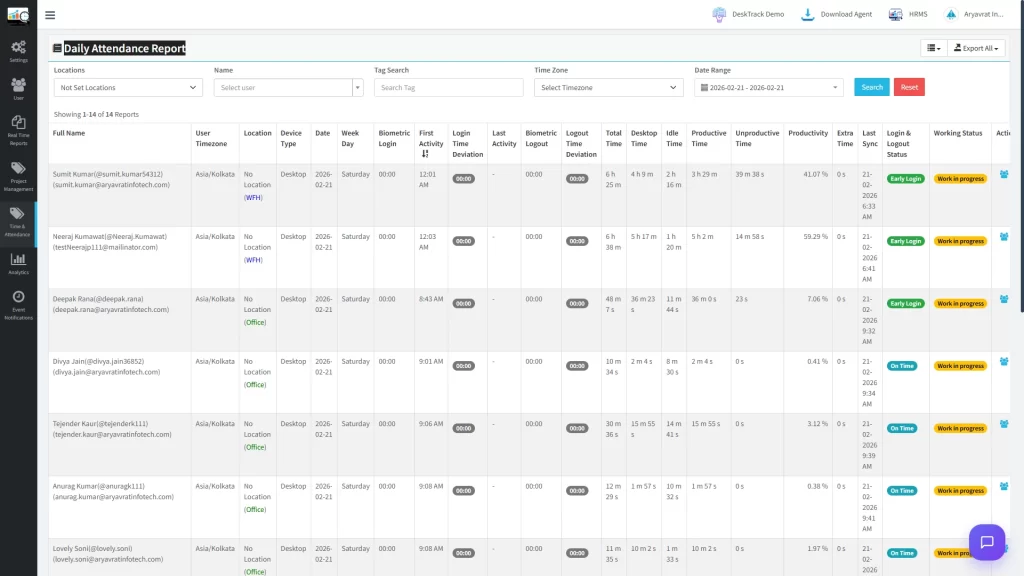
Manual timesheets are error-prone. Automated tracking reduces payroll disputes and time theft a meaningful concern, since a large majority of businesses actively compare time spent on work activities versus non-work activities to catch discrepancies.
3. Better Project and Resource Management
With visibility into how much time tasks actually take, managers can allocate workloads more fairly, spot burnout risk by comparing scheduled versus actual hours, and forecast project timelines more accurately.
4. Enhanced Data Security and Compliance
Security has become as important a driver of monitoring as productivity. Many companies now cite insider threats and data leak prevention as top reasons for deploying monitoring tools, and a notable share use monitoring to help meet regulatory requirements such as GDPR and HIPAA.
5. Supports Remote and Hybrid Work Visibility
Remote-first companies rely on monitoring far more heavily than in-office ones adoption among fully remote organizations is dramatically higher than among fully in-office companies, largely because managers lose the informal visibility they’d otherwise get from a physical office.
6. Fairer, Data-Backed Performance Appraisals
Instead of relying purely on manager impressions, monitoring data gives a factual record of output, task completion, and time allocation which can reduce bias in performance reviews and reward decisions.
No Credit Card Required
Is Employee Monitoring Software Right for Your Business?
Explore the benefits, challenges, and best practices of employee monitoring software to improve productivity, ensure transparency, and choose the right solution for your business..
Disadvantages of Employee Monitoring Software
1. Employee Privacy Concerns
This is the most cited drawback. Many remote workers report discomfort with employers potentially accessing personal devices or overly granular activity logs, and monitoring practices like webcam access or keystroke logging are consistently the most contested by employees.
2. Risk of Lower Trust and Morale
Multiple surveys show a clear trust gap: a significant share of employees feel that digital tracking damages trust at work, and many report feeling stressed or anxious under constant observation. Excessive monitoring has also been linked to lower employee engagement.
3. Potential for Micromanagement
When monitoring shifts from measuring outcomes to policing every click and keystroke, it can create a culture of surveillance rather than support which tends to backfire on morale and retention.
4. Implementation and Cost Challenges
Beyond software licensing, companies need time to configure tools correctly, train managers to interpret data fairly, and communicate the rollout to staff. Done poorly, this creates friction without the intended productivity gains.
5. Legal and Compliance Risks If Misused
Employers who monitor employee communications or online activity are generally required to disclose this under laws like the Electronic Communications Privacy Act and various state-level equivalents. Failing to disclose monitoring or monitoring beyond its stated purpose creates real legal exposure.
6. The Productivity Perception Gap
Perhaps the most striking finding across recent surveys: while a majority of managers believe monitoring software improves employee performance, most employees disagree, with many saying it has no effect or actively makes their performance worse. This gap between employer intent and employee experience is one of the biggest risks of poorly implemented monitoring.
Does Employee Monitoring Increase Productivity?
Employee monitoring can increase productivity when it’s transparent, outcome-focused, and paired with clear communication but evidence is mixed, and poorly implemented monitoring can backfire. Recent surveys show most managers believe tracking software boosts performance, while most employees report no improvement or a decline, largely due to added stress and reduced trust.
The data supports a nuanced conclusion:
- Many companies using structured time tracking report measurable productivity increases and better task prioritization.
- At the same time, research on excessive digital surveillance has found that heavier monitoring can coincide with reduced output per hour, more time lost to communication overhead, and reduced cross-team collaboration.
- A large share of employees say they would be more comfortable with monitoring tools if they avoided invasive methods like keystroke logging or continuous video, favoring outcome-based tracking instead.
Bottom line: Monitoring increases productivity most reliably when it’s used to remove friction (accurate time data, clearer task ownership) rather than to police behavior.
Pros vs. Cons: Quick Comparison Table
| Aspect | Pros of Employee Monitoring | Cons of Employee Monitoring |
|---|---|---|
| Productivity | Identifies bottlenecks, supports accountability | Can backfire if perceived as surveillance |
| Trust | Data-backed, fairer appraisals | Can erode trust and increase stress |
| Security | Reduces insider threats, supports compliance | Risk of privacy violations if mismanaged |
| Remote work | Restores visibility lost without an office | Employees may resent monitoring on personal devices |
| Cost | Reduces payroll errors, time theft | Setup, training, and tool costs |
| Legal | Supports regulatory compliance (GDPR, HIPAA) | Non-disclosure creates legal risk |
Monitoring Employees in the Workplace: Best Practices
1. Be transparent from day one : Tell employees exactly what’s being tracked, why, and how the data will be used. Employees who understand the purpose of monitoring consistently report more comfort with it than those who don’t.
2. Choose outcome-based tools over invasive ones : Favor time and activity tracking over keystroke logging or constant webcam capture. Less invasive approaches tend to get significantly higher employee buy-in.
3. Balance productivity goals with privacy : Monitor work-related activity only, avoid personal device access where possible, and set clear boundaries around off-hours tracking.
4. Know the legal requirements in your region : Disclosure obligations vary by jurisdiction U.S. federal and state laws, GDPR in the EU, and other regional frameworks all set different rules for what must be disclosed and how data can be used.
5. Train managers to interpret data fairly : Monitoring data should inform conversations, not replace them. Misreading activity data without context is one of the fastest ways to damage trust.
How to Choose the Right Employee Monitoring Software?
When evaluating tools, prioritize:
- Automatic, zero-effort tracking — reduces reliance on employees remembering to start/stop timers, which is a common source of inaccurate reports
- Productivity classification — automatic sorting of productive vs. unproductive time, rather than raw logs employers must interpret manually
- Project and task mapping — tying tracked time directly to projects, files, or clients
- Transparent employee-facing dashboards — so employees can see their own data, not just managers
- Compliance-ready reporting — for GDPR, HIPAA, or other applicable regulations
- Scalability — the tool should work whether you have 10 employees or 1,000
Platforms like DeskTrack are built around this balance combining automated time tracking, productivity analytics, and project mapping with dashboards designed to be transparent for both managers and employees, rather than a pure surveillance tool.
Conclusion
The pros and cons of employee monitoring both carry real weight. Done right with transparency, outcome-based tracking, and clear legal compliance monitoring of employees can improve productivity, strengthen security, and support fairer performance reviews. Done wrong, it damages trust, increases stress, and can even reduce the very productivity it’s meant to protect.
The deciding factor isn’t whether to monitor, but how. Tools like DeskTrack are designed to help businesses strike that balance automated, transparent, and focused on insights rather than surveillance.
Frequently Asked Questions
Ans. Yes, in most jurisdictions employers can legally monitor work-related activity on company-owned devices and networks, provided they disclose the monitoring where required by law. Rules vary by country and, in the U.S., by state. Ans. It can, particularly when focused on outcomes rather than constant surveillance. However, survey data consistently shows a gap between manager perception (mostly positive) and employee experience (mixed to negative), so implementation approach matters more than the tool itself. Ans. The most common drawbacks are reduced employee trust, increased stress, risk of micromanagement, privacy concerns, and legal exposure if monitoring isn’t properly disclosed. Ans. Limit tracking to work-related activity and company devices, avoid invasive methods like keystroke logging or continuous webcam capture, disclose monitoring practices clearly, and comply with applicable data protection laws. Ans. Often yes, automated time tracking can reduce payroll errors and improve project visibility even for small teams. The key is choosing a lightweight, transparent tool rather than an overly invasive enterprise-grade surveillance platform.
pros-cons-of-employee-monitoring-software