Business management software solutions are needed for all businesses in 2026 and beyond. However, what if I have a small business? Let me explain. Managing a small business or start-up is easy when you are just beginning. Management is simple since you only have to incorporate a few tools. However, as you scale up your organization, it becomes more complicated. Thus, business management software brings your business management solutions.
What is Business Management Software?
The best small Business management software is nothing but a system or application. It’s designed as an end-to-end solution for simplifying your business functions. For example, you will get intuitive features for support, management, and automation. The software helps you get rid of errors, complete business tasks, and report activities.
Read Also: Top 10 Employee Scheduling Software for Businesses in 2026
Types of Business Management Software in 2026

Small business management software is never one-size-fits-all. As per your needs, features, tools, and functionalities, there are different types of software solutions available:
1. Accounting
Business management system for accounting automates and helps simplify the financial part of managing businesses. It’s capable of handling financial data by connecting to relevant modules. Plus, you also get excellent payroll financial reporting and invoicing assistance.
2. Content Management
This type of data management software is all about document management. What it does is simplify uploading, sharing, accessing, retrieving, and backing up your organization’s documents.
3. CRM
CRM business management system, or customer relationship management software, is all about effective customer management. What you get are tools for tracking, recording, and coordinating customer interactions.
4. HR
We can also call this team management software for obvious reasons. Not only does it automate employee management, but it also helps you effectively manage contractors and third-party vendors.
5. Resource Management
It is all about assigning the correct tasks and resources to the right teams. The result is optimized workloads, which eliminate burnout. Business management system solutions of this type are an integration of inventory, HR, and asset management.
6. Marketing and Sales
Marketing and sales business operations software includes various sales-related features. Here, you get features for marketing automation, lead generation, email marketing, social media management, and analytics management.
7. Project Management
Business management system solutions for project management are all about project management and related work.
With such software, you can easily coordinate, control, and automate business workflows. Plus, you may also get time tracking, automated notifications, and task assignment features.
Key Benefits of Using Business Management Solutions

Utilizing software for business management offers numerous benefits. From automating workflows to simplifying business operations management, you gain numerous advantages that lead to long-term success.
1. Single, Unified System
One significant advantage of using business management software is that you get a single unified system. It is much better than managing different applications and switching between tools, which can cause confusion, chaos, and inaccuracies.
2. Optimal Coordination
Another advantage of using team management software is optimal coordination. How? It’s because everyone has direct access to the single unified system we talked about above. The overall result is optimized coordination and communication on projects, strategies, and outcomes.
3. More Data Accuracy
One of the biggest advantages of using business management software is error reduction. The idea here is to provide you with trustworthy datasets and ensure the avoidance of costly mistakes.
4. Improved Efficiency
As we all know, the best small business management solutions automates almost all business processes; it leads to improved efficiency. Overall, you can accomplish more by applying fewer resources, including employees, money, and/or time.
5. More Growth and Success
Finally, more growth and success. Using business management solutions gives you growth and success in the long run. Plus, as you run operations more smoothly, you earn more and reduce long-term losses.
6. Better Data Security
Software for business management comes integrated with stringent security and backup features, which protect your valuable information from:
- Leaks and breaches
- Malfunction
- Insider threats
7. Scalable with Your Business
Even if it’s a small business, your business will eventually grow. Similarly, your business management software is as scalable as your business. This allows it to adapt to the change in your business requirements. Plus, you can get features added or removed as you see fit.
8. Task Automation
Your software solution for managing your business provides the features to automate tasks, including inventory management, record-keeping, and data entry. This saves you more valuable time for more crucial work.
9. Improved Decision-Making
Your business management software solution provides you with detailed insights into the work and time utilization of your employees, which improves decision-making for more efficiency and success.
10. Improved Communication & Collaboration
If the communication and collaboration in your business are excellent, nothing is stopping you from achieving the peak of perfect teamwork. That’s what software for business management is for.
Things to Look for in Best Business Management Software in 2026
Selecting the right team management software is no joke. With so many software solutions for the same in the market, making a choice can be overwhelming. Plus, you can also end up buying a fake or a scam if you are not careful:
1. Deployment Options
The first thing to consider is how you can deploy the business management software. Here, we have 2 options. You can choose either cloud-based platforms. On the other hand, on-premise software gives you more freedom in selecting how you manage business functions.
2. Integration Capabilities
The software for business management may not have all the features you need. Thus, integrating the software with other tools you use will add the functionalities you need with the same concept of a single, unified system.
3. Industry-Specific Solutions
Every business is unique. So, is yours. However, if you are in the same industry as your competitors, you may be required to choose industry-specific business management system software to fulfill all your needs.
4. Business Size
Another thing to consider when investing in business management systems is the size of your organization. Plus, the projected growth of your business is also essential to consider when choosing business management system software for the maximum ROI.
5. Customization
What we need finally from the business management software is high levels of customization. Besides, who implements rigid software these days anyway? What you get with this feature is a high level of adaptability to your ever-changing business requirements.
6. Ease of Use
The business software you finalize must also be simple to implement and use. Otherwise, it’s of no use, no matter how sophisticated or trending it is. With that, the software must be:
- Simple and easy-to-understand user interface
- Compatible with multiple devices
- Easy to navigate
- Simple yet useful
7. Collaboration Features
Ensure that the business management software you finalize must also be able to collaborate with and boost your business’s end-to-end operations.
8. High-Level Analytics
Another must-have capability of business software is to automate your operations, skyrocket efficiency, and provide you with detailed insights and reports, dashboards, and analytics for better data-driven decision-making:
9. Seamless Integrations
The business management solutions you finalize must also seamlessly integrate with your existing tools and applications to improve your efficiency.
10. Compliance & Data Confidentiality
Compliance and data confidentiality also matter when choosing a business software solution.
11. Affordability
Another crucial aspect to consider when choosing business management software is to ensure that the option you end up with is light on your pocket. The bottomline is to choose a software that costs around your budget and still provides the best features.
12. Cloud-Based
A cloud-based business software is a must-have for you these days. This is to ensure scalability, seamless integrations, and collaboration.
Top 10 Business Management Software in 2026
Your time is far more valuable, and giving priority to other important tasks is also crucial. So, to help you speed up the process, we shortlisted the best 10 software solutions. Plus, who knows, you may end up choosing one from our list.
- DeskTrack
- Deel
- Connecteam
- Bonsai Agency Software
- Kissflow Workflow
- ClickUp
- Bitrix24
- Chanty
- FreshBooks
- HubSpot
1. DeskTrack

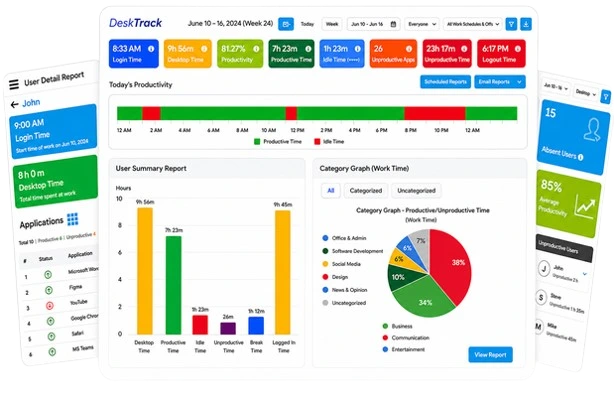
DeskTrack is the best business management software for your fieldwork, remote, and in-office teams. Plus, it’s the most customizable, intuitive, and adaptable time-tracking, employee monitoring, project management, and productivity-tracking integration.
Key Features:
- Screenshot monitoring
- Time tracking with data analytics
- Project and task management
- Integrations
- User-friendly scheduling interface
| Best For | Most Affordable Paid Plan | Rating |
| Best overall | $5.99/user/month | 5/5 |
2. Deel

Deel on our list is a team management software, which is one of the best for managing global teams. What we like about this HR and business operations software is that you can hire international employees without opening a foreign entity.
Key Features:
- EOR
- Mobile device management
- Entity setup
| Best For | Most Affordable Paid Plan | Rating |
| Global team management | $9/user/month | 4.8/5 |
3. Connecteam

If you have more non-desk employees, then we recommend this business management solutions. Connecteam provides you with intuitive features to simplify tracking and monitoring your team’s workloads, assigning tasks, recognizing employees, scheduling shifts, and planning events. That too from a single platform.
Key Features:
- Time clock
- Chat
- Training and onboarding
| Best For | Initial Pricing | Rating |
| Field teams | $29/month (for up to 30 users) | 4.8/5 |
4. Bonsai Agency Software

Bonsai is a comprehensive business operations software and team management software for optimizing the management of your projects. What it does is provide you with integrated project management tools to improve workflows, collaboration, and productivity.
Key Features:
- CRM
- Projects
- Invoicing
| Best For | Most Affordable Paid Plan | Rating |
| Agencies and professional services | $9/user/month | 4.6/5 |
5. Kissflow Workflow

If you wish to effectively automate and track your internal business processes, then I recommend this business management software. Kissflow Workflow lets you design, manage, and automate your workflow. Plus, despite your business industry and niche, it always does a good job.
Key Features:
- Workflow orchestration
- Integrations
- Boards
| Best For | Most Affordable Paid Plan | Rating |
| Workflow management | $1500/month | 4.1/5 |
6. ClickUp

ClickUp is a team management software with a plethora of features, including whiteboards, tasks, Docs, chats, and goals.
Primarily, it’s a productivity management platform that allows your teams to plan, organize, and collaborate on work.
Key Features:
- Customizable tasks
- Automations
- Workload and box view
| Best For | Most Affordable Paid Plan | Rating |
| Teams | $7/user/month | 4.7/5 |
Read Also: Top 5 Leave Management Systems for 2026
7. Bitrix24

Bitrix24 is one of the best business management software solutions on our list. The tool also combines the features of CRM, HR, and project management applications to provide you with the ultimate solution for managing your business.
Key Features:
- Sales automation
- Calendar
- Gantt chart
| Best For | Most Affordable Paid Plan | Rating |
| Remote and hybrid teams | $18.36/organization/month | 4.1/5 |
8. Chanty

Chanty is the team management software you need if you are looking to simplify team communication and productivity. It provides you with intuitive features, including video conferencing and audio team calls.
Key Features:
- Mentions
- Code snippets
- Pins
| Best For | Most Affordable Paid Plan | Rating |
| Improve team communication and productivity | $3/user/month | 4.5/5 |
9. FreshBooks

FreshBooks is all about accounting. It is one of the best business management software solutions for small businesses, sole proprietors, and freelancers. Overall, this cloud accounting platform simplifies tax management, financial forecasting, and other complex accountancy tasks.
Key Features:
- Invoicing
- Accounting
- Projects
| Best For | Most Affordable Paid Plan | Rating |
| Small businesses, sole proprietors, and freelancers | $151.20/year | 4.5/5 |
10. HubSpot

HubSpot is one of the best business management solutions when it comes to CRM. For starters, it’s easy to use, and even the free version is packed with intuitive features for small businesses and teams. Plus, did we mention that it has advanced reporting features?
Key Features:
- Marketing automation
- Deal management
- Customer success workspace
| Best For | Most Affordable Paid Plan | Rating |
| Managing customer lifecycles | Quote on contact | 4.4/5 |
Reasons Why DeskTrack is the Best Business Management Software for 2026
DeskTrack is the best team management software for 2026 and beyond. What makes it unique is that it encompasses all, including reporting and analytics, HR and resource management, marketing and sales app, project management, and invoicing functionalities in a single platform.
Furthermore, this project management, productivity-tracking, employee monitoring, and time-tracking software integrated solution platform provides you with:
- Real-time time-tracking and employee monitoring with data analytics.
- The most accurate analysis and reporting.
- Seamless integrations.
- A daily attendance monitoring sheet integrated with the attendance system.
- The best payroll systems software and more.
Frequently Asked Questions (FAQ)
Q. Where Can I Find Reviews of Popular Business Management Software Tools?
Ans. Genuine reviews of popular business management software are just one search away. You can find them on:
- Business listing websites
- Expert blogs
- Software listicles
- Articles
Q. How Do I Choose the Right Business Management Software for My Startup?
Ans. Choosing the ideal software for business management can be overwhelming if you don’t know where to start:
- Analyze your requirements. Why do you need the business tool? What areas of your business will it improve?
- Based on your needs, look for business management solutions features that fulfill your requirements.
- Make a shortlist of the most cost-effective tools for enhancing business operations.
- Avail of free trials and demos to further test the tools’ adaptation capabilities and features according to your workflow.
- Cross off any software solutions that are even marginally different from what you need.
Q. How to Migrate Data Safely to New Business Management Software?
Ans. After you have finalized your business management software, these are the things to consider to safely migrate your data to it.
- Take a backup of your crucial data
- Map the old data to match the new requirements
- Configure a realistic timeline to move your data
- Prepare your data
- Test by migrating only partial data. If everything goes well, execute the full migration.
Q. What Business Management Software Supports Team Collaboration & Communication?
Ans. Business management software, such as DeskTrack, supports team collaboration and communication. For example, its group chat feature lets you quickly share updates. Plus, assigning sub-tasks to multiple users is an excellent example of how it enhances collaboration.
Q. Can I Try Business Management Software With a Free Trial Before Buying?
Ans. Yes, you get a free trial with almost all business management solutions. This is useful as small businesses have limited resources. For example, you can try DeskTrack for 15 days before buying.