Here’s a scenario most managers know well. it’s a Tuesday afternoon, three projects are running behind, HR is chasing down two timesheets, and no one can tell you where the bottleneck actually is. That’s not a people problem — it’s a systems problem.
An employee management system exists precisely to fix this. Not by watching your team’s every move, but by giving managers, HR professionals, and business owners the structured visibility they need to make faster, smarter decisions — about time, people, and resources.
This guide covers everything. what these systems are, why they matter, the features worth paying for, common pitfalls, and how tools like DeskTrack fit into the bigger picture.
What Is an Employee Management System?
At its core, an employee management system is a software platform that centralizes, automates, and streamlines the full lifecycle of managing your workforce — from onboarding and attendance to performance tracking and payroll.
An employee database management system is not just an HR tool. It’s the operational backbone of how a company tracks time, manages people, monitors productivity, and ensures compliance — all from a single platform rather than a patchwork of spreadsheets, inboxes, and gut instincts.
Unlike older HR software that focused purely on record-keeping, modern employee management software integrates real-time data — who’s working, on what, for how long, and how productively — into dashboards that actually drive decisions.
According to Gartner’s HR Technology research, organizations with integrated workforce management platforms report significantly faster decision cycles and lower administrative overhead. The data speaks for itself: when people operations run on a system, not assumptions, the whole business moves faster.
Types of Employee Management Systems
Not all employee management systems are built the same. The right one depends entirely on what your business actually needs to manage. Here’s a practical breakdown:
| System Type | Primary Focus | Best For |
|---|---|---|
| Workforce Management System | Shift scheduling, activity tracking, idle time monitoring | Ops teams, field staff, distributed workforces |
| Human Resource Management System (HRMS) | Hiring, onboarding, payroll, compliance, benefits | HR departments scaling fast |
| Staff Project Management System | Task assignment, progress tracking, resource allocation | Project-driven businesses and agencies |
| Employee Leave Management System | Leave requests, approvals, balance tracking | Any business with complex leave policies |
| Employee Payroll Management System | Salary calculation, deductions, tax compliance | Finance and HR ops reducing payroll errors |
| Performance Management System | Goal setting, feedback, appraisals | Growth-stage companies building review culture |
| Employee Attendance Management System | Clock-in/out, break tracking, automated reports | All businesses requiring accurate time records |
For most mid-sized and growing companies, the most impactful starting point is combining a employee attendance management system with productivity and time tracking — because you can’t improve what you can’t measure.
Why Businesses Need an Employee Management System
The honest answer isn’t that businesses need an employee management system because it’s a trendy HR upgrade. They need it because the alternatives — disconnected spreadsheets, manual timesheets, anecdotal performance reviews — are costing them money every single day.
Forbes reports that businesses lose anywhere from 15–30% of productive work hours due to poor workforce visibility and untracked inefficiencies. In a 50-person company, that’s the equivalent of 7–15 employees doing nothing.
Think about what happens at the operational level without an online employee management system:
- HR spends hours reconciling timesheets that were filled in from memory
- Managers don’t know who’s overloaded until a deadline is missed
- Payroll errors pile up because attendance data lives in three different places
- Remote employees operate without any meaningful accountability structure
- Performance reviews happen once a year based on incomplete, subjective information
An effective staff management system doesn’t just organize data — it actively closes these gaps in real time.
Key Features of a Modern Employee Management System
The market is flooded with options. Here’s how to separate genuinely useful features from nice-to-have marketing fluff:
Automated Time Tracking
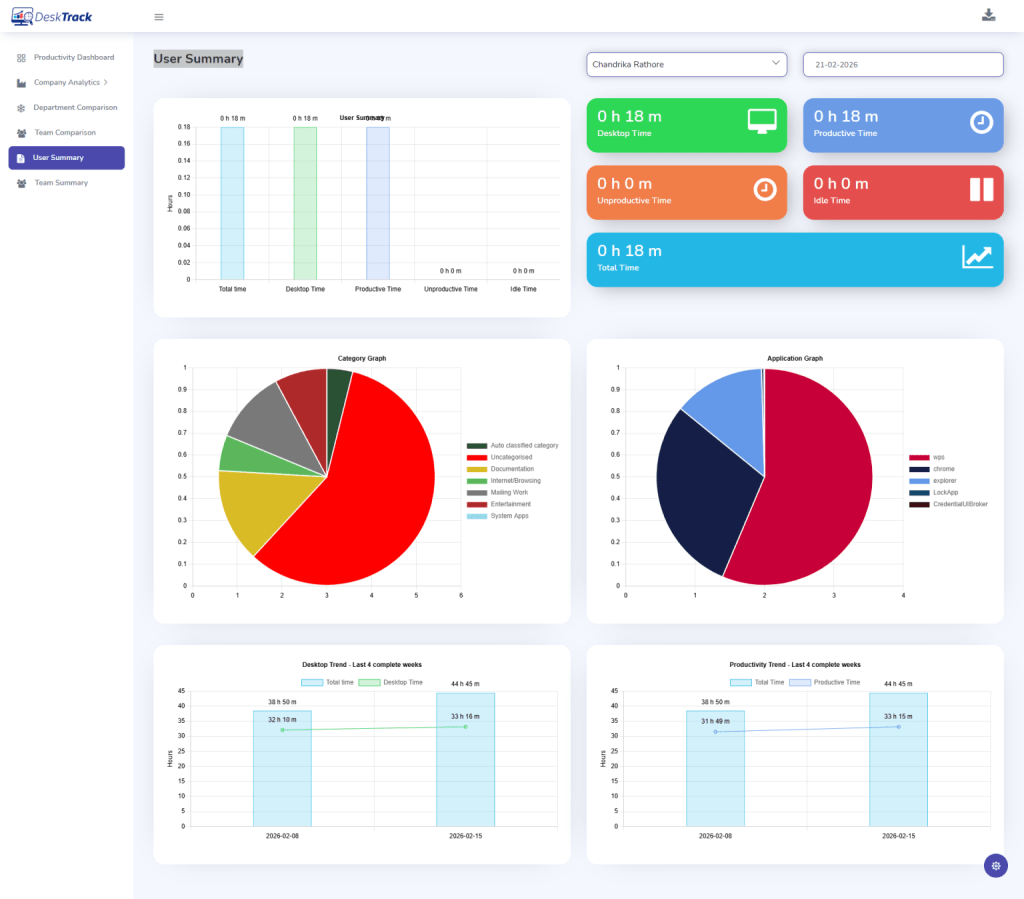
Tracks work hours without employee input. Eliminates time theft and inaccurate manual entries — a foundation for accurate payroll and project costing.
Productivity Analytics
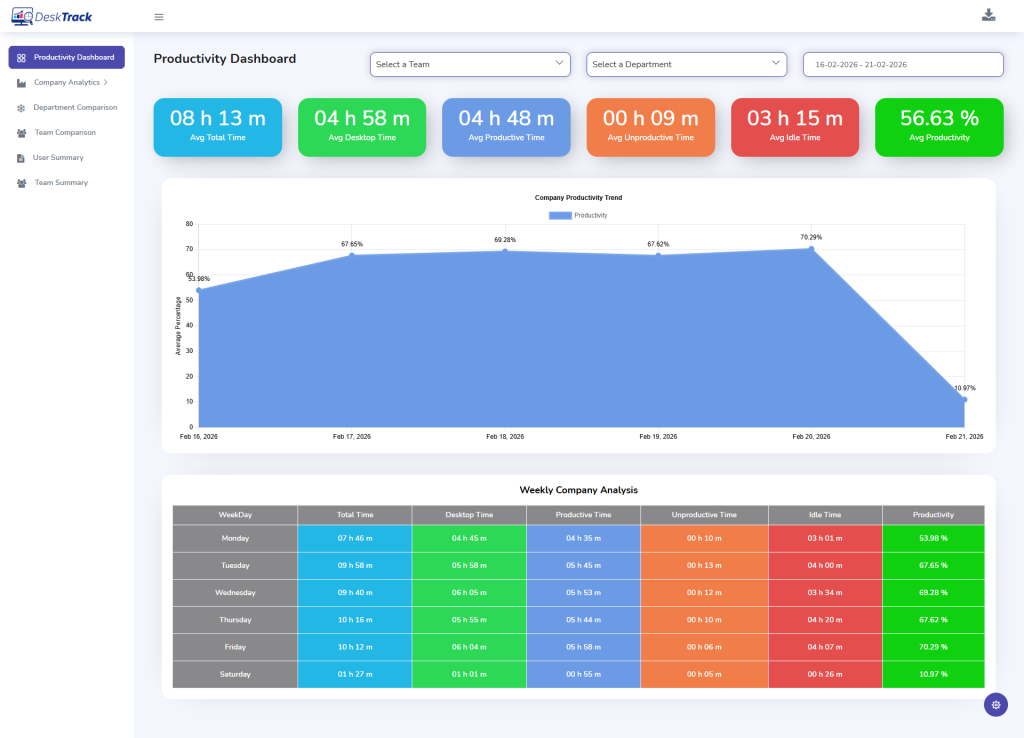
App usage reports, active vs. idle time, and productivity scores give managers real data rather than gut feelings about team output.
Attendance & Leave Management
Automated attendance logs with instant leave approval workflows replace the chaos of email chains and shared calendars.
Centralized Employee Database
All employee records — contracts, salary history, roles, performance data — in one secure, searchable place. No more hunting across systems.
Project & Task Management
Assigns work, tracks deadlines, and shows resource allocation across teams so nothing falls through the cracks between departments.
Data Security & Access Control
Role-based permissions ensure sensitive employee data is accessible only to those who need it — critical for compliance and trust.
Screenshot Monitoring
Optional visual verification of work activity — useful for remote teams and project billing where proof of work matters.
Payroll Integration
Syncs time data directly into payroll calculations — reducing human error and saving your finance team significant processing time.
Performance Reporting
Scheduled and on-demand reports on individual, team, and department performance provide the evidence base for appraisals and promotions.
Most businesses don’t have a people problem They have a visibility problem
When managers can’t see what’s happening across their teams in real time, they react instead of leading. The right employee management system doesn’t replace trust — it builds the foundation for it.
The Real Business Benefits of Employee Management Software
Beyond the feature checklist, here’s what actually changes when a business deploys a solid employment management system:
Operational Efficiency, Measurably Improved
When time tracking, attendance, and project data all flow into a single system, HR stops spending its days chasing information and starts spending it on work that actually matters. Companies using employee monitoring software with integrated workflows typically reclaim 4–6 hours per HR manager per week in pure administrative time.
Transparency That Builds Accountability
When every employee can see their own time logs, task completion rates, and performance metrics, accountability becomes part of the culture rather than a management tool. It’s a subtle but powerful shift. People self-correct when they can see their own data.
Meaningful Cost Reduction
Payroll errors, overstaffing, untracked overtime, and duplicate manual processes are silent budget drains. An employee database management software platform consolidates these into one trackable system, making it dramatically easier to identify and eliminate waste.
Better Decisions, Based on Real Data
Whether it’s deciding who to promote, which team needs more capacity, or whether a project is on track — every good decision in a business requires data. Employee productivity tracking tools turn everyday work activity into that decision-making data.
Compliance Without the Headaches
Employment law compliance — overtime rules, leave entitlements, data handling regulations — is easier to manage when your system enforces it automatically. The alternative is hoping someone remembers the rules. That’s not a strategy.
Improved Employee Retention
Employees who receive regular, data-backed feedback and can clearly see their contributions recognized are more likely to stay. According to SHRM research, consistent performance management is one of the most reliable predictors of employee retention.
What Happens Without a System: Real Business Challenges
For businesses still running their workforce operations manually or with disconnected tools, these are not hypothetical — they’re weekly realities:
Ghost Hours in Timesheets
Employees log hours from memory at end of week. The result is rounded numbers, forgotten tasks, and payroll figures that don’t reflect reality.
Attendance Tracking Gaps
Without automated logs, late arrivals and unplanned absences go untracked — until they become a pattern that’s already damaged a project.
No Visibility Into Remote Teams
Remote employees working without accountability structures either over-report or underperform — and managers often can’t tell which until it’s too late.
HR Bottlenecks Everywhere
Leave requests routed through email, manually approved, and manually updated in spreadsheets — every step is a potential error or delay.
Subjective Performance Reviews
Annual appraisals based on manager memory and recency bias don’t help employees grow — they just make them anxious once a year.
Data Siloed Across Tools
When HR data lives in one tool, project data in another, and payroll in a third, the reporting effort alone can consume entire workdays.
How DeskTrack Helps Solve These Problems
DeskTrack is not a generic HR platform. It was built specifically for businesses that need real, ground-level visibility into how work actually gets done — across offices, remote setups, and field teams alike.
What DeskTrack Brings to Your Workforce Operations
Rather than replacing your entire HR stack, DeskTrack fills the critical visibility gap that most HR software leaves open — the space between “employees are logged in” and “employees are actually productive.”
- Automatic time logging — Time tracking software for employees that captures actual working hours, not self-reported ones
- Real-time activity monitoring — See which apps and URLs your team uses, and how that time breaks down across productive vs. unproductive activity
- Screenshot-based verification — Employee screenshot monitoring software for remote billing verification and accountability
- Attendance automation — Automatic clock-in/out logs tied directly to payroll-ready reports via the employee attendance management system
- Project-level time tracking — Know exactly how many hours are going into which projects, and whether they’re on budget
- Productivity scoring — Actionable data that helps managers improve employee performance through evidence, not assumptions
- Scalable across team types — Used by 8,000+ businesses across 100+ countries, from 10-person startups to 500+ employee enterprises
What makes DeskTrack particularly useful in an employee management system project context is how it bridges HR data and operational data. Your attendance, time, productivity, and project metrics all live in one place — so reporting takes minutes, not days.
Ready to see what your team’s work actually looks like? Explore DeskTrack’s full feature set.
How to Choose the Right Employee Management System
With dozens of employee management systems on the market, narrowing down your options doesn’t have to be painful. A structured evaluation process helps:
- Define your actual pain points first. Are you struggling with attendance, productivity visibility, payroll accuracy, or project tracking? The answer determines which type of system you need before you look at a single vendor.
- Map features to team reality. A 20-person in-office team has different needs than a 200-person hybrid workforce. Don’t pay for GPS tracking if your team never leaves the office — and don’t skip screenshot monitoring if you have remote contributors billing by the hour.
- Shortlist by integration capability. The best online employee management system should talk to your existing tools — payroll software, project management platforms, communication apps — not create yet another data silo.
- Test before you commit. Read reviews on G2 and Capterra, but more importantly, run a free trial with a small team. Real usage patterns reveal what a demo never does.
- Evaluate scalability and pricing honestly. A tool that works for 20 people might not hold up at 200. Check per-user pricing tiers and feature availability at scale before signing a contract.
As HubSpot’s workplace research consistently shows, the biggest predictor of software adoption success is how well it fits existing workflows — not how many features it advertises. Choose a system your team will actually use.
Frequently Asked Questions
Ans. It’s a software platform that centralizes how a company manages its workforce — covering time tracking, attendance, performance, payroll, and HR data in one place instead of scattered tools and spreadsheets. Ans. An HRMS focuses primarily on traditional HR functions like hiring, payroll, and compliance. An employee management system is broader — it includes real-time productivity monitoring, project tracking, and operational data alongside HR functions. Ans. Not when implemented transparently. Tools like DeskTrack are designed to monitor work activity — not personal behavior. Employees are informed of what’s tracked, and the data is used to improve workflows, not to micromanage individuals. Ans. Absolutely. Even teams of five or ten people benefit from structured time tracking and attendance management. The administrative time saved and payroll accuracy gained are valuable at any company size. Ans. DeskTrack tracks app usage, active/idle time, screenshots (when configured), and project time for remote employees — giving managers the same operational clarity they’d have with an in-office team, without requiring constant check-ins. Ans. Planning, organizing, staffing, leading, and controlling. A good employee management system supports all five — providing the data and automation that lets managers focus on leadership rather than administration.employee-management-system