Ask ten small business owners where their hours actually go every week, and nine of them will pause before answering. The honest truth is that most businesses are flying partially blind. Time disappears into undocumented calls, unlogged admin, and half-finished tasks that never make it onto a timesheet. And when you can’t see where your team’s time is going, you can’t price jobs accurately, manage workloads fairly, or bill clients with confidence.

The global time tracking software market crossed $8 billion in 2026 not because business owners suddenly got passionate about software, but because the cost of not tracking time became impossible to ignore. Agencies lose an average of 10–15% of billable hours every month to unrecorded work. Payroll errors tied to manual timesheets cost companies thousands annually. And remote teams without time visibility are essentially managed on trust alone which is fine until it isn’t.

This guide covers the 10 best time tracking software options for small businesses in 2026. Every tool was evaluated on ease of use, pricing honesty, feature depth, monitoring capability, integrations, and who it’s actually built for. DeskTrack leads the list for reasons you’ll see clearly but we’ve included the full competitive picture so you can make the right call for your specific situation.

Get a Demo ➡

How We Selected the Best Time Tracking Software for Small Business

There are dozens of time tracking tools out there, and most comparison articles treat them as interchangeable. They’re not. We evaluated each tool against eight criteria that actually matter for small business owners not just feature count:

  • Ease of use: How quickly can a non-technical team member start tracking time without training?
  • Pricing and affordability: What does it actually cost at 5, 15, and 30 users including add-ons?
  • Time tracking capabilities: Automatic vs. manual, idle detection, offline tracking, mobile support.
  • Employee monitoring features: Screenshot monitoring, app and URL tracking, productivity scoring.
  • Project management functionality: Can tracked time link directly to projects, tasks, and client billing?
  • Reporting and analytics: Are reports actually decision-ready, or just raw data dumps?
  • Integrations: QuickBooks, Xero, Gusto, Asana, Jira do the tools you already use connect?
  • Customer support: Live chat, onboarding help, and response times when something goes wrong.

Quick Comparison: 10 Best Time Tracking Software for Small Business 2026

Use this table to identify which tools offer the specific features your business needs before reading the detailed reviews above.

Software Auto Tracking Project Track Screenshots Reporting Starting Price
DeskTrack ✅ Auto ✅ Full ✅ Yes ✅ Yes $5.99/user
Clockify ⚠️ Semi-auto ✅ Yes ✅ Paid ✅ Yes Free / $4.99+
Toggl Track ⚠️ Desktop ✅ Yes ❌ No ✅ Yes Free / $10+
Hubstaff ✅ Auto ✅ Yes ✅ Yes ✅ Yes $4.99+/user
Time Doctor ✅ Auto ✅ Yes ✅ Yes ✅ Yes $6.70+/user
Harvest ❌ Manual ✅ Yes ❌ No ✅ Yes $11/user
TrackingTime ⚠️ Desktop ✅ Yes ❌ No ⚠️ Basic Free / $5.75+
Everhour ❌ Manual ✅ Strong ❌ No ✅ Yes $8.50+/user
RescueTime ✅ Full auto ❌ No ❌ No ✅ Yes $6.50/user
Jibble ✅ Clock-in ⚠️ Limited ⚠️ Blurred ✅ Yes Free / $4.49+

10 Best Time Tracking Software for Small Businesses in 2026

1. DeskTrack

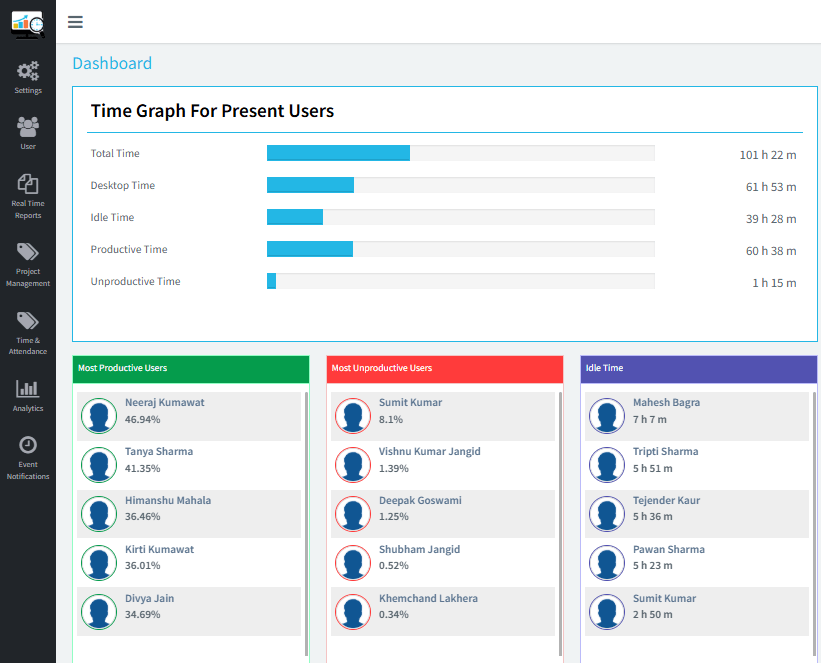
If you’ve ever wished you could see exactly what your team is working on, when, and for how long without asking them to fill in a timesheet at the end of the day DeskTrack is the answer. It’s the most complete time tracking and employee monitoring platform on this list, and the only one that combines automatic time capture, project tracking, attendance management, and workforce analytics in a single, affordable package. Here’s what sets it apart from every other tool reviewed: DeskTrack runs silently in the background from the moment a computer starts. There are no timers to remember, no manual entries to chase at month-end, and no gaps caused by employees forgetting to log their lunch break or late-afternoon calls.

Application usage, URL activity, document titles, idle time, meeting durations all captured and categorized automatically. Managers get a real-time dashboard; employees see their own productivity data. Nobody needs to guess.DeskTrack is trusted by 8,000+ organizations in 40+ countries, including IT firms, agencies, BPOs, law firms, and manufacturing companies. The platform is built by Aryavrat Infotech, led by founder Rashmi Singh a software developer with nearly 30 years of experience in productivity and workforce management. That operational depth shows in the product’s feature set, which goes well beyond what any pure time tracker can offer.

Key Features

  • 100% automatic time tracking zero manual input from employees
  • App usage, URL, and document title tracking
  • Screenshot monitoring (configurable intervals; stealth or visible mode)
  • Attendance management with biometric hardware integration (ZKTeco, eSSL, Suprema)
  • Project and task tracking with subtasks, checklists, and Kanban view
  • GPS tracking for field teams and mobile workers
  • Idle time detection with real-time alerts
  • Data Loss Prevention (DLP) monitors USB use and file transfers
  • Call tracking and CRM verification for sales teams
  • Leave management with automated approval workflows
  • Workforce analytics dashboard with cross-team reporting
  • Cross-platform: Windows, macOS, Linux, Android, iOS
✅  Pros Fully automatic tracking eliminates timesheet guesswork. One platform replaces time tracker + employee monitor + project management tool. Biometric integration prevents proxy attendance. 15-day free trial, no credit card required. 100% ROI documented within 90 days across deployments. GDPR-aware monitoring settings for European teams. Pricing starts at just $5.99/user/month.
⚠️  Cons Interface has a learning curve for managers new to workforce analytics. Screenshot monitoring requires transparent internal communication to maintain team trust. Some advanced reporting features take time to configure optimally.
💰  Pricing Starts at $5.99/user/month. 15-day free trial available at desktrack.timentask.com no credit card needed. Setup in under 30 minutes.
🎯  Best For IT teams, agencies, BPOs, consulting firms, law firms, remote-first businesses, and any small business managing 5–500 employees who need real operational visibility rather than just a basic timer.

Not Sure Which Time Tracking Software is Right for You?

We’ve compared pricing, features, automation, reporting, and integrations to make your decision easier.

👉 Start Free Trial →

2. Clockify

Clockify built its reputation on one thing: it’s completely free for unlimited users. That’s not a limited trial, not a freemium trick unlimited people, unlimited projects, unlimited clients, indefinitely. For a bootstrapping small business that needs to start tracking time immediately without any budget commitment, there’s no easier entry point in the market.The free plan gives you timer-based tracking, basic timesheets, and a reporting dashboard that covers the basics well.

Paying for more unlocks invoicing, GPS tracking, screenshots, payroll exports, and profitability analysis. At $4.99–$11.99/user/month on paid plans, it’s still one of the most affordable full-featured options available. For a team of 10 on the Standard plan, you’re looking at roughly $55/month total a genuinely low bar for what you get.The practical limitation: Clockify relies primarily on manual timer management. Employees have to remember to start and stop their trackers. The auto-tracker feature exists for Windows and Linux, but it’s more of an afterthought than a core capability. If your team forgets to track, Clockify won’t catch it for them.

Key Features

  • Free forever plan with unlimited users and projects
  • Timer, manual entry, and timesheet modes
  • Project and task tracking with billable/non-billable flags
  • GPS tracking and screenshot monitoring (Pro plan)
  • Kiosk clock-in mode for shared devices
  • Payroll and invoicing exports on paid plans
  • 80+ integrations: QuickBooks, Asana, Trello, Jira, Slack
  • Absence and leave management on paid plans
✅  Pros Best free plan in this category truly unlimited users. Fast setup, clean interface. Strong integration library. Solid paid tiers that scale affordably.
⚠️  Cons Manual timer dependence means forgotten entries are common. Auto-tracker is limited and not the core experience. App/URL data captured but not surfaced usefully on lower tiers. Less complete monitoring than DeskTrack or Hubstaff.
💰  Pricing Free forever for unlimited users. Paid plans: Basic $4.99, Standard $6.99, Pro $9.99, Enterprise $11.99 per user/month (billed annually).
🎯  Best For Startups, freelancers, and small teams that want zero-cost time tracking to start and a clear paid upgrade path as the business grows.

3. Toggl Track

Toggl Track has been around since the early days of time tracking software, and it’s earned a devoted following among creative teams and consultants for one clear reason: it’s the most frictionless experience on the market. Adding a time entry takes seconds. Switching between projects is immediate. The interface is genuinely well-designed not just clean, but thoughtfully built around how people actually work.Where Toggl outperforms its price point is reporting.

The Insights dashboard available on paid plans lets you build trend charts across teams, projects, and clients, and visualize Revenue vs. Budget and Profit & Loss in ways most time trackers don’t attempt at this price. For agency owners and consultants presenting results to clients, the output is polished and ready to share.The deliberate limitation is monitoring. Toggl has no screenshots, no keystroke tracking, no GPS surveillance. This is a philosophical choice, not an oversight. For teams with established trust and clear outcome measurement, it’s the right call. For businesses that need activity-level accountability particularly remote teams or distributed workforces you’ll need to pair it with a monitoring tool or look at DeskTrack or Hubstaff instead.

Key Features

  • One-click timer across web, desktop, mobile, and browser extension
  • Desktop automatic time tracking with idle detection
  • Insights dashboards: Summary, Workload, Revenue vs. Budget, P&L
  • 100+ integrations including Jira, Notion, GitHub, Asana, Salesforce
  • Billable rates, project estimates, and budget alerts
  • Scheduled reports and team capacity management
  • Chrome extension for tracking inside any web app
✅  Pros Best-in-class user experience fastest daily workflow of any tool on this list. Reporting quality is excellent for business intelligence. Strong cross-platform consistency. No surveillance means employees don’t feel watched.
⚠️  Cons Free plan capped at 5 users. Paid plans more expensive than Clockify at comparable tiers. No GPS, screenshots, or attendance monitoring. No built-in invoicing on Starter plan.
💰  Pricing Free for up to 5 users. Starter at $10/user/month, Premium at $20/user/month (billed annually). 30-day free trial on Premium.
🎯  Best For Creative agencies, consultancies, design studios, and professional services teams where UX adoption matters and outcomes are measured over activity.

4. Hubstaff

Hubstaff is built for businesses where accountability isn’t optional remote teams with distributed workforces, field crews, and organizations where proof-of-work is an explicit operational requirement. It goes beyond time tracking into a full workforce management platform: GPS tracking, geofenced clock-in/out, screenshots every 10 minutes, keyboard and mouse activity metrics, payroll processing, and contractor payments.The result is comprehensive visibility into what distributed employees are doing, where they’re doing it, and for how long. Field service businesses can use geofencing to automatically clock workers in when they arrive at a job site and out when they leave.

Remote teams get activity scoring that gives managers a sense of engagement without having to chase status updates. In the first quarter of 2026, Hubstaff redesigned its Time and Activity report with custom filters and additional data fields a meaningful upgrade for managers who rely on it daily.The caveat is cost and complexity. The monitoring features that make Hubstaff powerful are either add-ons or higher tiers. GPS tracking for field teams, for example, requires the Team tier ($7.50/user/month minimum) not the base Starter. For teams with five or fewer people who want everything, the monthly bill can climb quickly relative to alternatives like DeskTrack.

Key Features

  • Time tracking with desktop, mobile, and GPS modes
  • Screenshot monitoring (configurable, 1–3 per 10-minute window)
  • App and URL tracking with activity level scoring
  • GPS geofencing for automatic clock-in/out
  • Payroll processing and contractor payment workflows
  • Project budget tracking and client billing
  • Shift scheduling and workforce management
  • Redesigned Time and Activity report (Q1 2026) with custom filters
✅  Pros Most complete remote monitoring stack in this price range. GPS and geofencing for field teams is market-leading. Built-in payroll and contractor payment processing. 14-day free trial. Strong for construction, healthcare, field services.
⚠️  Cons Total cost rises quickly when add-ons are included. More complex setup than Clockify or Toggl. Monitoring features can create cultural friction if not introduced transparently. GDPR compliance requires careful configuration for EU-based teams.
💰  Pricing Starter from $4.99/user/month. Team from $7.50/user/month. Enterprise from $10/user/month. Billed annually. 2-seat minimum on paid plans.
🎯  Best For Remote-first businesses, field service companies, agencies with distributed workforces, and any organization where proof-of-work and GPS accountability are non-negotiable.

5. Time Doctor

Time Doctor is unique on this list because it doesn’t just record time it actively intervenes in the workday. If an employee visits a site marked as unproductive (social media, shopping, news), Time Doctor fires a pop-up notification asking them to get back to work. No other major time tracker in this category does this. It’s the difference between passive recording and active productivity coaching.The behavioral analytics are the most detailed available at this price point: idle time breakdowns, ‘poor time usage’ reports, timeline views showing the workday minute-by-minute, and distraction summaries that let managers identify patterns and coach proactively.

For businesses managing large remote call center teams, BPO operations, or distributed workforces where focus and accountability are daily challenges, this level of insight has real operational value.The tradeoff is employee experience. Time Doctor’s monitoring is the most visible and interventionist on this list. It requires deliberate management of how it’s introduced, with clear communication about what’s captured, how it’s used, and what the boundaries are. Companies that deploy it well transparently and with shared buy-in report productivity improvements averaging 22%. Companies that roll it out covertly tend to see trust issues that undermine the gains.

Key Features

  • Active distraction alerts pop-ups when unproductive sites are visited
  • Timeline view: minute-by-minute workday reconstruction
  • Screenshot monitoring with blurred-screenshot privacy option
  • App, URL, and website usage tracking with productivity classification
  • Poor time usage report identifying behavioral patterns
  • Payroll integration with 5+ payment platforms
  • Project and task tracking with billable/non-billable hours
  • GPS tracking on mobile (Android and iOS)
✅  Pros Most detailed behavioral analytics of any tool in this range. Distraction management feature is genuinely unique. Flexible screenshot options including blurred screenshots for privacy. Documented 22% productivity improvement in published case studies. Good payroll integrations.
⚠️  Cons Most interventionist monitoring approach can create a surveillance-culture feeling if mismanaged. Interface less polished than Toggl or Harvest. No GPS for desktop workers. Higher cost than DeskTrack for comparable monitoring depth.
💰  Pricing Basic from $6.70/user/month. Standard from $11.70/user/month. Premium from $16.70/user/month. Billed annually. 14-day free trial.
🎯  Best For Remote call centers, BPO companies, large distributed teams, and organizations where maintaining focus is a daily operational challenge rather than an occasional concern.

6. Harvest

Harvest has been a staple for agencies and freelancers since 2006, and it earned that longevity by solving one specific problem better than anyone else: the time-to-invoice workflow. You track hours against a project. You hit ‘invoice.’ Harvest generates a detailed, professional invoice from those entries in three clicks or fewer. It integrates directly with Stripe and PayPal for payment collection. For service businesses that used to spend hours every month reconciling timesheets and building invoices in Excel, this is transformative.The interface is minimal by design a deliberate choice that makes it very easy to learn and fast to use daily.

Harvest added multi-recipient invoice emailing in April 2026, addressing a long-standing pain point for agencies billing multiple stakeholders on the same project. The reporting covers project budgets, team capacity, and expense summaries clearly and without clutter.What Harvest isn’t is a productivity monitoring tool. There’s no automatic background tracking, no screenshots, no activity monitoring. Everything requires active timer management. And following significant price increases in 2025, the value proposition for pure time tracking compared to Clockify or DeskTrack at lower price points has weakened. It’s still the right call for invoicing-heavy client services businesses. For everyone else, the cost-to-feature ratio is harder to justify.

Key Features

  • Timer and manual time entry with project/task assignment
  • Built-in invoicing with Stripe and PayPal integration
  • Multi-recipient invoice email (added April 2026)
  • Expense tracking alongside time entries
  • Project budget management with overage alerts
  • Team capacity and resource forecasting
  • 100+ integrations: Asana, Basecamp, Jira, QuickBooks, Xero
  • Mobile apps for iOS and Android
✅  Pros Invoicing integration is genuinely best-in-class for client-billing businesses. Clean, minimal interface with almost no learning curve. Strong project budget management. 30-day free trial. Recently improved invoicing features (April 2026).
⚠️  Cons Significant 2025 price increase has reduced value-for-money vs. competitors. No automatic tracking purely manual timer management. No employee monitoring, screenshots, or attendance features. Free plan limited to 1 user and 2 projects only.
💰  Pricing Free (1 user, 2 projects). Pro: $11/user/month. Premium: $14/user/month. Billed annually. 30-day free trial.
🎯  Best For Freelancers, consultants, and agencies with 2–25 people whose primary need is converting tracked hours into accurate client invoices and getting paid faster.

7. TrackingTime

TrackingTime occupies a useful niche: it offers a genuinely complete free plan (unlimited users, tasks, projects, and clients) while also embedding time tracking natively inside over 50 business applications Asana, Trello, Jira, Basecamp, Microsoft Teams, Notion, and others. For teams already running their operations inside project management tools, TrackingTime means the timer appears right where they’re working. There’s no app-switching, no context loss, no reminder to ‘go log your time somewhere else.’That native integration dramatically improves adoption the single biggest predictor of whether any time tracking tool delivers ROI. The combination of attendance management, PTO tracking, project budgets, and invoicing at a very low paid-plan price point makes TrackingTime competitive for budget-conscious small teams with genuine operational needs.The areas where it trails the leaders: employee monitoring is limited, there’s no screenshot capability, and the reporting on lower tiers is basic. For teams that don’t need activity monitoring and just want solid project time tracking inside the tools they already use, it’s an excellent, underappreciated choice.

Key Features

  • Native time tracking inside 50+ apps (Asana, Trello, Jira, Teams, Notion)
  • AutoTrack desktop app for background capture
  • Attendance management with PTO and leave tracking
  • Project and task management with time budgets
  • Billing rates and client invoicing on paid plans
  • CSV, Excel, and PDF export for reporting
  • Google Calendar and Outlook integration
  • Unlimited users on free plan (up to 3 members)
✅  Pros Very strong free plan unlimited users and integrations. Native tracking inside PM tools dramatically reduces adoption friction. Attendance and PTO management included at low cost. Clean, modern design that teams actually like using.
⚠️  Cons Limited employee monitoring no screenshots or activity scoring. Advanced reporting gated behind paid plans. 3-user cap on free plan (unlimited on Pro). Less suitable for businesses that need behavioral accountability.
💰  Pricing Free (up to 3 users). Freelancer: $10/user/month. Pro: $5.75/user/month (billed annually). Business pricing on request.
🎯  Best For Small teams already using Asana, Trello, Jira, or Microsoft Teams who want time tracking embedded in their existing workflow rather than adding yet another standalone app.

8. Everhour

Everhour takes a similar integration-first approach to TrackingTime but goes deeper on the financial management side. It embeds its timer inside Asana, Trello, ClickUp, Basecamp, and Linear meaning time is tracked right next to the task, with zero context switching while also handling project budgets, expense management, billing rates, and invoicing from within the same platform.The budget management is particularly strong: managers set project budgets, and Everhour sends alerts when spending approaches the limit. Expense logging with receipt attachments sits alongside time data in project cost reports.

The combined view hours tracked plus expenses incurred plus revenue billed gives a clearer picture of project profitability than most standalone time trackers at any price.The genuine limitations to know upfront: Everhour has no Android app as of June 2026 (iOS only), which is a significant gap for mixed-device teams. There’s no GPS tracking. And the 5-seat minimum on paid plans means very small teams pay for more seats than they’re using. The occasional timer lag and integration friction that some users report are worth factoring in if reliability is a hard requirement.

Key Features

  • Native time tracking inside Asana, Trello, ClickUp, Basecamp, Linear
  • Project budget management with automated overage alerts
  • Expense tracking with receipt attachments
  • Billing rates by team member, project, or client
  • Invoice generation from tracked time and expenses
  • Team scheduling with shift management
  • Resource planning and capacity reporting
  • macOS desktop app; Chrome and browser extensions
✅  Pros Best-in-class integration depth with major PM tools. Project financial management budgets, expenses, invoicing is unusually strong for the price. Simple two-tier pricing (no tier anxiety). Good profitability reporting at the task level.
⚠️  Cons No Android app (iOS only) as of June 2026 serious limitation for mixed-device teams. No GPS or location tracking. 5-seat minimum on paid plans penalizes very small teams. No automatic background tracking purely active timer management.
💰  Pricing Free (up to 5 users, limited features). Team plan: $8.50/user/month (billed annually), 5-seat minimum. Always verify current pricing at everhour.com.
🎯  Best For Agencies and project-based teams using Asana, ClickUp, or Trello who need time tracking, budget management, and invoicing without leaving their project management environment and whose teams are all on iOS or desktop.

9. RescueTime

RescueTime is a different animal from every other tool on this list. It’s not a team management platform. It doesn’t do billing, project tracking, or payroll. What it does and does better than anything else in the market is tell individuals the honest truth about where their time actually goes.The app runs passively in the background, categorizing every application and website as productive or unproductive based on your custom settings. At the end of each day, you get a productivity score and a breakdown of your actual workday not the version you’d tell someone at a status update meeting, but the real one.

The Focus Sessions feature lets you block distracting sites during deep work periods. For solo business owners, developers, writers, and anyone who works in front of a computer and suspects they’re less focused than they think, RescueTime consistently surfaces uncomfortable insights that are genuinely useful.Used alongside a team tracker like DeskTrack or Clockify, it’s a powerful personal layer. Used alone, it’s limited there’s no project tracking, no invoicing, no payroll, and manager visibility into team activity is minimal. The sweet spot is a solo operator or a very small team where individual focus is the bottleneck.

Key Features

  • Fully automatic background tracking no timers to manage
  • Productivity scoring with daily and weekly summaries
  • Custom productivity categories (set your own productive/unproductive rules)
  • Focus Sessions with website and app blocking
  • Distraction alerts when spending exceeds set thresholds
  • Daily highlights for manual context-adding
  • Dashboard showing most and least productive hours of the day
  • 14-day free trial for both Solo and Team plans
✅  Pros Passive tracking requires zero behavior change set it and forget it. Productivity scoring creates genuine self-awareness around focus patterns. Website blocking during Focus Sessions is effective and simple. Honest data that most people find eye-opening.
⚠️  Cons Not a team management tool very limited manager visibility. No project or task tracking for billing or payroll. No mobile time tracking beyond basic app usage logging. Doesn’t integrate meaningfully with most project management or payroll platforms.
💰  Pricing Solo plan: $6.50/month (annual) or $12/month. Team plan: $6/user/month (annual) or $9/month. 14-day free trial on both plans.
🎯  Best For Solo business owners, freelancers, developers, and remote workers who want objective data on their focus habits particularly those who suspect social media or context-switching is eating more of their day than they realize.

10. Jibble

Jibble’s free plan is legitimately impressive: unlimited users, AI facial recognition for clock-in fraud prevention, GPS location tracking, attendance management, and basic PTO handling all at no cost. For a retail shop, cleaning company, restaurant, or small shift-based business that just needs to know when employees clock in and out without spending money on hardware or software, Jibble delivers more than the price tag would suggest.The facial recognition feature is the real differentiator. Employees clock in by taking a selfie.

The system matches it against their registered profile automatically, preventing buddy punching without requiring a biometric terminal that costs hundreds of dollars. For businesses that have had issues with time fraud, this alone changes the calculus significantly.The honest caveats for 2026: Jibble raised its paid plan pricing significantly in March 2026 the Premium tier increased approximately 80% to $4.49/user/month, and Ultimate rose 60% to $7.99/user/month. User reviews from this year flag that geofencing causes significant battery drain on Android devices (a 70% drop in an 8-hour shift reported by multiple users), and that screenshot monitoring on the paid tier can be unreliable, occasionally producing blank images. The platform also lacks the project management depth and workforce analytics that growing businesses eventually need. It’s the right tool for a specific starting point not necessarily for where you’ll be in two years.

Key Features

  • Free forever plan for unlimited users
  • AI facial recognition clock-in (no hardware required)
  • GPS geofencing for location-based clock-in/out
  • Clock-in via mobile, web, kiosk, Slack, or Microsoft Teams
  • Attendance management and PTO/leave tracking
  • Offline mode with automatic sync on reconnection
  • Timesheet export to QuickBooks, Xero, Deel
  • Basic screenshot monitoring on paid plans (blurred for privacy)
✅  Pros Most capable free plan for unlimited-user attendance tracking. AI facial recognition prevents buddy punching without expensive hardware. Simple interface with very short onboarding. Works across every device type and clock-in method.
⚠️  Cons Geofencing causes significant battery drain on Android devices (documented by multiple 2026 users). Significant price increase in March 2026 weakens the paid-plan value proposition. Screenshot monitoring on paid tiers is reported as inconsistent. Limited project management and productivity analytics vs. DeskTrack or Hubstaff.
💰  Pricing Free forever for unlimited users. Premium: $4.49/user/month. Ultimate: $7.99/user/month. Enterprise: $8.99/user/month. Billed annually. (March 2026 pricing verify at jibble.io before purchase.)
🎯  Best For Brick-and-mortar businesses, shift-based teams, hospitality, retail, and cleaning companies that need reliable clock-in/out and attendance records with zero budget to start.

Key Features Small Businesses Should Look For in Time Tracking Software

Automatic Time Tracking

The biggest predictor of whether a time tracker delivers ROI is adoption and adoption depends on whether your team actually uses it consistently. Manual timers require employees to remember to start and stop them, which means entries get missed, estimates get filled in retroactively, and your data is as accurate as your team’s memory. Automatic tracking eliminates that variable. DeskTrack and RescueTime are the strongest examples of true background capture. Toggl and Hubstaff offer partial automation. Clockify and Harvest rely primarily on manual entry.

Employee Productivity Monitoring

For remote and hybrid teams, some level of productivity visibility is essential not to surveil employees, but to create the same operational awareness that physical proximity used to provide naturally. The key is choosing monitoring that surfaces patterns and trends rather than individual keystroke-level surveillance. DeskTrack, Hubstaff, and Time Doctor all handle this well at different price points and monitoring intensities. Whatever tool you use, be transparent with your team about what’s captured and why.

Project Time Tracking

Billing accurately and pricing future work confidently both require knowing what your current work actually costs at the project and task level. DeskTrack, Hubstaff, Harvest, and Everhour all link tracked hours directly to projects. Clockify and Toggl do it cleanly at lower price points. If you’re choosing between tools and project-level billing is a core requirement, test this feature specifically before committing.

Attendance Tracking

For businesses with defined work hours office-based, field-based, or hybrid attendance management removes the ambiguity around who is available and when. DeskTrack integrates with biometric hardware (ZKTeco, eSSL, Suprema) for businesses requiring the highest level of verification. Jibble handles attendance via facial recognition on the free plan. Hubstaff uses GPS geofencing for field crews.

Screenshot Monitoring

Screenshot monitoring is a tool that works well in specific contexts compliance-heavy industries, offshore teams, or high-value client work where audit trails matter. It should always be deployed transparently. DeskTrack, Hubstaff, Time Doctor, and Jibble (paid) all offer screenshot features with different levels of configurability. DeskTrack’s stealth versus visible mode gives businesses control over how monitoring is presented to employees.

Reporting and Analytics

Raw time data without clear reporting is nearly useless. Before you commit to a tool, look at what its reports actually look like and whether they answer the questions your business needs to ask. Who on the team is consistently overloaded? Which projects are running over budget? Where is idle time concentrated? DeskTrack’s workforce analytics dashboard and Toggl’s Insights reporting are the strongest examples of data presented for decision-making rather than just compliance.

Remote Team Management

For distributed teams, the combination of time tracking, activity data, and communication tools determines whether you can manage effectively without physical proximity. DeskTrack is purpose-built for this scenario. Hubstaff is strong for field operations. Clockify covers the basics affordably. If you’re managing a team across US time zones or between the US and Europe, prioritize tools that handle async visibility well and check GDPR compliance before deploying any monitoring to EU-based employees.

Integration Capabilities

Your time tracker needs to talk to your payroll system, your accounting software, and your project management tool. Before committing to any platform, confirm the specific integrations your business actually needs. QuickBooks, Xero, Gusto, Asana, Jira, and Slack are the most common small business requirements. Everhour and TrackingTime lead on PM integration depth. Harvest and Hubstaff lead on payroll and billing integrations.

Benefits of Time Tracking Software for Small Businesses

Improve Productivity

Measurement alone changes behavior. When employees can see their own productivity data where focused time goes, what pulls them off track, how their week compares to their targets output tends to improve without any additional management pressure. Research consistently shows that visibility into how work time is spent helps teams identify and eliminate the patterns that drain productive hours. DeskTrack customers consistently report 30–40% productivity improvements after the first quarter of deployment, driven largely by this self-awareness effect.

Increase Employee Accountability

Remote teams without time visibility are managed on trust alone. That’s fine until a project goes over budget, a deadline gets missed, and nobody can reconstruct what happened. Time tracking creates a data layer that gives both managers and employees a shared, objective record of how work time was spent enabling better coaching conversations and earlier problem identification.

Reduce Administrative Work

Manual timesheets are a hidden tax on every business that uses them. Someone has to chase submissions, verify entries, reconcile them against project records, and transfer data into payroll. Automated time tracking particularly DeskTrack’s zero-input approach eliminates most of that chain. Teams save hours every payroll cycle. HR teams stop spending Friday afternoons chasing timesheet submissions from the same three people.

Improve Project Profitability

You can’t price future work accurately if you don’t know what your current work actually costs. Time tracking at the project and task level gives you the data to build better estimates, identify scope creep before it compounds, and understand which types of clients and projects are genuinely profitable. For service businesses, this data can change pricing strategy entirely.

Simplify Payroll Processing

For businesses with hourly employees or contractor teams, accurate time records are the foundation of payroll. Manual errors in this area are expensive in the immediate miscalculation and in the trust it costs when employees notice they’re being paid incorrectly. Automated time tracking with direct payroll integrations eliminates most of that error surface. The American Payroll Association estimates manual payroll error rates of 1–8% for a 50-person company, that’s thousands of dollars per quarter.

Gain Better Visibility Into Team Performance

Time tracking data surfaces people problems before they become departure notices. When attendance patterns change, when project hours spike unexpectedly, when active time drops week over week these are operational signals that something needs attention. Catching them at the data level, when a conversation can still help, is far more effective than discovering them in an exit interview three months later.

Why DeskTrack Stands Out Among All Competitors

Most time tracking tools make you choose: monitoring depth or simplicity. Enterprise features or affordable pricing. Remote accountability or employee trust. DeskTrack’s position is that small and medium businesses shouldn’t have to choose and the platform is built to prove that point.

The automatic tracking engine means teams don’t need to change their habits for the tool to produce useful data. The workforce analytics go beyond raw time totals to surface patterns idle time trends, application usage across teams, workload distribution, project cost variance that most standalone time trackers don’t even attempt. The biometric attendance integration closes the proxy-attendance gap that quietly costs field-heavy businesses thousands per employee per year. And the Data Loss Prevention layer adds a security dimension (USB monitoring, file transfer detection) that most competitors either don’t offer or charge enterprise rates for.

8,000+ organizations across 40+ countries trust DeskTrack. 500,000+ work hours tracked globally every month. Setup in under 30 minutes. 100% ROI documented within 90 days across deployments.

At $5.99/user/month with a 15-day free trial (no credit card required), DeskTrack offers the strongest total value on this list for small businesses that need real operational visibility not just a timer.

Contact Us ➡

Conclusion:

There’s no single best time tracking software for every business but there’s almost certainly a right one for yours.

If you need complete operational visibility automatic time tracking, employee monitoring, attendance management, project tracking, and workforce analytics in one platform that starts at $5.99/user/month DeskTrack is the strongest total-value option on this list, and the one we recommend first for most small businesses managing remote or hybrid teams.

If budget is the primary constraint and you need to start for free, Clockify (for project-based teams) and Jibble (for shift-based attendance) are the most capable free-forever options. If your team already runs inside Asana, Trello, or ClickUp, Everhour or TrackingTime will give you the smoothest adoption because tracking lives inside the tools they already use. If client invoicing is your main pain point, Harvest still offers the cleanest time-to-invoice flow despite its recent pricing increases. If remote accountability is non-negotiable, Hubstaff and Time Doctor provide the deepest activity-level visibility.

Whatever you choose, start with a trial before committing. Most tools on this list offer 14–30 days free. Run your actual team’s actual work through it for two weeks and see what the data tells you because the data will tell you things the demos won’t.

Frequently Asked Questions (FAQ)

time-tracking-software

What is the best time tracking software for small businesses in 2026?

Ans. The best overall option for most small businesses is DeskTrack it combines automatic time tracking, employee monitoring, attendance management, project tracking, and workforce analytics in a single platform starting at $5.99/user/month, with a 15-day free trial. For free unlimited-user tracking, Clockify is the strongest starting point. For client billing and invoicing, Harvest leads. For remote team monitoring, Hubstaff and Time Doctor offer the deepest visibility. The right choice depends on your team’s size, work model, and the specific problems you’re trying to solve.

How much does small business time tracking software cost?

Ans. Pricing ranges from completely free (Clockify, Jibble, and TrackingTime all offer genuine free plans) to $20+/user/month for enterprise-tier tools. For most small businesses, the functional sweet spot is $5–12/user/month. DeskTrack starts at $5.99/user/month. Clockify’s paid plans start at $4.99. Hubstaff starts at $4.99. Toggl starts at $10. Harvest starts at $11. Always check total cost including add-ons some tools advertise a low base price but charge separately for GPS, screenshots, or payroll exports.

Is employee monitoring legal for small businesses in the US and Europe?

Ans. In the United States, monitoring employees on company devices during work hours is generally legal provided employees are informed in advance disclosure is required in most states. In Europe, GDPR governs employee monitoring: it must be proportionate, transparent, and have a documented legitimate business purpose. Employers must tell employees what data is being collected and why. Covert monitoring is only defensible in narrow circumstances involving suspected misconduct. Tools like DeskTrack offer configurable monitoring settings (including stealth versus visible mode) that allow businesses to match their approach to local legal requirements. Always document your monitoring policy in writing before deploying any tracking tool.

What is the difference between manual and automatic time tracking?

Ans. Manual time tracking requires employees to start and stop a timer whenever they switch tasks which means entries get missed, breaks are forgotten, and data quality depends entirely on human habit. Automatic time tracking captures activity in the background from the moment a computer starts, logging apps, websites, documents, and idle time without any input from the employee. DeskTrack is the strongest example of fully automatic tracking for teams. RescueTime offers automatic tracking for individuals. Most other tools (Clockify, Harvest, Toggl) rely primarily on manual timers with limited automatic capabilities.

Can small businesses use time tracking software for payroll?

Ans. Yes, most modern time tracking platforms integrate directly with payroll providers. DeskTrack integrates with major payroll systems and HR platforms. Hubstaff includes built-in payroll processing. Clockify, Harvest, Everhour, and Jibble all integrate with QuickBooks, Xero, and Gusto. Before choosing a tool, verify it integrates with your specific payroll provider and check whether payroll exports are included in the base plan or require a higher tier. Some tools lock payroll integrations behind their most expensive plans.