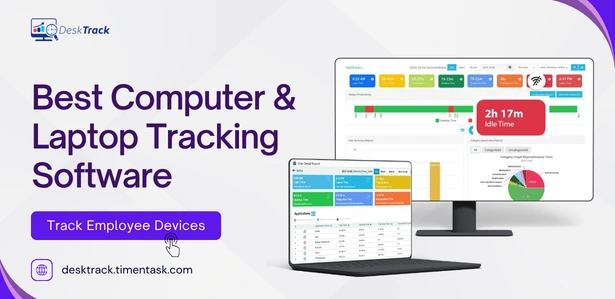
Your team is working. But are they really working?
Are you looking for the best computer & laptop tracking software in 2026? That’s the question every manager, HR leader, and business owner asks when deadlines slip, productivity drops, and there’s no clear answer for why. You can’t stand behind every employee all day and honestly, you shouldn’t have to.
That’s exactly where computer monitoring software comes in. The right tool gives you full visibility into how work time is actually being spent on desktops, laptops, and remote workstations without micromanaging anyone.Choosing a reliable tracking program for laptop ensures that your mobile workforce remains productive regardless of their location.
In this guide, we’ve reviewed the 8 best computer tracking software options available in 2026, compared their features side-by-side, and highlighted which one delivers the most value for businesses of all sizes. Let’s get into it.
What Is Computer Tracking Software?
Computer tracking software also called PC monitoring software or desktop monitoring software is a tool that records and analyzes how employees use their computers during work hours.
It automatically logs things like:
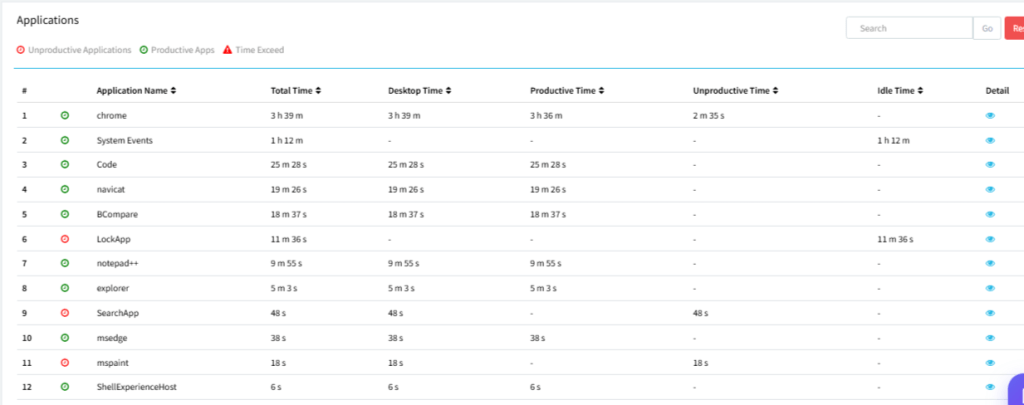
- Which apps and websites employees use (and for how long)
- When employees log in and log out
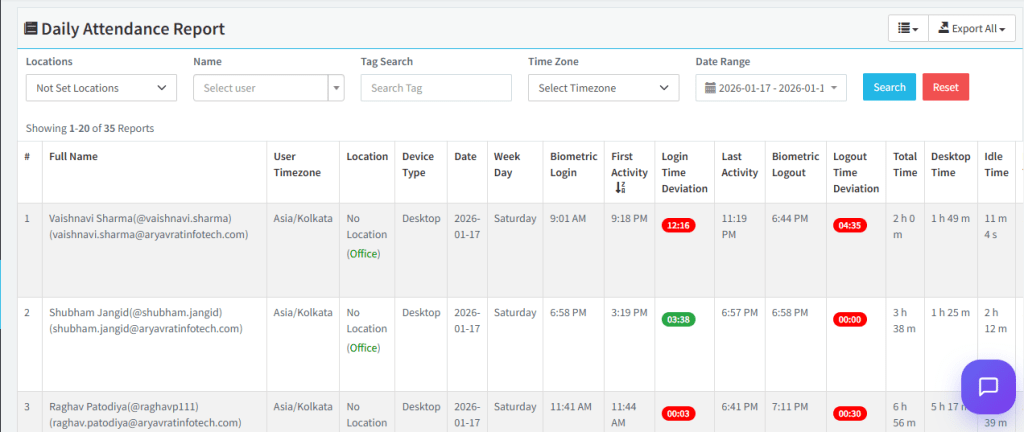
- How much time is spent actively working vs. idle
- Screenshots of work activity at set intervals
- Project and task time breakdowns
Think of it as a digital time-audit that runs in the background giving managers real data instead of guesswork. The best computer monitoring software for employers does this without disrupting workflows or creating a surveillance-heavy culture.
Why Do Businesses Need Computer Monitoring Software in 2026?
Remote and hybrid work is now the default for millions of teams which means visibility into actual work activity has never been more important. Here’s what’s driving adoption:
1. Productivity Gaps Are Costly
Studies show employees spend up to 2.5 hours per day on non-work activities at their computers. Over a year, that’s thousands of dollars per employee in lost productivity. Computer time tracking software gives you the data to close that gap not by punishing employees, but by identifying where time actually goes.
2. Remote Teams Need Accountability Without Micromanagement
When your team is distributed across cities or time zones, you can’t walk over to check in. A robust tracking program for laptop and desktop monitoring software let you see who’s engaged, who’s falling behind, and where bottlenecks are forming all without scheduling another Zoom call.
3. Data Security Is Non-Negotiable
Insider threats whether accidental or intentional are a major risk. PC tracking software that includes screenshot monitoring, app usage tracking, and file access logs creates an audit trail that protects your business.
4. Fair Performance Reviews Require Real Data
Annual reviews based on gut feel are outdated. Employee productivity tracking software generates objective reports that make performance discussions fairer, more accurate, and more motivating for your team.
Top 8 Computer Tracking Software: At a Glance
Here’s a quick overview before we go deeper into each tool:
| Tool | Starting Price | Key Strength | Best For | Free Trial |
|---|---|---|---|---|
| DeskTrack | $5.99/user/mo | All-in-one monitoring + time tracking + projects | SMBs & enterprises | ✅ 15 days |
| Teramind | $13.72/user/mo | Deep behavioral analytics & email monitoring | Compliance-heavy orgs | ✅ |
| ActivTrak | $10/user/mo | Cloud-based productivity analytics | Mid-sized businesses | ✅ |
| Hubstaff | $4.99/user/mo | GPS + time tracking combo | Remote/field teams | ✅ |
| Controlio | $7.99/user/mo | Keylogging + video capture | Security-focused teams | ✅ |
| DeskTime | $4.22/user/mo | Project time tracking | Freelancers & small teams | ✅ |
| Insightful | $6.40/user/mo | Kanban + remote productivity | Small businesses | ✅ |
| Clockify | $5.49/user/mo | Simple time tracking | Startups on a budget | ✅ Free plan |
Feature Comparison: DeskTrack vs. Top Competitors
Not all computer monitoring software for employers is built the same. Here’s how the top contenders stack up on the features that matter most:
| Feature | DeskTrack | Teramind | ActivTrak | Hubstaff |
| Screenshot Monitoring |
✅ |
✅ | ✅ | ✅ |
| App & URL Tracking |
✅ |
✅ | ✅ |
✅ |
| Idle Time Detection |
✅ |
✅ | ✅ |
✅ |
| Keystroke Logging |
❌ |
✅ | ❌ |
✅ |
| GPS / Location |
✅ (field) |
❌ | ❌ |
✅ |
| Project Management |
✅ |
❌ | ❌ |
❌ |
| Automated Timesheets |
✅ |
❌ | ✅ |
✅ |
|
Payroll Integration |
✅ | ❌ | ❌ |
✅ |
| Silent Mode |
✅ |
✅ | ✅ |
❌ |
|
Price (starting) |
$5.99 | $13.72 | $10 |
$4.99 |
Pro Tip: If project tracking and automated timesheets are important to your workflow, DeskTrack is the only tool on this list that bundles all three monitoring, time tracking, and project management into one platform at this price point.
This ensures a balance between accountability and privacy.
Detailed Reviews: The Best Computer Tracking Software in 2026
1. DeskTrack
DeskTrack is the standout choice for businesses that want a single platform to handle employee monitoring, time tracking, project management, and productivity analytics. It works seamlessly for in-office, hybrid, and fully remote teams.
What makes DeskTrack different:
- Automated time tracking with real-time activity logs no manual timers needed
- Screenshot monitoring at configurable intervals
- App & URL tracking that classifies time as productive or unproductive automatically
- Full project time tracking with tasks, subtasks, and checklists [Link: Project Time Tracking Software]
- Attendance management, idle time detection, and payroll integration
- Silent mode for unobtrusive monitoring
- Works on Windows, macOS, and Linux
Pricing: $5.99/user/month | Free Trial: 15 days, no credit card required
Best for: SMBs, enterprises, remote teams, IT firms, legal, accounting, and architecture practices
Ratings: Google 4.9/5 | Capterra 4.2/5 | G2 4.8/5 | Trustpilot 4.6/5
Bottom line: If you want one tool that replaces your time tracker, employee monitor, and project management software DeskTrack is it.
2. Teramind

Teramind is the go-to choice for enterprises with strict compliance requirements. It offers deep behavioral analytics, email monitoring, live session recording, and keystroke logging. It’s powerful but the complexity and cost make it a tough fit for small or mid-sized businesses.
- Highlights: Video recording, email/IM monitoring, rule-based alerts
- Drawback: Complex setup; starts at $13.72/user/month
- Best for: Financial services, healthcare, legal compliance teams
3. ActivTrak

ActivTrak is a cloud-based computer monitoring software that focuses heavily on workforce analytics and productivity coaching. Its dashboards are clean and its reports are easy to share with executives. However, it lacks keystroke logging and some advanced monitoring features.
- Highlights: Productivity benchmarking, team insights, remote worker reports
- Drawback: No keystroke logging; higher price for advanced features
- Best for: Mid-sized businesses focused on productivity optimization
4. Hubstaff

Hubstaff shines when your team works across multiple locations. It combines desktop monitoring with GPS tracking, making it a top pick for companies with field employees. That said, its reporting is fairly basic, and advanced monitoring features are limited.
- Highlights: GPS tracking, geofencing, shift scheduling
- Drawback: Reports lack depth; occasional sync issues
- Best for: Construction, logistics, field service, distributed remote teams
5. Controlio

Controlio is a solid cloud-based option that includes keylogging and video capture. It supports both Windows and macOS, and its scalability makes it suitable for growing businesses. However, it lacks mobile support and advanced AI/OCR on video captures.
- Highlights: Keylogging with video, cloud and on-premises options, scalable
- Drawback: No mobile app; no universal search
- Best for: Security-conscious IT teams, regulated industries
6. DeskTime

DeskTime is a lightweight, easy-to-use computer time tracking software that’s particularly popular with freelancers and small agencies. It tracks URLs, applications, and documents while offering a privacy mode for personal breaks. Reports are somewhat limited, but the interface is clean.
- Highlights: Private time feature, document tracking, calendar integration
- Drawback: Can’t be paused by users; limited CSV export
- Best for: Freelancers, small creative agencies
7. Insightful

Insightful (formerly Workpuls) is an affordable tracking software for computers that includes activity monitoring, screenshot proof of work, and Kanban-style project boards. It’s employee-friendly in design, though it occasionally shows data inaccuracies in time tracking.
- Highlights: Kanban boards, cloud and on-premises, team productivity view
- Drawback: No mobile app; occasional data inaccuracies
- Best for: Small to medium remote teams on a budget
8. Clockify
Clockify is the most popular free time tracking software for computers and teams. Its free plan is genuinely functional, and premium tiers add advanced features like lock time, kiosk mode, and scheduling. It’s less of an employee monitoring tool and more of a time management platform.
- Highlights: Free plan available, clean UI, good reporting
- Drawback: Limited monitoring features vs. dedicated tools
- Best for: Startups, freelancers, small teams on tight budgets
Real-World Use Cases: Who Benefits from Computer Tracking Software?
IT & Software Companies
A Jaipur-based IT firm with 60 remote developers was losing an estimated 18% of billable hours to unlogged work. After deploying DeskTrack’s computer monitoring software, they recovered 340+ billable hours per month within the first quarter and cut timesheet errors by 80%.
Legal and Accounting Firms
Professionals in legal and accounting track their time by client and matter. Computer time tracking software eliminates manual time entry, ensures billing accuracy, and generates compliance-ready reports. DeskTrack’s project time tracking is purpose-built for this workflow.
BPO and Call Centers
In high-turnover environments, PC tracking software helps managers spot disengagement early. Screenshot monitoring and idle time detection let team leads coach proactively rather than reactively.
Remote-First Companies
For companies where everyone works from home, laptop monitoring software is the closest thing to office visibility. Real-time activity feeds, automated timesheets, and productivity scores give managers the data they need to run standups, set priorities, and have honest conversations.
How to Choose the Right Computer Monitoring Software for Your Business
With so many options available, here’s a simple framework to narrow down your choice:
- Define your primary goal — pure time tracking, security monitoring, or all-in-one productivity management?
- Consider your team setup — on-site, hybrid, or fully remote? Field workers?
- Assess your compliance requirements — do you need keystroke logging, email monitoring, or video recording?
- Check integrations — does it connect with your existing payroll, HR, or project management tools?
- Evaluate pricing at scale — per-user costs add up; look at annual plans and free trial terms.
- Test before you commit — any reputable computer tracking software should offer a free trial.
Why DeskTrack Is the Best Computer Tracking Software for Most Businesses
After reviewing dozens of tools, DeskTrack consistently comes out ahead for one core reason: it’s the only solution that combines employee monitoring, time tracking, project management, and productivity analytics in a single, affordable platform without the complexity of enterprise tools.
Key Differentiators
- 100+ countries, 8,000+ organizations, 100,000+ users trust it
- Starts at $5.99/user/month competitive at every company size
- 15-day free trial with no credit card required
- Rated 4.9/5 on Google, 4.8/5 on G2
- Works silently in the background zero disruption to workflows
- Dedicated support for IT, legal, accounting, and BPO industries
- ISO 27001 certified your data is secure
This ensures a balance between accountability and privacy.
This ensures a balance between accountability and privacy.
Conclusion
“Finding the right tracking program for laptop or PC can transform how you manage your team’s efficiency.”Computer tracking software has become an essential tool for modern businesses not to spy on employees, but to create the visibility, accountability, and data that productive teams need to thrive.
From lightweight time trackers like Clockify to enterprise-grade behavioral tools like Teramind, the right solution depends on your team size, work model, and monitoring goals. But if you’re looking for one tool that does it all monitoring, time tracking, project management, and productivity analytics DeskTrack is the clear choice.
It’s affordable, easy to deploy, trusted by 100,000+ users worldwide, and backed by a 15-day free trial with no strings attached.
Frequently Asked Questions
Ans. Computer tracking software is a tool that helps businesses monitor employee computer activities, track work hours, measure productivity, monitor applications and websites used, and generate performance reports in real time. Ans. Most PC tracking software collects: login/logout times, active vs. idle time, applications used, websites visited, screenshot captures, and productivity scores. Some tools also log keystrokes, emails, and files accessed. DeskTrack collects behavioral data without keystroke logging, balancing visibility with employee privacy. Ans. Computer time tracking software improves productivity by creating accountability, surfacing time-wasting patterns, enabling accurate project billing, and giving managers data-driven insights for coaching. Companies using DeskTrack report 20-30% productivity gains within the first few months of deployment. Ans. DeskTrack, ActivTrak, and Insightful are the top laptop monitoring software options for remote teams. DeskTrack leads for its combination of activity tracking, automated timesheets, and project management in one platform. Ans. Yes, computer monitoring software is legal in most countries when used for legitimate business purposes. However, best practices require you to inform employees in writing before deployment, limit monitoring to work hours and work devices, and establish a clear workplace monitoring policy. DeskTrack supports ethical monitoring with transparent settings.computer-tracking-software