Most managers know exactly how many people are on their team. Far fewer can say where those people’s hours actually go. That gap is what workforce productivity software is built to close.
In this guide we compare ten employee productivity tools, from employee tracking software like DeskTrack, ActivTrak and Insightful to planning apps like Todoist and Reclaim. We also explain the main types of productivity management software, what the market looks like in 2026, and how to pick productivity solutions for business needs without overpaying. Prices come from public listings we checked in October 2026. Vendors change them often, so confirm on each pricing page before you buy.
One honest note up front: DeskTrack is our product, and it’s on this list. We’ve tried to say plainly where it fits and where another tool is the better call.
Short on time? Pick by job
- Time tracking, monitoring and attendance in one tool: DeskTrack, ActivTrak or Insightful
- Simple, budget-friendly time tracking: DeskTrack, DeskTime
- Task lists and personal planning: DeskTrack, Todoist
- Scheduling and meetings: Google Calendar, Calendly or Reclaim
- Quick notes: Apple Notes
Why Measuring Productivity Matters in 2026
Gallup’s State of the Global Workplace 2026 report found that global employee engagement slipped to 20% in 2025, the lowest level since 2020. Gallup puts the cost of that disengagement at roughly $10 trillion in lost productivity, around 9% of global GDP, and says falling manager engagement drove most of the drop.
Software won’t fix engagement on its own. But you can’t improve what you can’t see. If you don’t know how many hours go to client work, how much time is idle, or how often people stay late, every conversation about “being more productive” turns into guesswork. Good data gives you a baseline. It also tells you whether a change you made actually helped.
What Is Workplace Productivity Software?
Workplace productivity software is any tool, app or platform that helps you and your team get more done. Some of it is narrow, like a time tracker. Some of it is broader productivity management software that covers planning, collaboration and reporting.
The workforce productivity services most teams care about are:
- Time tracking and automatic timesheets
- Employee monitoring and activity reports
- Attendance and leave management
- Scheduling and workload planning
- Payroll and invoicing support
Used well, these tools show you where work slows down, so you can fix workflows, cut wasted time and protect your margins. Used badly, they just create more dashboards nobody opens. That’s why the choice matters.
Read also: The Future of Time Tracking: AI & Automation in Workforce Management
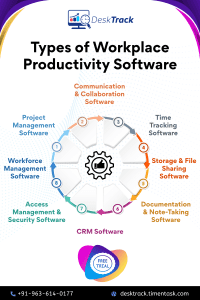
Types of Workforce Productivity Tools
No single product covers everything, and most companies end up combining two or three of the categories below.
1. Project management software
Teams rarely work alone, so this is usually the first thing a growing company adds. Project management software handles planning, task tracking and delivery in one place.
2. Communication and collaboration software
In remote and hybrid teams, unclear communication costs more time than almost anything else. Chat tools and shared documents that several people can edit at once keep everyone working from the same page.
3. Time tracking software
This is the category that tells you the truth about your day. Before you can work faster, you need to know where the hours go. A good time tracking software shows that without anyone filling in forms.
4. Storage and file-sharing software
People can only deliver if they can find the right file at the right moment. Shared storage keeps files organised in one dashboard instead of scattered across inboxes.
5. Documentation and note-taking software
Pen and paper gets lost. Note-taking and documentation tools let you capture information in a few clicks, and they make billing, invoicing and auditing a lot less painful.
6. CRM software
How you treat customers shapes your reputation. CRM software keeps customer information in one place, and many tools automate repetitive jobs like follow-up emails.
7. Access management and security software
Only the right people should reach sensitive data. Access tools handle permissions, and some security features, like screenshot monitoring and data leak protection, overlap with productivity tracking.
8. Workforce management software
HR and payroll platforms handle onboarding and offboarding, performance tracking and payroll processing. If you’re comparing options, our guide to HR software for business is a good next read.
The Productivity Management Software Market in 2026
The business productivity software market keeps growing as remote and hybrid work becomes normal. Analysts don’t agree on the exact size, because each firm draws the category lines differently. The Business Research Company, for example, estimates the employee monitoring software market at $3.89 billion in 2025 and $4.59 billion in 2026, growing about 16% a year to 2030. Other reports use narrower definitions and land on much smaller numbers. Treat any single figure as a rough guide, and pay attention to the direction instead: it’s up.
Four trends matter if you’re shopping in the productivity management software market this year:
- All-in-one platforms are winning over app sprawl. Most buyers would rather run one workforce productivity software that covers time tracking, monitoring, attendance and reporting than juggle five logins.
- AI is taking over the boring parts. Automatic time categorisation and smart calendar scheduling now save managers real hours each week.
- Pricing is public, and free tiers are common. ActivTrak, Reclaim, Calendly and Todoist all have free plans, so you can test before you commit. Prices do creep up, though. Todoist, Reclaim and Calendly have all raised paid plans in the last couple of years.
- Privacy rules are getting attention. Employees and regulators both expect clear notice about what is tracked. More on that below.
How to Choose the Right Productivity Management Software
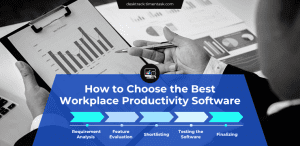
With this many productivity solutions for business, picking one can feel like a second job. This five-step process keeps it manageable.
- Work out why you need it. Is the problem hidden overtime, unclear project costs, missed deadlines or remote visibility? Also count how many people will use it.
- List the features that matter. A ten-person office doesn’t need heavy communication features. A field team might need GPS and attendance.
- Build a shortlist. Cross off anything over budget. Remember that per-user prices add up fast across a whole team.
- Test before you decide. Read recent reviews, ask current users, and take a free trial or demo with a real team.
- Choose the one that fits, not the one with the longest feature list. If a tool does a lot you’ll never use, you’re paying for noise.
Top 10 Workplace Productivity Software in 2026
Don’t have time for a deep comparison? We shortlisted ten of the best employee productivity tools and workforce productivity tools, with what each one does best and what it costs.
1. DeskTrack
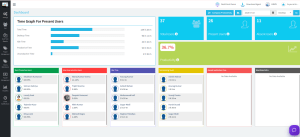
DeskTrack is employee tracking software built for businesses that want monitoring and time tracking in one place. It works as computer tracking software for business too: it records time on apps and websites, flags idle time, and turns that into reports managers can actually use. Everything runs in real time, so you see what’s happening while the work is happening. It suits on-site, in-office, remote and hybrid teams, which makes it a practical employee productivity solution for mixed setups.
Key features:
- Customisable screenshot monitoring
- Employee scheduling that’s easy to set up
- Integrations with the tools you already use
- AI-powered time categorisation
- Automated attendance tracking
- Time tracking with data analytics
- Data leak protection
| Cheapest Paid Plan | User Rating |
|---|---|
| $1.99/user/month | 4.9/5 |
Worth knowing: it’s built around monitoring and time tracking. If all you need is a to-do list, Todoist below will do the job for less.
2. Desklog
Desklog is a straightforward staff productivity tracking tool that keeps the price down. It’s a good fit if you want automated timesheets and project-level time tracking without a lot of extras.
Key features: automated time tracking, automated timesheets, project time tracking.
| Cheapest Paid Plan | User Rating |
|---|---|
| $2.99/user/month | 4.8/5 |
3. ActivTrak
ActivTrak is a cloud-based employee productivity app that works especially well for hybrid teams. It gives you detailed views of how people spend their working day and which apps they rely on. It also has a free plan, which helps if you want to test it on a small group first.
Key features: employee productivity insights, employee monitoring, workforce management.
| Cheapest Paid Plan | User Rating |
|---|---|
| $10/user/month | 4.5/5 |
That’s the Essentials plan, billed annually. Higher tiers run to about $19, and there’s a free plan for up to 3 users. Check which features sit in which plan, because some extras cost more.
4. DeskTime
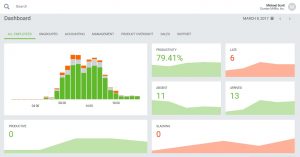
DeskTime is a cloud-based time tracker that suits freelancers and small businesses. It also has a handy project cost calculation feature. DeskTrack, by comparison, is a fuller productivity management software for teams that want monitoring, attendance and scheduling together.
Key features: automatic time tracking, URL and app tracking, web timer.
| Cheapest Paid Plan | User Rating |
|---|---|
| $4.58/user/month | 4.5/5 |
That’s the Pro plan billed annually ($7 month to month). There’s no permanent free plan, and screenshots aren’t included in Pro.
5. Insightful
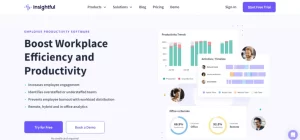
Insightful software (formerly known as Workpuls) combines workforce analytics with activity monitoring. It works well for remote teams thanks to real-time reports, app and website tracking, and workload management.
Key features: apps and website tracking, activity tracking, attendance tracking.
| Cheapest Paid Plan | User Rating |
|---|---|
| From $8/user/month | 4.7/5 |
Listings differ between $8 and $10 depending on the plan, so check the vendor’s pricing page and ask what’s included before you sign up.
6. Todoist
Todoist isn’t the most powerful to-do app, and it isn’t the simplest. That balance is exactly why people stick with it. It’s a popular employee productivity app for tasks, projects and personal time management.
Key features: task management, project management, time management.
| Cheapest Paid Plan | User Rating |
|---|---|
| $5/month (Pro) | 4.6/5 |
That’s billed annually ($7 month to month). Business is $8 per user per month. Todoist raised these prices in late 2025, so older articles quoting lower numbers are out of date.
7. Google Calendar
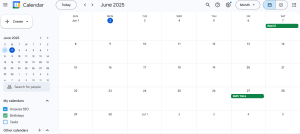
Google Calendar looks like a plain calendar, but it does a lot: shared calendars, event invites, reminders and room booking for teams. It’s the quiet workhorse behind many companies’ scheduling.
Key features: easy calendar creation and management, quick event sharing, integrations with other tools.
| Cheapest Paid Plan | User Rating |
|---|---|
| Free | 4.8/5 |
Free with a personal Google account. For business use it comes bundled with Google Workspace.
8. Calendly
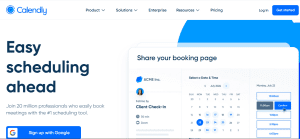
Calendly is built for booking meetings and appointments, and it does that one job really well. Share a link, let people pick a time, and skip the email back-and-forth.
Key features: integrations, mobile app, analytics.
| Cheapest Paid Plan | User Rating |
|---|---|
| $10/user/month | 4.7/5 |
That’s the Standard plan billed annually ($12 monthly). Teams, with round-robin scheduling and admin controls, is $16. The free plan is limited to one event type.
9. Reclaim
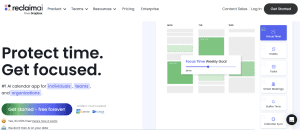
Reclaim uses AI to protect focus time on your calendar. It pulls tasks from apps like Todoist and drops them into open slots, then moves things around when your week changes. It’s now part of Dropbox.
Key features: tasks, smart meetings, time tracking.
| Cheapest Paid Plan | User Rating |
|---|---|
| $10/user/month | 4.8/5 |
That’s the Starter plan billed annually ($12 monthly). There’s also a free Lite plan for one user.
10. Apple Notes
Apple Notes is one of the easiest ways to capture a quick thought. Notes sync across your Apple devices, and you can also open them in a browser through iCloud. It’s best if your whole team uses Apple hardware.
Key features: supports multiple languages, attachments, and audio recording with transcription inside a note.
| Cheapest Paid Plan | User Rating |
|---|---|
| Free | 4.5/5 |
It comes with macOS and iOS.
Read also: All You Need to Know About Workload Management in 2026
Employee Monitoring Software: Free, Open Source and What to Expect
Two questions come up constantly, so here are straight answers.
Is there free employee monitoring software?
Yes, but expect limits. Some vendors offer a free plan for a handful of users. ActivTrak, for instance, has one for small teams. Free plans usually cap the number of users, the history you can keep, or the reports you can run. They’re fine for testing. Once your team grows, you’ll probably move to a paid plan.
Is there open source employee monitoring software?
Partly. Most open source options are time trackers, not full monitoring suites. ActivityWatch tracks your own app and window usage locally, and Kimai is a self-hosted time tracking app. Both are free to use, but you host, secure and maintain them yourself, and there’s no vendor support when something breaks. If your team has the technical skills and wants full control of the data, that’s a fair trade. If not, a paid hosted tool is usually cheaper once you count the hours it takes to maintain.
What should computer tracking software for business actually do?
Good computer tracking software for business records active and idle time, apps and websites used, and attendance, then turns it into reports you can read in a minute. Look for role-based access so only the right managers see the data, clear controls over what gets captured, and a vendor that tells you where the data is stored.
Using Monitoring Fairly and Legally
Monitoring works best when people know about it. Tell your team what you track and why, put it in a written policy, and keep the focus on work activity, not personal browsing or private messages.
The legal side varies by location. Some US states, including New York, require written notice before you monitor employees’ electronic activity, and the EU’s GDPR expects monitoring to be proportionate and justified. Check the rules where your employees work, and talk to a lawyer if you’re unsure. Transparency also helps with trust, which Gallup’s numbers suggest is already in short supply.
What Changes After You Roll Out an Employee Productivity Solution
Results depend on how you use the data, so we won’t promise a fixed percentage. In practice, teams tend to see these changes:
1. You spot problems earlier
Because the data is live, you notice a stalled project or an overloaded person before it becomes a missed deadline.
2. Workflows get smoother
When you can see where time disappears, you can remove the repeated steps, pointless meetings and handoffs that cause it.
3. Conversations get fairer
Performance talks start from shared numbers instead of impressions. That tends to help engagement, as long as people trust how the data is used.
4. Payroll and billing get faster
Time tracking that feeds into payroll and invoicing cuts manual timesheet work and reduces disputes.
5. Overtime becomes visible
With accurate clock-in and clock-out records and scheduling, you can see who’s regularly working late and rebalance the load.
6. Deadline rushes shrink
When work is spread more evenly, fewer projects end in a last-minute scramble, and burnout risk goes down.
Why DeskTrack Is More Than Productivity Software
DeskTrack covers employee monitoring, time tracking, productivity tracking, attendance and leave management in one platform, so you don’t have to stitch tools together. Customisable screenshot monitoring and real-time notifications help you catch insider-threat risks early, and data leak protection adds another layer. It works for in-office, field, remote and hybrid teams. You can see how it fits your team with a free demo.
Frequently Asked Questions
Q.What is productivity in human resource management?
Ans. In HRM, productivity is how efficiently and effectively an employee or team contributes to the organisation’s goals.
Q. What is employee productivity software?
Ans. It’s any tool, app or platform that helps you and your team get more done. That covers time tracking, employee monitoring, workforce management and scheduling, all of which show you where to remove obstacles and improve efficiency.
Q. What are the common types of workforce productivity tools?
Ans. The main categories are project management, communication and collaboration, time tracking, storage and file sharing, documentation and note-taking, CRM, access management and security, and workforce management software.
Q. How do I choose the best productivity management software?
Ans. Define the problem, list the features you need, build a shortlist within budget, test with a free trial or demo, then pick the tool that fits your team rather than the one with the most features.
Q. What is employee tracking software?
Ans. Employee tracking software records how working time is spent: hours worked, apps and websites used, active and idle time, and attendance. Managers use the reports to plan workloads, bill clients accurately and spot bottlenecks.
Q. Is there free employee monitoring software?
Ans. Yes, though free plans usually limit users or features. ActivTrak offers a free plan for small teams. Use free tiers to test, then compare paid plans as you grow.
Q. Is there open source employee monitoring software?
Ans. Mostly in the form of time trackers rather than full monitoring suites. Tools like ActivityWatch and Kimai are free, but you have to host, secure and maintain them yourself.
Q. What is computer tracking software for business?
Ans. It’s software that records activity on work computers, such as apps, websites, idle time and attendance, and turns it into reports. DeskTrack, ActivTrak and Insightful all fall into this group.
Q. Is Insightful software worth it?
Ans. Insightful is strong on activity monitoring and remote team analytics. Compare its plan prices and add-ons with alternatives like DeskTrack and ActivTrak, and ask whether its monitoring style suits your team culture before you commit.
Q. Which employee productivity app is best for businesses?
Ans. It depends on the job. For monitoring and time tracking, DeskTrack, ActivTrak and Insightful are strong choices. For tasks and scheduling, Todoist and Reclaim work well.
Q. What are productivity solutions for business, and are they worth it?
Ans. They’re tools that measure and improve how teams work. They pay off when you use the data: you find where time is lost, cut overtime, and speed up payroll and reporting.