






Stop Guessing Start Knowing Where Your Team Is Right Now
DeskTrack is the attendance tracking software that gives HR leaders real-time GPS visibility across every office, field site & time zone with leave management and payroll sync built right in.
 G2
G2
 Capterra
 Trustpilot
 SSuggest
More Than 1000+ Companies Worldwide Trust DeskTrack






Attendance Chaos Is Costing
You Every Day
Biometrics and spreadsheets cannot keep up with dispersed, mobile, field & remote teams. Here's what HR teams face every single week.
Ghost Locations
Managers assume employees are at another site — only to discover they're home without pre-approved leave. Zero visibility, zero accountability.
Field No-Shows
Healthcare and field service companies take weeks compiling attendance, causing billing delays and serious client relationship damage.
Multi-System Overload
Separate tools for attendance, leave, and payroll create compliance gaps, manual errors, and hours of wasted HR time every pay cycle.
Time Zone Confusion
Coordinating global teams across time zones makes accurate, consistent attendance recording nearly impossible with legacy tools.
Monday Leave Patterns
Recurring absences on Fridays, Mondays, and post-holidays go unnoticed until they cascade into missed deadlines and poor morale.
Payroll Errors
Manual attendance-to-payroll transfers introduce costly miscalculations and expose organizations to federal compliance violations.
No credit card · 15-day trial · Setup in under a day
Every Hour, Every Employee In One Exportable Report
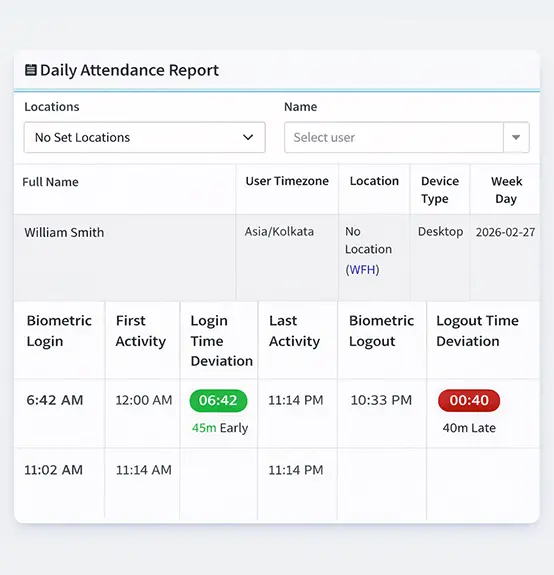
The daily attendance report captures login time, total hours, desktop time, idle time, productive vs. unproductive hours, and working status for every employee — across every location. Filter by timezone, location tag, or employee and export to payroll in one click.
See Exactly What Your HR Team Gets
Every screen below is the actual DeskTrack interface — no mockups, no illustrations. What you see is what your team uses from day one.
Company-Wide Attendance at a Glance
See total users, present vs. absent count, and overall company productivity in real time. Drill into top performers, idle time alerts, and minimum working hours breaches — from one unified screen.
- ✓Live present / absent headcount with productivity %
- ✓Most & least productive employee rankings
- ✓Idle time and minimum-hours breach alerts
- ✓Filter by date, device type, or location instantly
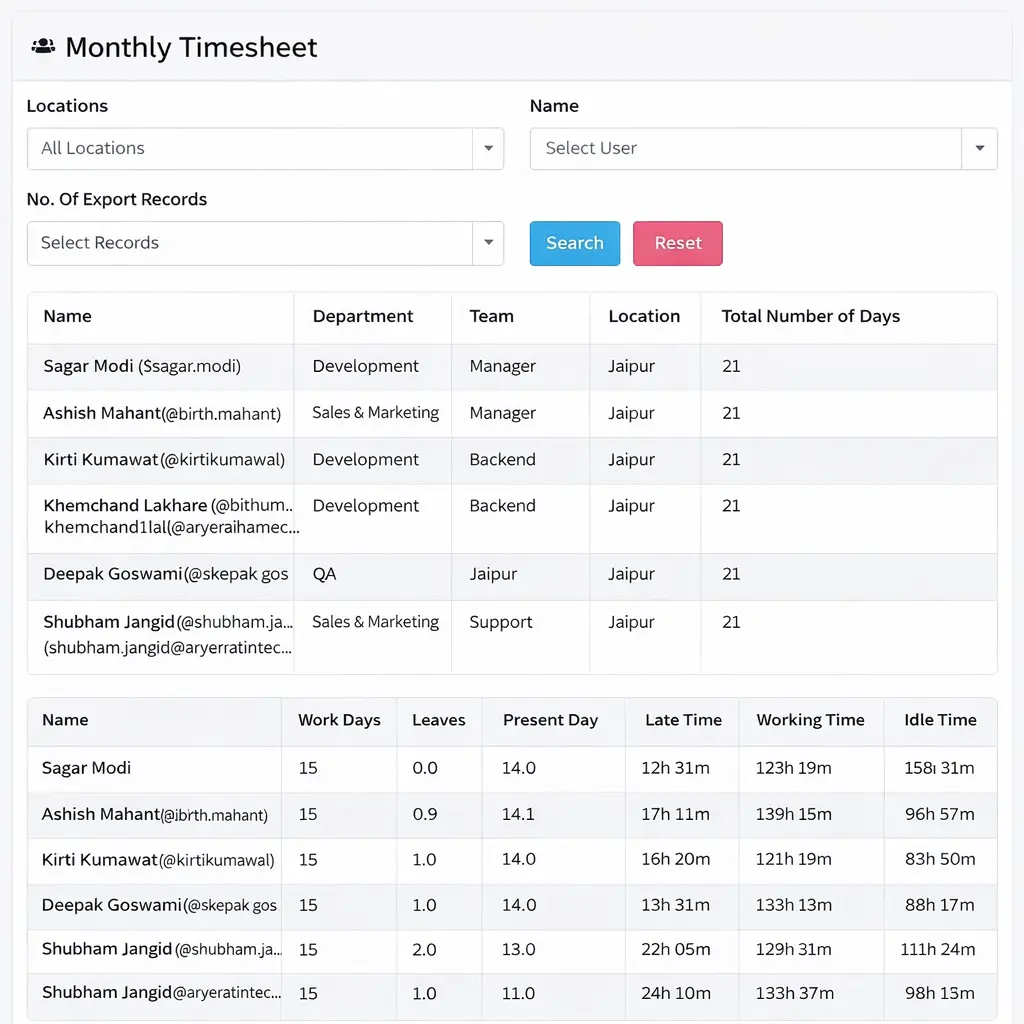
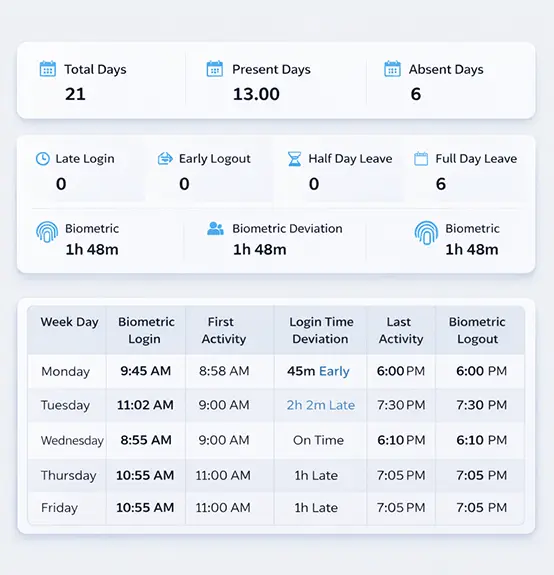
Daily Attendance — See Who Is In, Late, or Absent
Track every employee's daily check-in and check-out times accurately. Automatically capture their first activity and last activity of the day without manual timesheets.
- ✓Automatic first-in and last-out timestamps
- ✓Clearly marked late arrivals and early departures
- ✓Visual indicators for present, absent, and Half-Day statuses
- ✓Real-time updates across multiple office locations

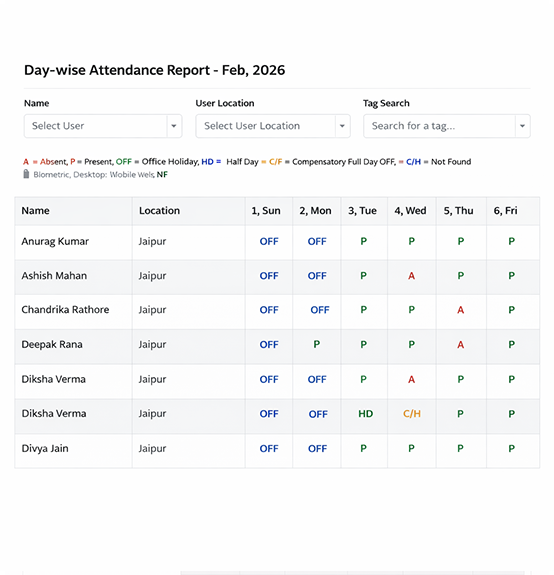
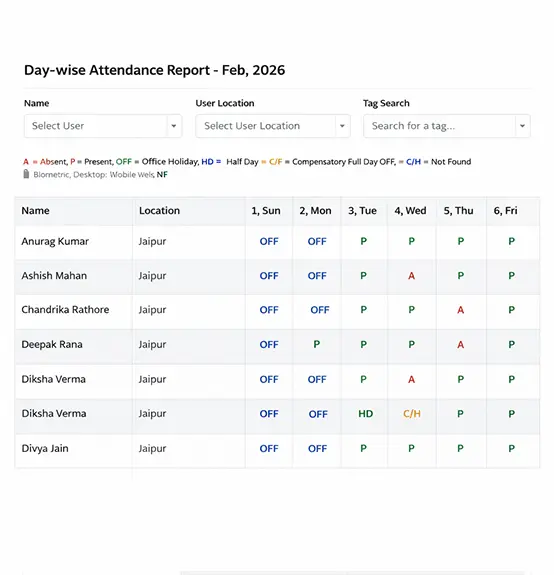
Day-wise Report — Detailed Monthly Breakdowns
Get a comprehensive view of an individual employee's attendance throughout the entire month. Analyze work hours, productive time, and absenteeism patterns with ease.
- ✓Month-at-a-glance calendar view for every user
- ✓Daily breakdown of total work hours and productive time
- ✓Easily spot recurring unscheduled absences or late check-ins
- ✓Exportable format for seamless payroll integration
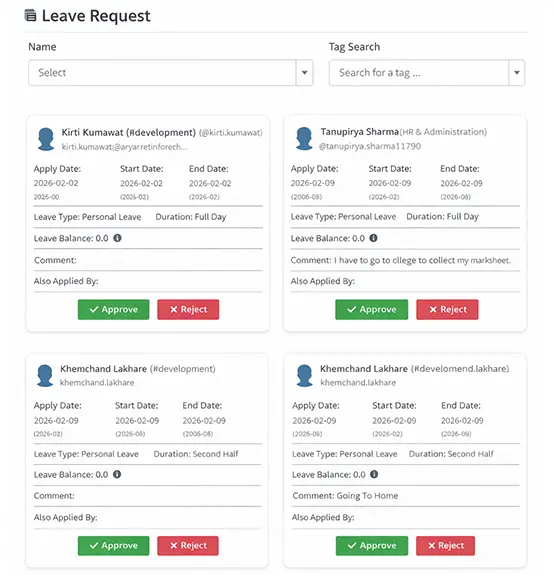
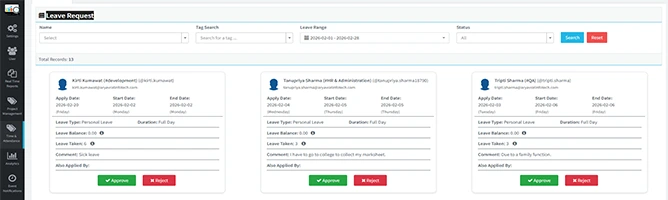
Leave Requests — Streamlined Approval Workflows
Manage all employee time-off requests in one centralized portal. Employees can easily apply for leaves, and managers can approve or reject them with a single click.
- ✓Unified dashboard for pending, approved, and rejected leaves
- ✓Instant email and desktop notifications for new requests
- ✓Multi-level approval workflows for different departments
- ✓Seamless sync with the central attendance calendar
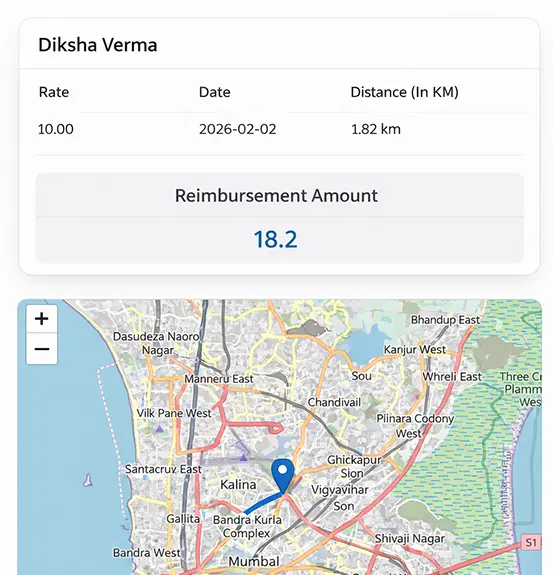
Location Report — GPS Tracking for Field Teams
Ensure your remote and field employees are exactly where they need to be. Track check-in locations via mobile GPS to verify client visits and on-site work.
- ✓Precise GPS coordinates captured for every check-in
- ✓Geofencing support to restrict punch-ins to specific areas
- ✓Historical location logs for route audits and reimbursements
- ✓Eliminate buddy punching and location spoofing entirely
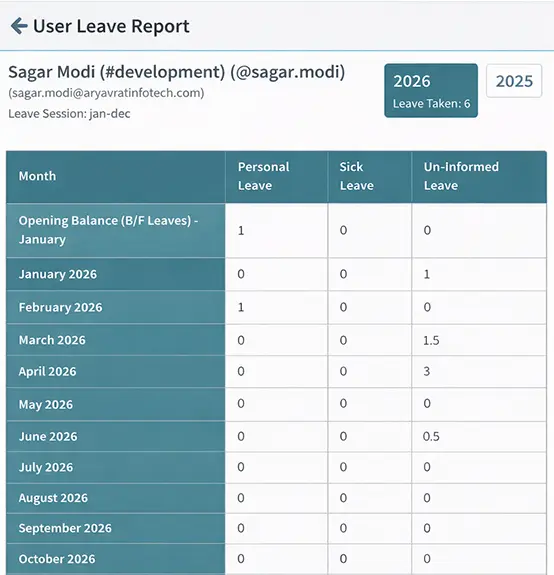
Leave Balance — Transparent Accruals and Entitlements
Keep HR and employees on the same page regarding available time off. Automatically calculate earned leaves, sick days, and vacation balances based on your company policy.
- ✓Real-time display of Used, Remaining, and Accrued leaves
- ✓Pro-rata calculations for new joiners and mid-year changes
- ✓Automated end-of-year leave lapsing or carry-forward rules
- ✓Empowers employees with a self-service balance view
Trusted by HR Teams in 50+ Countries
Join 12,000+ companies who've replaced their attendance chaos with DeskTrack's unified platform.
Everything in One Attendance Management Platform
DeskTrack consolidates your entire workforce attendance ecosystem — from GPS check-ins to payroll export — in a single, unified platform.
Up & Running in Under a Day
No IT team required. No months of setup. DeskTrack's guided onboarding gets HR teams live with accurate attendance in hours.
Setup Your Organization
Add locations, shifts, departments, and leave policies. Import employees via CSV or HRMS sync in minutes.
Employees Check In
Via mobile app with GPS, desktop activity, or biometric devices — whichever fits your location type.
HR Monitors Live
Real-time dashboards show attendance, leave requests, and alerts across all locations in one unified view.
Payroll in Clicks
Approve attendance and push to payroll with compliance reports auto-generated — zero manual data entry.
Turn Attendance Data Into Strategic Decisions
DeskTrack's analytics surface the patterns, risks, and opportunities hidden in your workforce attendance data.
Leave Pattern Detection
Flag employees with repeated Monday, Friday, or long-weekend absences automatically using historical leave data — before it impacts delivery.
Productivity Loss Calculation
Quantify the business cost of absences by skill level and role criticality — giving leadership concrete numbers to act on, not just gut feel.
Workforce Availability Forecast
Predict staffing shortages weeks ahead using approved leave data and historical trends. Commit to client projects with confidence.
Compliance-Ready Reports
One-click export of attendance, overtime, and leave reports in formats ready for payroll systems, audits, and regulatory submissions.
The Day-wise Calendar That Reveals Every Leave Pattern
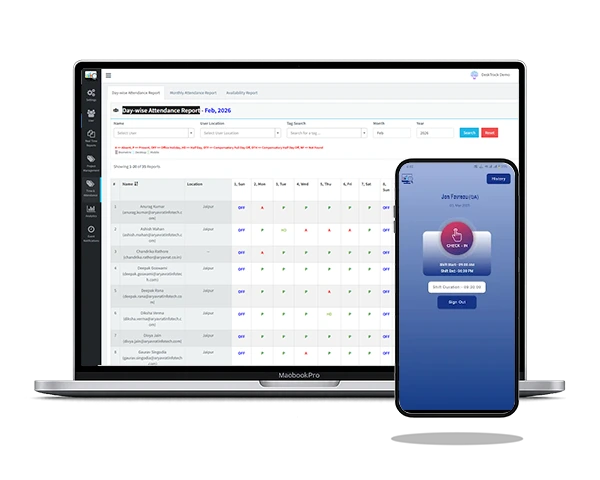
DeskTrack's Day-wise Attendance Report shows a full month calendar per employee — instantly revealing who takes Mondays off, who clusters leaves around holidays, and who has the most late comings. Historical data you can actually act on.
- Spot Monday/Friday leave patterns instantly
- Compare present days vs. absent days side-by-side
- Late coming count auto-calculated per employee
- Sync attendance data directly from the report
The Best Attendance Tracking Software
Built for Teams of All
Sizes
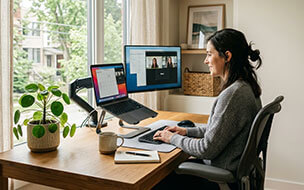
From startups in Jaipur to enterprises in New York, DeskTrack's attendance tracking software adapts to how your organization works, whether you are remote, hybrid, or site-based.
Stay Compliant. Stay Protected.
Built for regulated environments — with multi-region compliance, enterprise data security, and audit-ready reporting from day one.
Multi-Region Calendars
Region-specific holiday and leave calendars automatically apply correct rules by employee location.
Labor Law Compliance
Built-in overtime rules, minimum wage tracking, and leave entitlements aligned with local labor laws.
Enterprise Data Security
256-bit encryption, role-based access controls, and SOC 2 compliant data handling throughout.
Audit-Ready Reports
Instant generation of attendance audit trails, leave history, and payroll reconciliation reports.
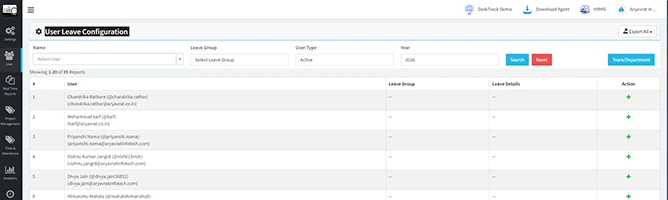
Full Control Over Every Employee's Leave Policy & Balance
Two dedicated screens give your HR team complete authority — manually adjust leave balances for any employee at any time, and configure unique leave policies per person, team, or department.
Meet Our Expert
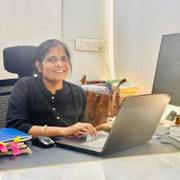
Rashmi Singh is the founder of the company, CEO, and lead Product Manager at DeskTrack as well as TitaPro. With a long-running career that spans nearly 30 years, Rashmi is now a pioneering software developer during the "pre-Google" period at an internationally leading company in time monitoring, employee tracking, and operational efficiency.
Her path is outlined by a single goal: helping businesses and individuals achieve a better work life balance by freeing themselves from the responsibilities of a constantly connected world.
Read Founder StoryLoved by HR Leaders Worldwide
Frequently Asked Questions
Everything you need to know about DeskTrack's time and attendance tracking software.
Ready to Know Exactly Where Your Team Is Right Now?
Join 12,000+ companies who eliminated attendance chaos with DeskTrack. No biometrics required. No IT team needed. No credit card to start.
Free track client — no credit card · Full features in trial · Setup in under 5 minutes · Dedicated onboarding support
