







Employee Screenshot Monitoring Software With Built-In Time Tracking
Screenshots under your control: you set the interval, the teams and who can view.
Employee screenshot monitoring software captures work screens at intervals you set and places each screenshot next to the time it was taken and the app in use. Employees know it is running and can see their own data.
 G2
G2
 Capterra
 Trustpilot
 SSuggest

More Than 8K+ Companies Worldwide Trust DeskTrack


Why Teams Rely on Screenshot Monitoring
Gain complete transparency, resolve timesheet disputes, and keep hybrid teams accountable with automated proof of work.
A Client Questions Hours
Show the work behind the timesheet, with timestamps.
A Task Stalls
See where work got stuck without chasing people.
Remote and Hybrid Teams
Context for work done across locations and time zones.
Reviews and Audits
Timestamped records, kept for one month and downloadable by admins.
What You Control in Screenshot Capture
Configure capture intervals, team permissions, multi-monitor settings, and retention policies to match your workplace needs.
Capture Interval
Every 5 minutes by default; longer if you prefer (minimum 5 minutes)
Per-Team Policy
Screenshots on for some teams, off for others
Multi-Monitor
Captures every connected monitor
Who Can View
Only permitted managers, by hierarchy
Filters
By user, date and time range
Context
Each screenshot sits next to its time log, app and window title
Retention
Kept for one month; admins can download them
Storage
Encrypted, access by permission
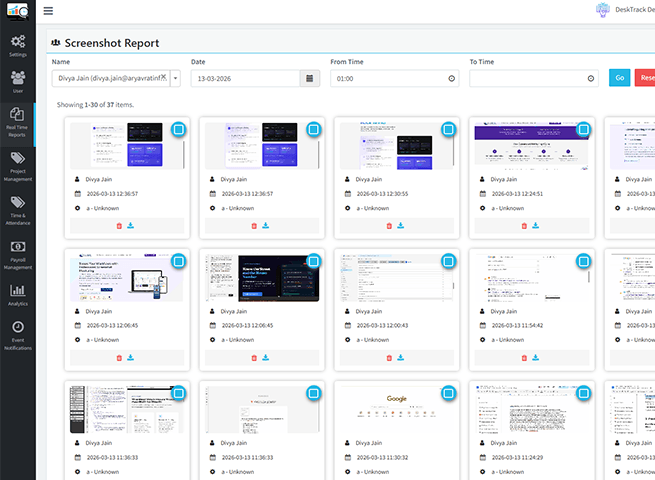
Time Tracking & Screenshots in One Tool
DeskTrack logs work hours automatically and places each screenshot on the same timeline, next to the app and window title in use. Managers see hours and the work behind them together. No separate timer to start.
- Set your policy: interval, teams, who can view
- Automatic capture with timestamps and the active app
- Context: lines up with activity and productivity reports
- Review: check work in progress and settle questions with facts
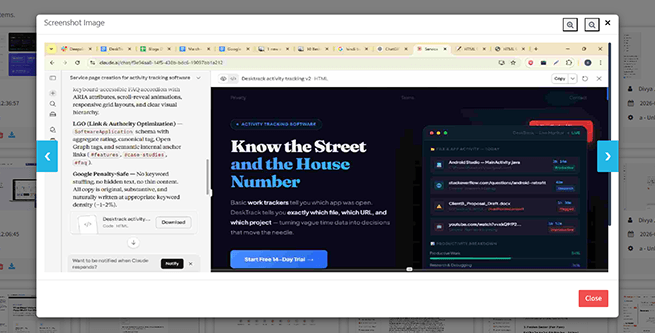
How DeskTrack Keeps Employee Monitoring Fair
Most screenshot tools compete on how much they can capture. DeskTrack competes on control.
DeskTrack does
- Visible by default; silent only where law and policy allow
- Employees see their own data
- You choose teams, interval and viewers
- Reads file names, never file contents
DeskTrack never does
- Video recording
- Webcam photos
- Live screen streaming
- Reading text on screen (OCR)
Real Customer Success Stories
See how businesses use DeskTrack’s screenshot monitoring to gain clear visibility into daily work activities, resolve workflow issues, and improve team productivity with real work evidence.
Qatar Cool
Qatar Cool uses DeskTrack to gain better visibility into employee time, attendance, activity, and productivity.

Patanjali Foods
Teams across locations use screenshot reports and daily attendance to see who hasn't started their system.

Oswaal Books
Screenshots helped identify responsibility for a ₹3 lakh loss and improve deadlines.
Protecting source code
An employee zipped and password-protected the company's codebase and deleted the local files. Screenshots showed exactly what happened, and the company regained access within hours and resumed work.
Settling work-time disputes
When managers and employees disagreed about active working time, screenshots next to the time log settled it with facts instead of opinions.
Meet Our Founder & Expert
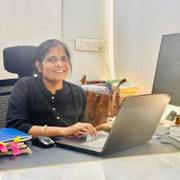
Rashmi Singh is the founder of the company, CEO, and lead Product Manager at DeskTrack as well as TitaPro. With a long-running career that spans nearly 30 years, Rashmi is now a pioneering software developer during the "pre-Google" period at an internationally leading company in time monitoring, employee tracking, and operational efficiency.
Her path is outlined by a single goal: helping businesses and individuals achieve a better work life balance by freeing themselves from the responsibilities of a constantly connected world.
Read Founder StoryWhat Our Clients Say
Discover why 70K+ Users trust DeskTrack for transparent activity tracking and productivity management.
Frequently Asked Questions
Answers to common queries on employee monitoring, screenshot intervals, and data privacy.
How are screenshots protected?
- ISO 27001:2022 certified
- Kept one month, then removed
- Encrypted, permission-based access
Which systems are supported?
Windows, macOS and Linux work computers, every monitor. Mobile apps (iOS, Android) handle GPS attendance, not screenshots.
₹99/user/month + GST in India. Screenshots included in every plan; lower price without them.
See Screenshot Monitoring on Your Team
Start your free trial to experience automated screen capture and activity tracking.
Get complete
visibility across your remote and hybrid teams in minutes.