






App & Website Usage Tracking That Knows Each Role's Real Work Tools
See which apps, websites and AI tools your team uses, for how long, and whether it fits their role.
DeskTrack records every desktop app and website on work computers, separates active time from idle time, and scores it against the tools you set for each role. Employees know it is running and can see their own data.
 G2
G2
 Capterra
 Trustpilot
 SSuggest

Companies registered
Users
146 reviews on 4 platforms
Countries
2022 certified
Clients in the US, India, UAE, Qatar, UK and Bangladesh
Trusted by 8K+ Companies Worldwide with DeskTrack


DESKY · THE DESKTRACK AI AGENT
App usage tracking with a conversational AI agent
Ask Desky which apps matter for each role, where time leaks and how much time goes into AI tools. It answers from your own app and website data, on demand or every week.
One conversational AI agent across office, remote and field data.
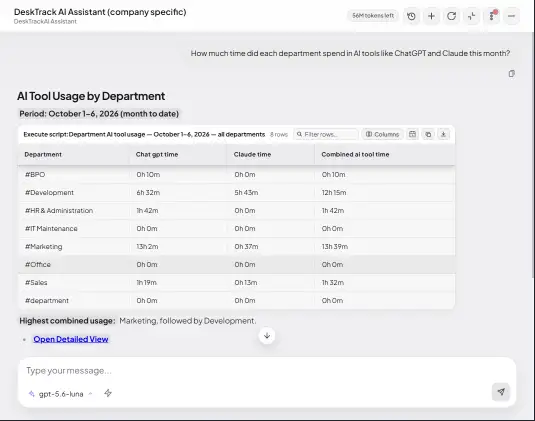
Ask or schedule
Type a question, or start from suggested questions for CEO, HR and team leads.
Analyses across data
Combines attendance, activity, calls and field time, and compares with benchmarks.
Answers on schedule
Scheduled questions and saved scorecards arrive before your meetings.
Humans stay in charge
Desky won't rate or recommend action on a person from activity data alone.
See what managers see
Four reports, ready from day one. Real product screens, shown with demo data.
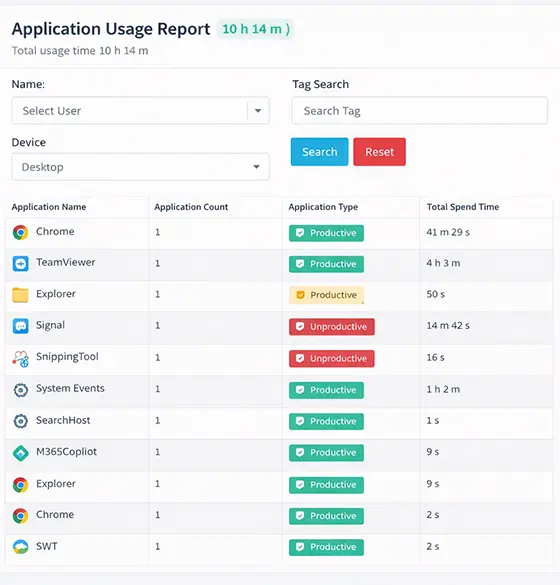
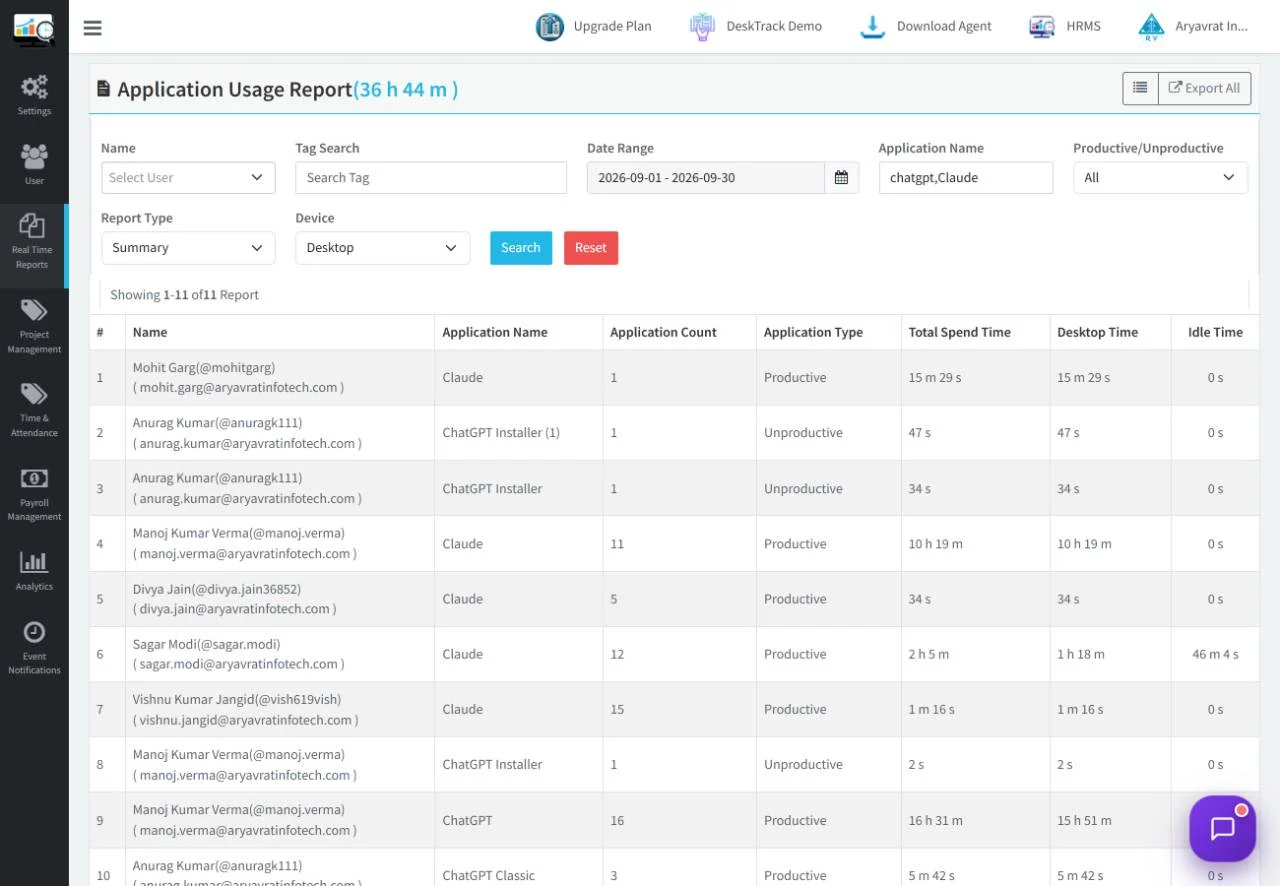
App Usage Report
Each person, each app: total, active, idle, productive and unproductive time. The view for where work happens.
- Reach: how many people or days each app was used
- Activity log: every app and site in time order
- Blacklisted sites: visits with time, plus a manager alert
What does app usage tracking software record?
App usage tracking software records which desktop apps and websites each employee uses on a work computer, when, and for how long. DeskTrack also splits active time from idle time and marks each app productive or not based on the tools you set for that person's role.
It answers everyday questions: is the team working in the right tools, where does the day actually go, which paid software is barely opened, and which AI tools are people adopting.
What did one day of app data show on our own team?
We run DeskTrack on ourselves. Here is what a normal working day looked like, with names removed.
of active time was inside a web browser. App names alone miss half the day, so websites are tracked too.
of the time apps were open, nobody was using them. Open is not the same as working.
active hours went into one AI coding tool, used by a third of the team.
different remote-access tools in use on one day. A question for IT, found in minutes.
Reach is not the same as time
The app almost everyone opened was internal chat. The work happened in the browser and one AI tool. Counting who opens an app shows adoption; measuring active time shows where work happens. DeskTrack shows both.
Source: DeskTrack Application Usage Report, internal team, 30 Sep 2026. System processes excluded. Not an industry benchmark.
Want to see the same patterns in your team?
Your own app report after the first working day.
Why can't one productive app list work for every team?
A browser is core work for a developer reading docs and a distraction for someone else. When we reclassified our own September data by department, the picture changed a lot. Our default list called almost all active time productive; by role, Development came to about two-thirds core work. So DeskTrack lets you set the rules per role, and the Desky AI Agent can recalculate with them.
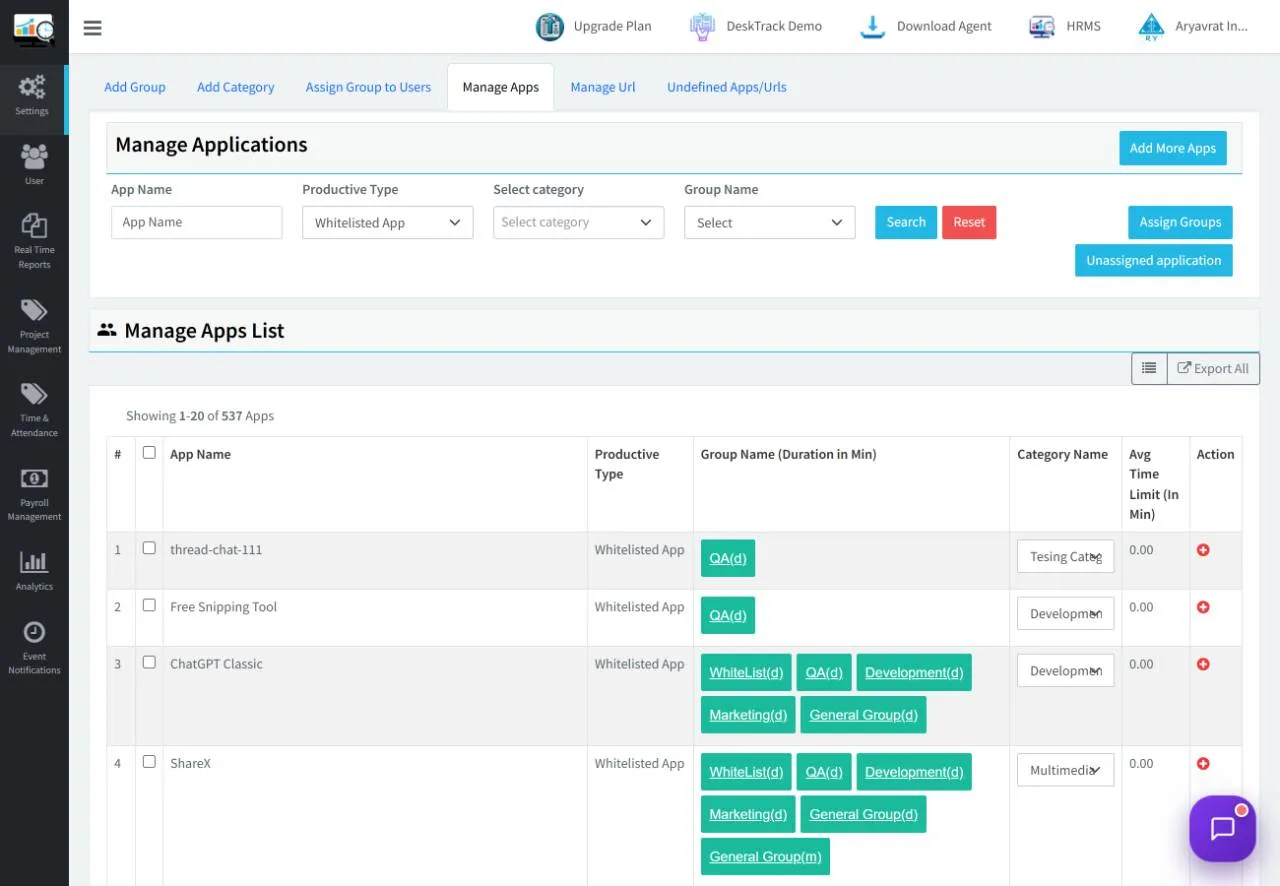
Illustrative example of role rules. You decide the rules for your teams.
How do you track AI tool usage without reading prompts?
Your team already uses ChatGPT, Copilot, Gemini, Claude and AI coding tools, often on personal accounts. DeskTrack shows which AI tools each team uses and for how long, the same way it tracks any app or website. It never reads what people type into them.
-
Adoption by team: who uses AI tools, how often, how long
-
Approved vs unapproved: mark tools by role; flag the rest
-
Never: prompt capture, chat transcripts or screen recording
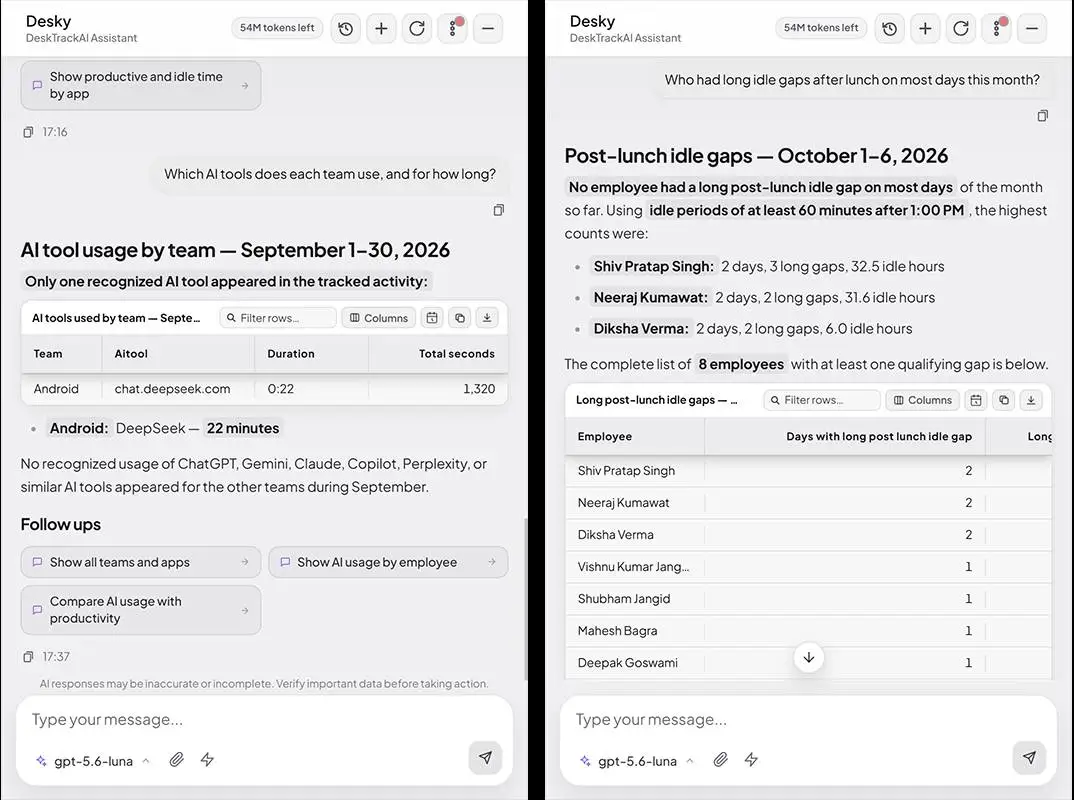
Ask your app data a question in plain words
No filters to learn. Type the question, get the table and the summary. Save the questions you like and schedule them, so the answer reaches you every Monday without asking again.
How do you track employee app usage in
4 steps?
Sign up and install
Start in under 5 minutes. Larger rollouts use an MSI package pushed through your IT tools and Active Directory.
Set rules by role
Start from the Role-wise App Rulebook, then adjust each department's productive apps and sites.
Tell your team
Share the policy. Employees see their own app data, which keeps the rollout calm.
Read, ask, act
Review the reports or ask Desky. Schedule a weekly summary.
What happens after
you sign up?
Install the agent. Setup help on WhatsApp if you want it.
Your first app and website report is ready.
Teams of 10+ get an App & AI Tool Audit call on their own data.
Choose a plan or stop. No card was taken, so nothing is charged.
Use app data before you renew a tool
Before a renewal, check how many people opened the tool in the last 30 days and how long they used it. Reach plus time is better evidence than a guess.
What DeskTrack never does
Evidence for a conversation, not a verdict on a person
An app report shows how tracked work time was used. It does not measure a person's worth or effort, directly measure business output, or replace a manager's judgment.
Use it to spot a pattern, then ask about it.
₹99/user/month + GST in India. App and website tracking comes with attendance and productivity reports in one tool.
Windows, macOS and Linux work computers
Self sign-up in under 5 minutes, or MSI rollout with Active Directory for larger teams. iOS and Android apps handle GPS attendance, not app tracking.
Built for Every Team
Remote, Hybrid, Enterprise & SMB
From startups in Jaipur to enterprises in New York, DeskTrack's application tracking software adapts to how your organization works.


Meet Our Expert

Rashmi Singh is the founder of the company, CEO, and lead Product Manager at DeskTrack as well as TitaPro. With a long-running career that spans nearly 30 years, Rashmi is now a pioneering software developer during the "pre-Google" period at an internationally leading company in time monitoring, employee tracking, and operational efficiency.
Her path is outlined by a single goal: helping businesses and individuals achieve a better work life balance by freeing themselves from the responsibilities of a constantly connected world.
Read Founder StoryTrusted Across USA, India & Global Teams
How businesses use DeskTrack's employee application usage tracking software to save money, improve productivity, and stay compliant.
Frequently Asked Questions
From $1.99 per user per month, or ₹99 + GST in India.
Free trial, no credit card required.
See all plans →Stop guessing where the workday goes
See which apps, websites and AI tools each role uses, starting with your first working day.
No credit card · 15-day free trial · From $1.99/user/month · ₹99 + GST in India