










Ask Desky: AI Workforce Analytics From Your DeskTrack Data
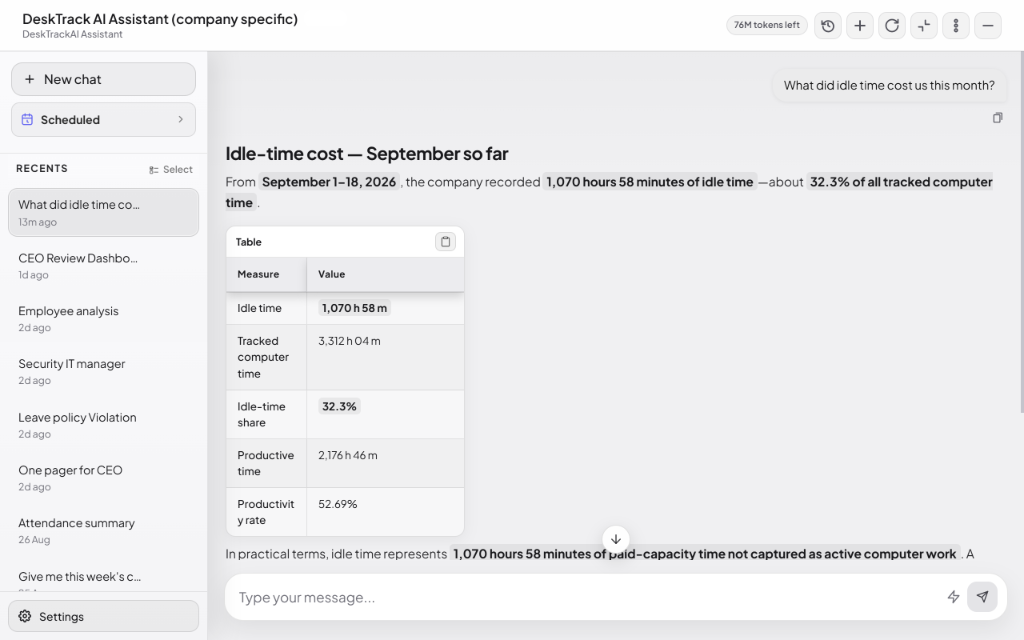
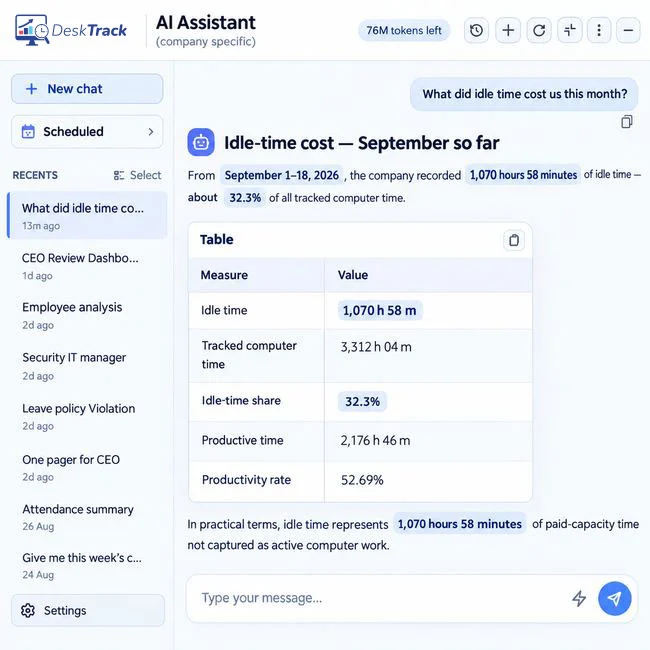
Desky is DeskTrack's built-in AI workforce agent. You ask questions in plain English, and Desky answers from your team's tracked attendance, computer activity, calls and field location, compares results with industry benchmarks, and sends scheduled reports by email or WhatsApp. It does not rate employees or make decisions about them.
Built for CEOs and CXOs who don't have time to open dashboards. Schedule any report daily, weekly, monthly or yearly, and Desky delivers it to your email or WhatsApp at the time you choose. No one has to prepare it, chase it or send it.
 G2
G2
 Capterra
 Trustpilot
 SSuggest
Companies registered
Users
Countries
desktop agents, plus iOS and Android
Clients in the US, India, UAE, Qatar, UK and Bangladesh
Trusted by 8K+ Companies Worldwide with DeskTrack







Every review meeting, the same four things go wrong
If you run a team, you know this cycle. The data already exists in your system. Getting the answer out of it is what takes the week.
You chase managers and HR for numbers
One message for attendance, another for productivity, another for field visits.
The numbers arrive late, or wrong
Different sheets, different filters, different totals. You spend the meeting checking the data instead of deciding.
The meeting gets moved, again
Everyone's calendar is full, so the review slips to next week, then the week after.
The “export and paste into AI” habit dies
Exporting reports into an AI chat works once. Doing it every week, while travelling or busy, does not.
You don't have a time problem. You have a visibility problem.
The real question is simple: are you getting enough output from what you spend on people? Desky connects that question to your actual workforce data.
What did lost productive time cost us this month?
Who is overloaded, and where do we have spare capacity?
Where is paid time going: work, idle, breaks or meetings?
Which teams are below target, and is it getting better?
Built by a CEO who was tired of waiting for answers
We built Desky because leadership teams shouldn't have to open several dashboards, export reports and wait for someone to explain what happened. Our founder did exactly that before every meeting, until the habit broke under travel and busy weeks. The data already existed. Desky makes it easy to ask the question, and sends the answer on schedule.
“I didn't want another dashboard. I wanted the answer to arrive before the meeting, without me remembering to ask.”
A conversational AI agent that works on your team's real data
Not a chatbot on top of reports. Desky reads your DeskTrack data, does the analysis and comes back with an answer you can act on.
Ask in plain English
No filters, no report builder. Type the question the way you would ask your HR head.
Compared with industry benchmarks
Answers show where your team stands against custom industry benchmarks, not just against last week.
Scheduled answers
Run any report daily, weekly, monthly or yearly. It reaches your email or WhatsApp before the meeting, without you remembering to ask.
Saved prompts
Save a prompt once and run it again in one click. No retyping, and no back and forth to get the same answer next week.
Suggested prompts for your team
Managers start from your proven questions and build on them, so everyone asks the right things.
Project summaries, automatically
Desky summarises tracked activity into project work: who worked on what, and for how long.
What can I ask Desky?
You can ask Desky about productivity, attendance, activity, projects and team capacity in plain English. Start from these prompts or write your own; each one can run on a schedule.
CEO and founders
HR
Team leads
Sales and field heads
Reports make you look. Desky gives you the answer.
A general chatbot knows the internet. Desky knows your team.
Desky doesn't guess what happened. It answers only from your company's DeskTrack data: attendance, activity, calls, meetings and field time.
DeskTrack captures the work. Desky explains it. TitaPro helps you act on it.
Data, then insight, then a decision. Desky works on DeskTrack data alone. With TitaPro, its answers become tasks, timesheets and billing.
A week of tracked activity
Apps, documents, calls and meetings for your Design team.
“Summarise this week by project”
[Project A] [X] h · [Project B] [X] h · [X] h not linked to any project.
Act on it
Tag the unlinked hours to clients and bill them, or plan next week's capacity.
From install to your first answer
Install DeskTrack
Self-register and start tracking in under 5 minutes. Larger teams push the MSI package with Active Directory.
Data comes in
Computer activity, attendance, biometric punches, calls, meetings and field location flow into one timeline. Answers get richer as days and weeks of data build up.
Ask or schedule
Type a question or pick a suggested prompt. Save it, or schedule it daily, weekly, monthly or yearly to your email or WhatsApp.
You decide
Desky gives you the answer and the context. Decisions about people stay with you.
One AI workforce agent. Office, remote, hybrid and field.
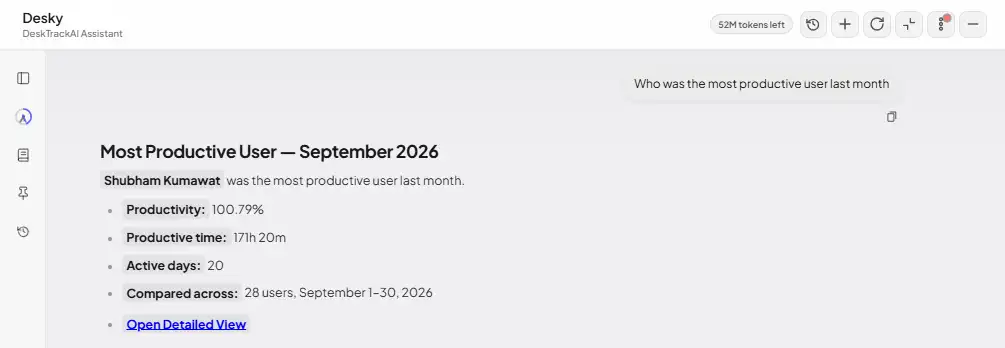
Most AI features only see one kind of data. Desky answers across everything DeskTrack records.
See all DeskTrack features →Computer activity
Apps, websites, idle time and focus sessions on Windows, Mac and Linux.
Attendance and biometrics
Logins, breaks and punches from any biometric machine.
Calls and meetings
Customer calls and meetings counted as productive time.
Field location
GPS punch-in and location time from the iOS and Android apps.
Productivity, the DeskTrack way
Productivity % = productive time ÷ scheduled office hours. Productive time includes role-defined apps, customer calls, meetings and field time. How productivity is measured →
Visibility without micromanagement
Your workforce data stays under your company's control, and your people can see what is tracked.
Your data stays yours
Desky answers only from your own company's DeskTrack data.
Humans stay in charge
Desky does not rate people or recommend action on an employee from activity data alone.
No hidden capture
DeskTrack never records video, turns on webcams, streams screens or opens file contents.
Employees see their own data
Each person can view their own tracked time and activity, so nothing is hidden from them.
Screenshots on your terms
Screenshot capture can be turned off. When on: 5-minute minimum interval, kept for one month, and only admins can download them.
Who sees what
Users see their own data. Managers see only their assigned teams. Admins see the organization. Desky respects your DeskTrack role-based access controls automatically.