Attendance management is not the same as watching the clock
An attendance management system is supposed to answer a simple business question: who was available to work, when were they scheduled to work, and what happened when the attendance record did not match the plan?
That sounds straightforward until a company has multiple shifts, remote employees, field staff, flexible schedules, overtime, leave approvals, different time zones, and payroll deadlines. At that point, spreadsheets and manual punch records start creating work of their own.
The better approach is to bring attendance, working hours, leave, schedules, and exceptions into one system. The important part is not collecting more employee data. It is collecting the right data and using it to fix real operational problems.
This guide explains how attendance management systems work, what they should measure, where they fit with employee time tracking and monitoring software, and how to introduce one without turning attendance management into a daily exercise in micromanagement.
| Quick answer An attendance management system automates employee clock-ins, clock-outs, schedules, leave, working hours, attendance exceptions, and reporting so HR and managers can spend less time reconciling records and more time managing the workforce. |
What is an attendance management system?
An attendance management system is software used to record and manage when employees start work, finish work, take breaks, miss scheduled time, request leave, or work outside normal hours. Depending on the product and the workplace, attendance can be captured through a desktop or web application, mobile punch-in, GPS, biometric devices, or integrations with HR and payroll systems.
The useful distinction is between an attendance record and a productivity record. Attendance tells you that an employee was available or present. Productivity data can add context about how work time was spent. One should not be treated as a substitute for the other.
Why companies move away from spreadsheets
- Manual attendance sheets are difficult to reconcile when schedules change.
- Late arrivals, early departures, overtime, and missed punches create follow-up work for HR.
- Remote and field employees may not have a practical office punch-in point.
- Payroll teams need clean, consistent attendance records before every pay cycle.
- Managers need a quick way to see attendance exceptions instead of checking several files.
- Different systems for attendance, leave, and working hours can create duplicate data entry.
No Credit Card Required
Are You Tracking Attendance or Actually Understanding Work?
Attendance tells you who was there. DeskTrack helps you understand where work time went. .
Benefits of an Attendance Management System
A well-configured attendance management system can provide several operational benefits.
1. Reduces Manual Attendance Work
Instead of collecting attendance information manually, businesses can automate clock-ins, clock-outs, working-hour calculations, and attendance reports.
2. Improves Attendance Accuracy
Automated attendance records can reduce common errors such as duplicate entries, missing records, incorrect calculations, and manual data-entry mistakes.
3. Simplifies Payroll Preparation
Attendance information can provide payroll teams with organized data about working hours, leave, overtime, and attendance exceptions.
Where integrations are available, attendance data can also be connected with payroll or HR systems.
4. Makes Attendance Exceptions Easier to Identify
Managers can quickly identify situations such as:
- Late arrivals
- Early departures
- Missing punches
- Unapproved absences
- Excessive overtime
- Schedule mismatches
This allows HR teams to investigate exceptions instead of manually reviewing every attendance record.
5. Supports Remote and Field Employees
Employees who do not work from a fixed office may need different attendance methods.
Mobile, web, GPS, or location-based attendance options can help businesses manage distributed teams where appropriate.
6. Improves Workforce Planning
Attendance reports can help managers understand patterns in absence, overtime, shift coverage, and employee availability.
These insights can support better staffing and scheduling decisions.
7. Creates Centralized Attendance Records
Instead of keeping separate spreadsheets or files for different teams, businesses can maintain attendance information in a centralized platform.
How an attendance management system works
Most systems follow the same basic flow:
- Set up employees, teams, locations, shifts, working hours, and attendance rules.
- Capture a clock-in or attendance event through the chosen method.
- Record clock-out, breaks, overtime, leave, or other exceptions.
- Compare actual attendance with the employee’s schedule or policy.
- Create reports for HR, managers, finance, and payroll.
- Use the patterns to correct scheduling, staffing, or process problems.
The main ways employees can clock in
| Method | Works well for | Watch-outs |
| Web or desktop | Office, hybrid, and knowledge-work teams | Device or browser policies need to be clear |
| Mobile | Remote and field employees | Location and device permissions need careful handling |
| Biometric | Fixed workplaces and shift-based operations | Hardware, enrollment, and fallback procedures matter |
| GPS / geofencing | Field teams and distributed sites | Use only where location visibility is justified |
| HR/payroll integrations | Organizations with established HR systems | Data mapping and exception handling need testing |
Attendance data that actually helps managers
A long report is not automatically a useful report. The best attendance dashboard brings the few signals that require a decision to the front.
| Metric | What it means | Why it matters |
| Scheduled hours | What the employee was expected to work. | Shows the baseline. |
| Actual working time | Time recorded between relevant attendance events. | Helps identify gaps between plan and reality. |
| Late arrivals | Instances where the employee starts after the expected time. | Useful when repeated patterns affect coverage. |
| Early departures | Instances where the employee leaves before the scheduled end. | Useful for staffing and policy follow-up. |
| Absence | Scheduled work that was not attended. | Helps HR manage recurring attendance issues. |
| Leave | Approved or pending time away. | Connects attendance with workforce planning. |
| Overtime | Time worked beyond the normal schedule. | Useful for payroll, staffing, and workload review. |
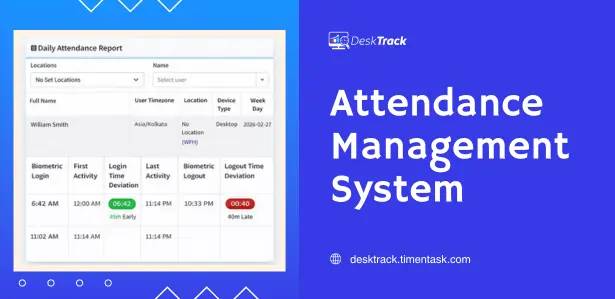
| Attendance exceptions | Missed punches, unusual records, or policy exceptions. | Gives HR a manageable review queue. |
Attendance is not productivity
This is one of the most important points in the whole subject. A person can be logged in for eight hours and still have a poor day. Another person may finish high-value work in six focused hours. An attendance management system should help you understand availability and schedule adherence. It should not become a shortcut for judging the quality of someone’s work.
This matters even more in hybrid teams. Harvard Business Review has discussed proximity bias—the tendency to favor employees who are physically closer to decision-makers. Its research summary cites a survey in which 42% of managers said they sometimes forget about remote employees when assigning work, while 15% of employees reported being less productive when working remotely. Read the original HBR article:
Harvard Business Review: What Is Proximity Bias and How Can Managers Prevent It?
There is another trap: employees can start optimizing for visible activity rather than meaningful output. BambooHR’s 2024 survey found that 88% of remote workers and 79% of in-office workers reported taking actions to prove they were online and working. That is a good reminder that a green status indicator is not the same thing as productive work.
| Manager rule of thumb Use attendance data to manage availability, coverage, schedules, and exceptions. Use output, quality, deadlines, customer results, and role-specific goals to evaluate performance. |
What DeskTrack adds to attendance management?
DeskTrack combines attendance and time data with activity context. Its public product information describes automated login/logout tracking, biometric integration, working and idle hours, leave management, GPS visibility for field teams, application and website activity, and reporting that can be exported for payroll workflows.
That broader view is useful when an attendance question needs context. For example, a manager may see a late login and need to know whether it was an isolated exception, a recurring shift problem, or part of a wider scheduling issue. The goal should be to investigate patterns, not to stare at individual screens all day.
A Real DeskTrack Customer Note
| Customer feedback published by DeskTrack “It helps us to track time, attendance, productivity of the employees in this online work from home scenario.” — Nupur S., Education Management |
How to measure attendance without creating a micromanagement culture
- Start with a written attendance policy. Employees should know what is collected and why.
- Separate attendance rules from performance evaluation. Being online is not the same as producing quality work.
- Review repeated patterns instead of reacting to one unusual day.
- Give employees a way to explain exceptions before managers make conclusions.
- Limit access to attendance and activity data to people who need it.
- Set retention rules before collecting data, rather than keeping everything forever.
- Review whether every tracking feature is necessary for the role and business purpose.
How to choose an attendance management system
Before buying, make the vendor answer these questions in a real demo:
- How does the system handle missed punches and corrections?
- Can it support multiple shifts, locations, and time zones?
- Can employees clock in from mobile devices when they work in the field?
- Does it integrate with biometric devices or the HR/payroll systems you already use?
- Can managers see attendance exceptions without exposing unnecessary employee activity?
- How are permissions controlled?
- How long is attendance data retained?
- Can reports be exported in the format payroll actually needs?
- What happens when an employee has no internet connection?
- Can you separate attendance tracking from more detailed employee monitoring?
Attendance management system vs. time tracking software
| Need | Attendance system | Time tracking software |
| Presence / absence | Core function | Usually supported |
| Clock-in / clock-out | Core function | Core function |
| Shifts and schedules | Usually strong | Varies by product |
| Project/task time | Sometimes | Usually strong |
| Application / website activity | Usually separate or advan ced | May be included |
| Payroll attendance | Common | Varies |
Attendance management system vs. employee monitoring software
Attendance software answers when someone was scheduled and present. Employee monitoring software can go further into activity, application usage, websites, idle time, screenshots, or other work signals. That additional visibility can be useful in specific roles, but it also creates a higher responsibility around transparency, access, security, and proportionality.
If attendance is the actual business problem, start there. Do not buy a more intrusive system simply because it produces more data.
Common attendance management mistakes
- Tracking everything because the software can – More data does not automatically mean better management.
- Treating attendance as a productivity score – Presence is one input, not a complete performance assessment.
- Ignoring exceptions – A missed punch may be a device issue, schedule change, or legitimate business reason.
- Using one rule for every role – A warehouse shift, software engineer, salesperson, and field technician may need different attendance workflows.
- Keeping data forever – Define retention and access rules before rollout.
- Skipping employee communication – People should understand what is being tracked and what managers will do with it.
How to roll out an attendance system in 30 days
- Days 1–5: document attendance rules, shifts, locations, leave policies, and payroll requirements.
- Days 6–10: configure the system and test clock-in, clock-out, exceptions, approvals, and reporting.
- Days 11–15: run a small pilot with one team or location.
- Days 16–20: collect employee and manager feedback; fix confusing rules and reports.
- Days 21–25: train HR, managers, payroll, and employees.
- Days 26–30: go live, monitor exceptions, and schedule a 30-day review.
A practical manager dashboard
If a manager opens the dashboard at 9:15 a.m., they should not need to interpret twenty reports. A useful first screen might show:
- Who is scheduled today
- Who has clocked in
- Who is late or missing
- Who is on approved leave
- Which attendance exceptions need review
- Overtime or coverage issues that need attention
- A link to deeper activity data only when there is a legitimate reason to investigate
Security, privacy, and employee trust
Attendance records are workforce data. Treat them accordingly. Use role-based access, secure storage, controlled exports, and clear retention rules. If the system includes GPS, application usage, screenshots, or other monitoring features, the privacy conversation becomes more important.
Legal requirements vary by state, industry, workforce arrangement, and the type of data being collected. Before deploying detailed monitoring in the United States, have your employment counsel review the policy for the states and employee groups involved. This article is general information, not legal advice.
Conclusion
A good attendance management system should make attendance less complicated, not make employees feel watched every minute. The strongest setup gives HR clean records, gives managers a useful view of exceptions, gives payroll dependable data, and gives employees clear rules.
If your company is moving beyond spreadsheets, start with the attendance problem you actually need to solve. Then choose the smallest amount of technology and monitoring that gives you a reliable answer. For organizations that also need time tracking, application activity, productivity reporting, biometric integration, or field visibility, DeskTrack can bring those workflows together in one platform.
Frequently Asked Questions (FAQs)
Ans. It is software that records and manages employee presence, working hours, schedules, leave, overtime, and attendance exceptions. Ans. Software can automate attendance capture, exception handling, reporting, and integrations, reducing repetitive manual reconciliation. Ans. Yes, Depending on the product, remote employees can use web, desktop, or mobile attendance methods. GPS may also be available for field teams. Ans. Many systems can calculate or report overtime based on configured schedules and rules. Payroll teams should validate the final calculation against company policy. Ans. No, Attendance focuses on presence and scheduled work. Monitoring software can collect additional activity information. Ans. It can provide context, but it should not be the sole measure of performance. Output, quality, goals, deadlines, and role-specific results matter too. Ans. There is no single universal period for every company. Define retention based on business needs, applicable law, payroll requirements, and your privacy policy. Ans. Look at attendance accuracy, shift handling, exceptions, leave, integrations, permissions, reporting, mobile support, security, and ease of rollout.attendance-management-system