Many businesses struggle to understand where employee time actually goes. Some hours directly generate revenue, while others support operations but don’t bring immediate income.
This is where the concept of billable vs non-billable hours becomes essential.
Understanding the difference between billable vs non-billable hours helps companies track profitability, improve productivity, and make smarter workforce decisions. In this guide, we will explain what billable and non billable hours mean, examples, and how companies track them effectively.
What Are Billable and Non-Billable Hours?
Billable hours are the hours employees spend working directly on tasks that clients are charged for.
Non-billable hours are the hours spent on internal tasks that cannot be billed to clients but are necessary for business operations.
For example:
Billable Work
- Client project development
- Consulting sessions
- Client meetings
- Paid support services
Non-Billable Work
- Internal meetings
- Employee training
- Administrative work
- Marketing activities
Understanding what does non billable mean and how it differs from billable work helps organizations measure real productivity.
This ensures a balance between accountability and privacy.
Billable vs Non Billable Hours: Key Difference
| Factor | Billable Hours | Non-Billable Hours |
| Revenue Impact | Directly generates revenue | Does not directly generate revenue |
| Client Billing | Charged to client invoices | Not charged to clients |
| Examples | Development work, consulting, design | Meetings, training, HR work |
| Profitability | Improves company revenue | Supports operations |
Knowing the difference between billable vs non-billable employees work helps companies understand which activities contribute to revenue.
What Are Non Billable Hours?
Non billable hours refer to the time employees spend on tasks that support the organization but cannot be billed to a client.
Common non billable hours examples include:
- Internal team meetings
- Proposal writing
- Administrative tasks
- Employee training
- Recruitment interviews
- Marketing and content creation
Although these activities do not directly generate revenue, they are still critical for company growth.
What Is Billable and Non Billable in a Timesheet?
In a timesheet, employees record the hours they spend on different tasks.
A typical timesheet classification includes:
Billable Entries
- Client project work
- Client consultation
- Technical implementation
- Paid support
Non-Billable Entries
- Internal meetings
- Training sessions
- Documentation
- Business development
Tracking billable vs non-billable hours in timesheets helps managers measure project profitability and workforce efficiency.
This ensures a balance between accountability and privacy.
Generate Accurate Timesheets ➡
Examples of Billable vs Non Billable Work
Here are some real-world examples to clarify the concept.
Billable Work Examples
- A software developer building features for a client project
- A lawyer preparing legal documents for a client
- A consultant advising a business strategy
- A designer creating a website for a customer
Non-Bllable Work Examples
- Team meetings
- Company training sessions
- Marketing campaigns
- Writing project proposals
- Administrative paperwork
These examples help organizations manage billable and non billable tasks more effectively.
Billable and Non Billable Employees
In some organizations, employees are categorized based on their contribution to revenue.
Billable Employees
- Consultants
- Developers
- Designers
- Accountants
- Lawyers
These roles typically spend most of their time on client projects.
Non-Billable Employees
- HR professionals
- Marketing teams
- Administrative staff
- Internal IT support
While they do not generate direct revenue, they support the entire organization.
Why Tracking Billable Hours Is Important
Tracking billable hours helps organizations understand how employee time contributes to business revenue. For service-based businesses such as IT companies, consulting firms, marketing agencies, and freelancers, monitoring billable time improves financial transparency and operational efficiency. When companies track billable hours accurately, they can make better decisions about pricing, project management, and workforce productivity.
Below are some key reasons why tracking billable hours is important.
1. Improve Profitability
Tracking billable hours helps businesses understand how much revenue each employee, team, or project generates. It allows managers to identify whether a project is profitable or consuming more resources than expected. By monitoring billable time, organizations can adjust pricing strategies, optimize workflows, and maintain better profit margins.
2. Optimize Resource Allocation
When businesses track billable hours, managers gain visibility into how employees spend their work time. This helps assign the right people to the right projects and ensures that employees focus more on high-value client work instead of unnecessary tasks.
3. Increase Productivity
Billable hour tracking helps identify inefficiencies in workflows and highlights tasks that consume excessive time. With clear time data, organizations can improve processes, encourage better time management, and ensure employees prioritize important tasks.
4. Ensure Accurate Client Billing
Tracking billable hours ensures clients are billed fairly based on the actual work delivered. Accurate time records prevent overbilling or underbilling and help maintain transparency and trust in client relationships.
How Do Companies Track Billable Hours?
Most organizations use billable hours software or billable time trackers to monitor work activity.
A billable hours tracker allows businesses to:
- Track project time automatically
- Monitor employee productivity
- Generate timesheets and reports
- Analyze billable vs non billable work
- Improve project planning
These tools help teams maintain accurate records of working hours.
How to Track Billable vs Non-Billable Hours Effectively
Tracking billable and non-billable hours accurately is essential for improving productivity, ensuring fair client billing, and maintaining operational efficiency. When businesses implement structured tracking methods, they gain better visibility into how employees spend their work hours and which tasks contribute directly to revenue.
Below are some effective ways organizations can track billable and non-billable time.
1. Use Time Tracking Software
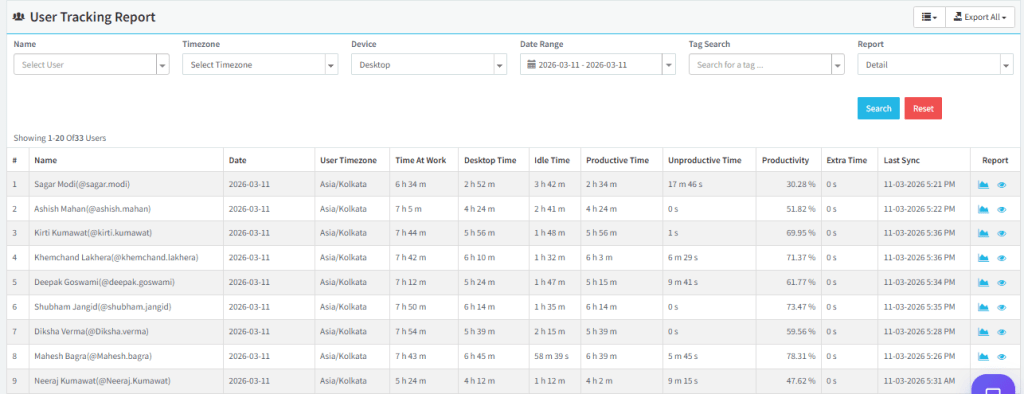
Using time tracking software is one of the most efficient ways to monitor billable and non-billable hours. These tools automatically record employee work activity, track time spent on tasks, and categorize work based on projects or activities. Automated tracking reduces manual errors and provides accurate insights into how work hours are distributed.
According to productivity research published by Harvard Business Review, time tracking improves workflow visibility.
2. Create Clear Task Categories
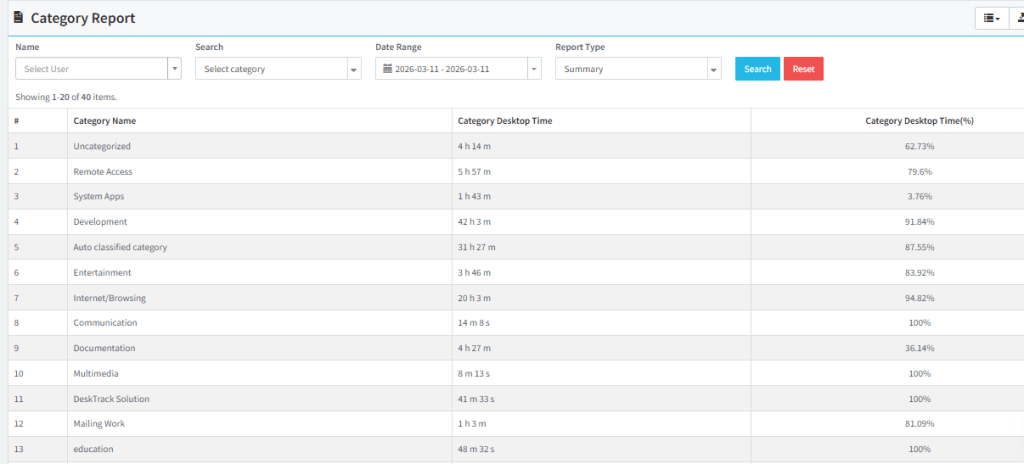
Organizations should clearly define which tasks are considered billable and which fall under non-billable activities. By creating clear categories for different types of work, employees can easily log their time correctly. This also helps managers analyze how much time is spent on client work compared to internal operations.
3. Use Detailed Timesheets
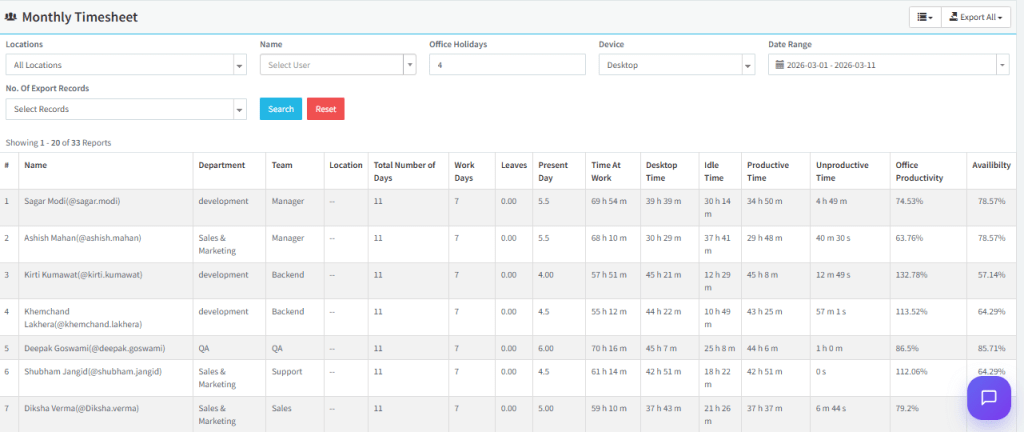
Maintaining detailed timesheets allows employees to record the exact time spent on different tasks throughout the day. Daily time entries improve accuracy and ensure that no billable work is missed. Well-maintained timesheets also make it easier to review project progress and track employee contributions.
4. Monitor Productivity Metrics
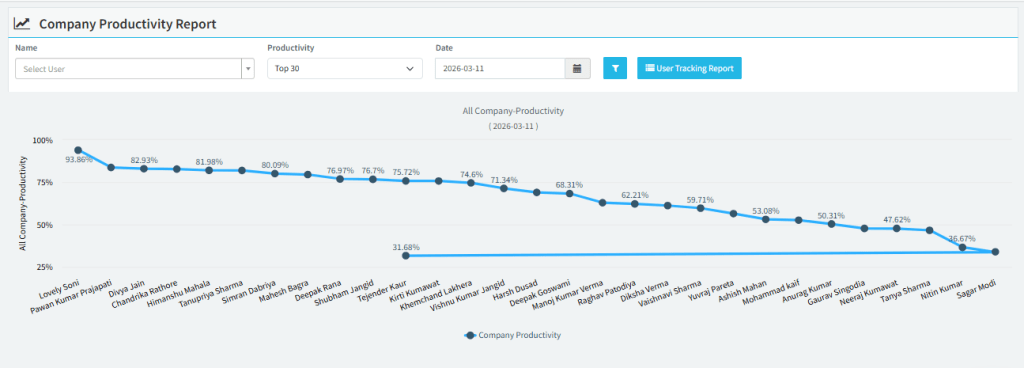
Tracking productivity metrics such as project time, idle time, and task completion rates helps organizations evaluate work efficiency. These insights allow managers to identify workflow bottlenecks, reduce unnecessary delays, and ensure employees focus more on high-value activities.
5. Generate Performance Reports
Regular performance reports provide a clear overview of employee productivity and project profitability. By analyzing these reports, managers can identify trends, evaluate team performance, and make better decisions about resource allocation and project planning.
How to Reduce Non Billable Hours
While non billable tasks are necessary, reducing unnecessary time can improve productivity.
Automate Repetitive Tasks
Automation tools reduce administrative workload.
Improve Time Management
Applying effective time management techniques helps teams focus on priority work.
Use Productivity Tools
Companies can use employee productivity tracking systems to monitor task efficiency.
Track Working Hours Properly
Organizations should track working hours with reliable monitoring tools to understand how time is spent.
Best Tools for Tracking Billable Hours
Businesses often rely on time tracking software and employee monitoring tools like Desktrack to manage billable work.
These tools provide:
- Automatic activity tracking
- Productivity analytics
- Accurate timesheets
- Project-wise billing reports
Using the best employee monitoring software helps businesses improve workforce efficiency while maintaining transparency.
Final Thoughts
Understanding billable vs non billable hours is essential for businesses that want to maximize productivity and profitability.
By clearly identifying billable work, tracking non billable hours, and using billable hours tracking software, companies can gain deeper insights into employee productivity and project performance.
When businesses track time effectively, they not only improve profitability but also create better workflows and smarter resource management.
This ensures a balance between accountability and privacy.
Frequently Asked Questions (FAQs)
Ans. Non billable refers to work hours that cannot be charged to a client but are necessary for internal operations, such as meetings, training, and administrative tasks. Ans. Non billable hours are the time employees spend on tasks that support the company but do not directly generate revenue. Ans. In a timesheet, billable hours are recorded for client work, while non billable hours represent internal or operational activities. Ans. Companies typically use billable hours software or billable time trackers to monitor work activity, manage timesheets, and generate reports.billable-vs-non-billable-hours