If you’ve ever sent a client invoice and wondered, “Wait should I have charged for that discovery call?” or “Does research time count?” you’re not alone. Misunderstanding billable vs non-billable hours is one of the most expensive mistakes freelancers, consultants, and agencies make every year.
According to industry research, professionals lose an average of 30–40% of their workable hours to non-billable activities they never account for costing businesses thousands in lost revenue annually.
In this guide, you’ll learn exactly what billable and non-billable hours are, how to track them accurately using tools like DeskTrack, how to reduce time leakage, and how to finally get paid for the work you actually do.
What are Billable Hours?
Billable hours are the hours you directly charge to a client for work completed on their project. These are hours where your time creates measurable value that the client has agreed to pay for either by project, retainer, or hourly rate.
Common Billable Activities:
- Client project work design, development, writing, consulting
- Client-requested meetings and calls
- Revisions or edits approved by the client
- Research specifically required for a client deliverable
- Travel time (if pre-agreed in the contract)
- Reporting and updates submitted to the client
Billable Hours by Profession:
| Profession | Billable Examples | Typical Hourly Rate Range |
| Freelance Designer | Wireframing, mockups, revisions | $50–$150/hr |
| Software Consultant | Code development, architecture review | $80–$250/hr |
| Legal Professional | Case research, court time, client calls | $150–$500/hr |
| Marketing Agency | Campaign setup, content creation, reporting | $60–$200/hr |
| HR Consultant | Policy drafting, interviews, onboarding | $70–$180/hr |
What are Non-Billable Hours?
Non-billable hours are work hours that are necessary to run your business or project, but cannot be charged to a client. They’re real work but they don’t directly generate revenue. Left untracked, they silently erode your profitability.
Non-Billable Activities Checklist:
- Internal team meetings and planning sessions
- Business development and proposal writing
- Administrative tasks: invoicing, HR, onboarding
- Training, skill development, and certifications
- Fixing internal process issues not related to a client
- Marketing your own services or business
- Sales calls with prospects who don’t convert
- Time spent waiting for client feedback
Most professionals underestimate non-billable time by 2–3 hours per day. Over a year, that’s 500–750 hours of invisible work and revenue loss you can’t recover.
Billable vs Non-Billable Hours: Side-by-Side Comparison
| Activity | Billable? | Notes |
| Client Project Work | ✅ Yes | Core deliverable time |
| Client-requested revisions | ✅ Yes | Always document approval |
| Discovery/Onboarding Calls | ✅ Often | Include in contract terms |
| Research for client project | ✅ Yes (limited) | Cap hours in proposal |
| Internal team meetings | ❌ No | Operational overhead |
| Business proposals / pitches | ❌ No | Pre-sales cost |
| Admin & invoicing | ❌ No | Business operations |
| Travel time | ⚠️ Depends | Must be pre-agreed |
| Training / learning | ❌ Usually No | Self-investment |
| Waiting for client response | ❌ No | Unproductive wait time |
How DeskTrack Helps You Track Billable and Non-Billable Hours Automatically
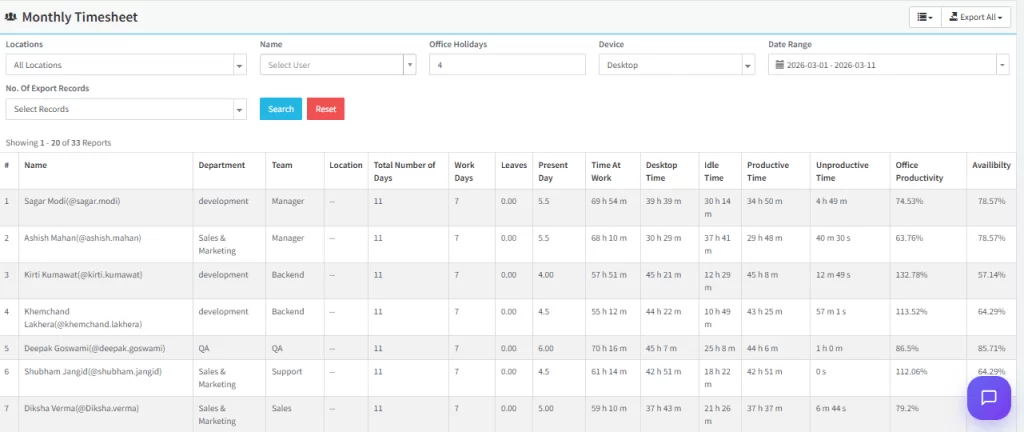
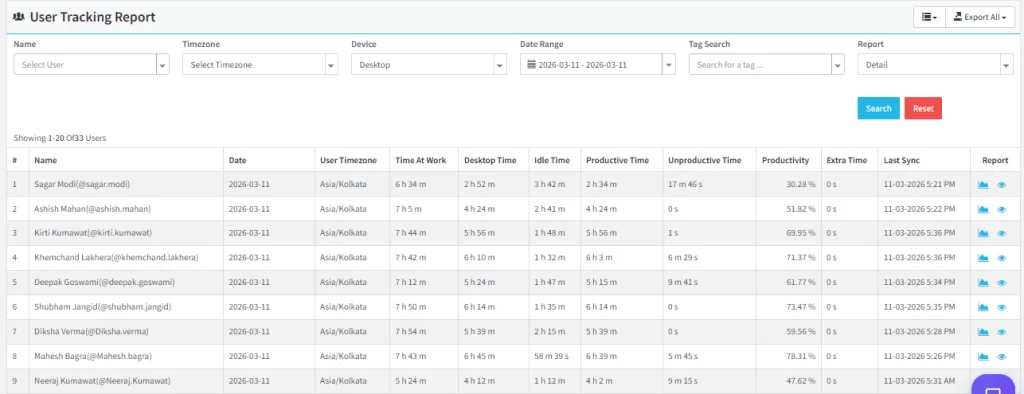
Manual timesheets are error-prone and time-consuming. DeskTrack’s automatic time tracking software eliminates guesswork and gives you a precise breakdown of every hour billable and non-billable without interrupting your workflow.
Key DeskTrack Features for Time Tracking:
- Automatic activity capture — tracks time spent per app, website, and project without manual input
- Project tagging — label tasks as billable or non-billable in real time
- Client-wise reports — generate accurate invoices based on verified tracked hours
- Idle time detection — automatically excludes AFK (away from keyboard) periods
- Screenshot monitoring — verifiable proof of work for client transparency
- Billable hours dashboard — visual breakdown of revenue-generating vs overhead time
- Integration with billing tools — export tracked hours directly to invoices
DeskTrack’s employee productivity tracking gives managers and freelancers a real-time view of how working hours are being utilized making it the most reliable way to track working hours without micromanagement.
Who Benefits Most from DeskTrack?
| Industry / Role | Business Size | DeskTrack Benefit |
| Freelancers / Consultants | Solo / 1–5 | Accurate client billing, no missed hours |
| Digital / Creative Agencies | 10–200 | Project profitability tracking per client |
| IT & Software Companies | 20–500 | Developer productivity + sprint billing |
| Legal & Accounting Firms | 5–100 | Client-hour compliance and audit trails |
| Remote-first Companies | Any size | Time zone-aware activity reports |
| BPO & Outsourcing Firms | 50–500+ | Attendance + billable hours for clients |
| HR & Staffing Agencies | 10–200 | Payroll accuracy + client invoicing |
How to Reduce Non-Billable Hours (5 Proven Strategies)
Turn tracked hours into higher profits
Monitor billable work, control non-billable activities, and ensure every project contributes to business growth.
Reducing non-billable time directly increases your effective hourly rate and business profitability without working more hours. Here’s how:
Strategy 1: Automate Administrative Tasks
Use tools like DeskTrack to auto-generate timesheets, invoicing integrations to eliminate manual data entry, and templates for proposals and contracts. Every hour saved on admin is an hour you can bill.
Strategy 2: Batch Your Non-Billable Work
Instead of breaking your flow throughout the day, batch all emails, internal meetings, and administrative tasks into dedicated time blocks ideally early morning or end of day. Protect your peak hours for billable client work.
Strategy 3: Set Clear Project Scope from Day One
Scope creep silently kills billable hours. When a client’s “quick fix” turns into three rounds of revisions, that unbounded time becomes non-billable. Always document scope, define revision limits, and charge for out-of-scope requests.
Strategy 4: Use Efficient Time Management Techniques
Implement proven time management techniques like time-blocking, the Pomodoro method, or deep work sprints. When you work in focused intervals, you produce more billable output in less time reducing the ratio of overhead hours.
Strategy 5: Track Everything Then Analyze
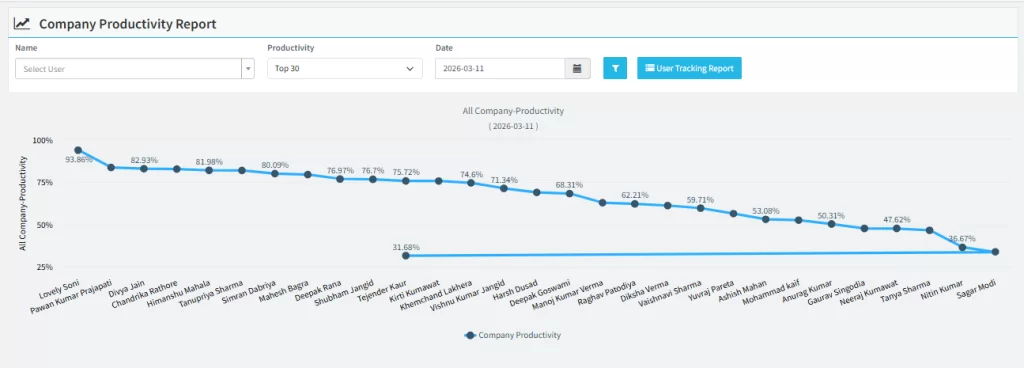
You can’t improve what you don’t measure. Use time tracking software like DeskTrack to generate weekly reports showing your billable-to-non-billable ratio. Identify your biggest time drains and systematically reduce them.
The Gray Areas: What Should You Actually Charge for?
Some activities sit in an ambiguous zone they feel billable, but clients may push back. Here’s how to handle the most common gray areas:
- Billable only if explicitly agreed in the contract. Always specify your travel rate (e.g., 50% of hourly rate) upfront.(Travel Time)
- Billable if it’s client-specific research. General skill-building is non-billable. Document research hours with deliverable links.(Research & Learning)
- Initial 30-minute calls are typically non-billable. Structured paid consultations (1+ hour) should always be billed.(Discovery Calls)
- Define revision limits in your proposal (e.g., “2 rounds of revisions included”). All additional rounds are billable.(Revision Rounds)
- Non-billable in most cases. Instead, protect yourself by setting response SLAs in your contract.Waiting Time:
- Billable it’s part of delivering quality work. Frame it as “quality assurance” in your invoices.(Internal QA & Testing)
Pro Tip: Use DeskTrack’s project tagging feature to mark gray-area tasks in real time. When a client questions an invoice, you’ll have timestamped, screenshot-verified proof.
Who is this Guide for?
If you charge by the hour or project, understanding billable vs non-billable hours directly impacts your take-home income. DeskTrack helps you build transparent, defensible invoices reducing client disputes.
Agency Owners & Project Managers
Agencies lose revenue when team members don’t log hours accurately. DeskTrack’s employee monitoring software gives you real-time visibility into every project’s billable efficiency so you can price better and scale confidently.
SMB Owners & HR Leaders (5–500 Employees)
When you’re managing teams across projects and clients, billing errors compound fast. DeskTrack automates timesheet collection, flags anomalies, and integrates with payroll saving hours of manual reconciliation every month.
Remote & Distributed Teams
For remote teams, visibility is everything. DeskTrack tracks working hours across time zones with automatic activity logs giving managers the confidence that billable commitments to clients are being met, without micromanaging staff.
Start Tracking Smarter with DeskTrack
The difference between a profitable business and one that constantly feels understaffed often comes down to time visibility. When you know exactly where your hours go, you can charge fairly, price accurately, and eliminate the hidden time drains costing you revenue.
DeskTrack is purpose-built for businesses that bill by time whether you’re a solo freelancer or managing a 200-person agency. With automatic tracking, real-time dashboards, and client-ready reports, it’s the most trusted time tracking software for modern teams.
Conclusion
Every hour you work has value but only tracked, documented billable hours turn into revenue. The businesses that thrive are the ones that close the gap between time spent and time charged.
Whether you’re a freelancer trying to invoice with confidence, an agency scaling its team, or an HR leader managing workforce costs understanding billable vs non-billable hours is the foundation of sustainable growth.
DeskTrack gives you the tools to track working hours automatically, reduce non-billable overhead, and build a business where every hour counts. Start your free trial today and see the difference 30 days of accurate time tracking makes.
Frequently Asked Questions (FAQ)
Ans. Billable hours are client work you can invoice. Non-billable hours are internal or unpaid tasks that support the business but aren’t charged to a client. Ans. Client meetings related to the project are usually billable. Internal team meetings, planning, and sales calls are non-billable. Ans. Divide billable hours by total working hours and multiply by 100. For example, 30 billable hours out of 40 is 75%. Ans. Many service businesses aim for 30–32 billable hours in a 40-hour week, though the ideal target varies by role and industry. Ans. Yes, Automation, shorter meetings, templates, and clear project scopes all reduce non-billable time without hurting quality. Ans. It shows the true cost of running the business, helps set correct rates, and reveals productivity gaps.billable-vs-non-billable-hours