Time is the most finite resource in any business and most organizations are spending it without knowing exactly where it goes. Whether you manage a remote software team, run a marketing agency, oversee a construction crew, or lead a hospital department, understanding how to track time spent on work is the first step to making smarter decisions, boosting productivity, and protecting your bottom line.
Yet despite its importance, time tracking remains one of the most inconsistently managed functions in the modern workplace. Teams rely on memory, manual spreadsheets, or loosely filled timesheets, leading to inaccurate payroll, inefficient payroll processing, missed billing opportunities, and projects that quietly go over budget. This guide walks through the practical, real-world steps businesses of all sizes can take to track time spent on work accurately, efficiently, and at scale.
What Does Time Tracking Mean at Work?
At its core, time tracking is the systematic recording of how employees spend their working hours broken down by tasks, projects, clients, or activities. But modern time tracking goes well beyond a simple clock-in/clock-out system.
Effective time tracking at work includes:
- Recording hours worked per day, week, or pay period
- Logging time against specific projects, clients, or cost centers
- Monitoring which applications and websites employees use during work hours
- Distinguishing productive time from idle or unproductive time
- Generating reports that help managers make data-driven decisions
For businesses serious about growth and efficiency, time tracking is not just an administrative task it is a performance intelligence system.
Why Businesses Need to Track Time Spent on Work
Organizations that do not track time spent on work are essentially flying blind. Here is what accurate time tracking delivers across teams and industries:
- Productivity Improvement: When employees know their time is being tracked, focus and accountability improve naturally. Managers can also identify workflow bottlenecks by analyzing where time is being lost.
- Project Profitability: By comparing estimated hours against actual time spent, businesses can determine whether projects are truly profitable and adjust their pricing or planning accordingly.
- Employee Accountability: Time tracking creates a transparent record of work activity, reducing disputes, improving fairness, and reinforcing a results-oriented culture.
- Accurate Payroll: Automated time logs eliminate payroll errors caused by manual records, particularly important for companies with hourly workers, contractors, or shift-based staff.
- Better Resource Allocation: Real-time visibility into who is working on what enables managers to redistribute workloads, prevent burnout, and align resources with business priorities.
Industry Insight
Organizations that effectively track employee productivity and work patterns are better positioned to improve operational efficiency and resource utilization. According to Forbes, businesses that implement structured employee tracking and monitoring practices gain a measurable advantage in workforce management and operational performance.
How to Track Time Spent on Work Effectively
Tracking time effectively is not just about logging hours it requires a structured approach. Follow these five steps to build a time tracking system that actually works.
Step 1: Define Work Categories
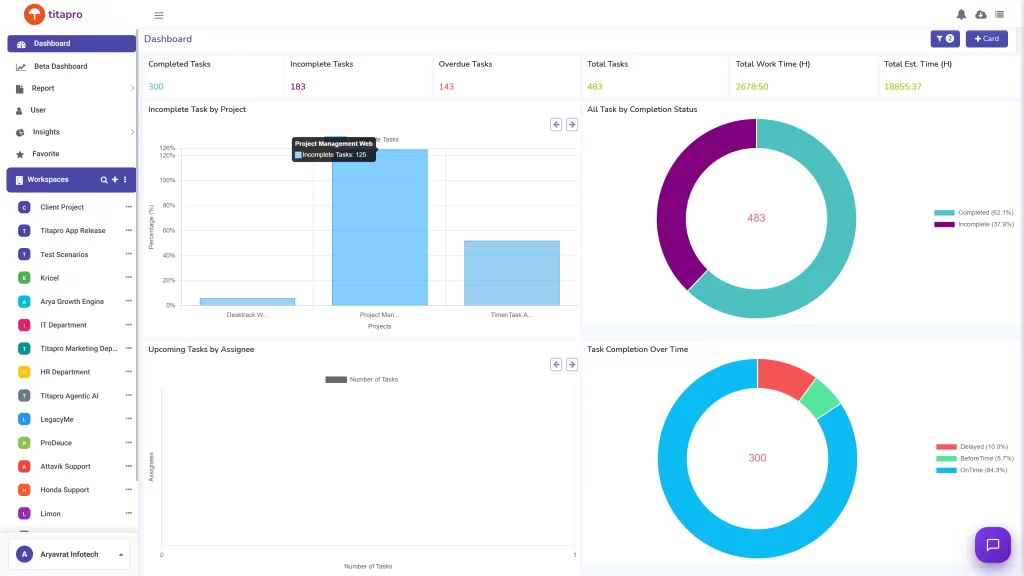
Before tracking can begin, businesses must establish a clear hierarchy of work categories. This typically includes projects, sub-projects, tasks, and activity types (e.g., development, meetings, client calls, admin). Well-defined categories ensure that time data is comparable, reportable, and actionable.
Step 2: Track Time Spent on Tasks
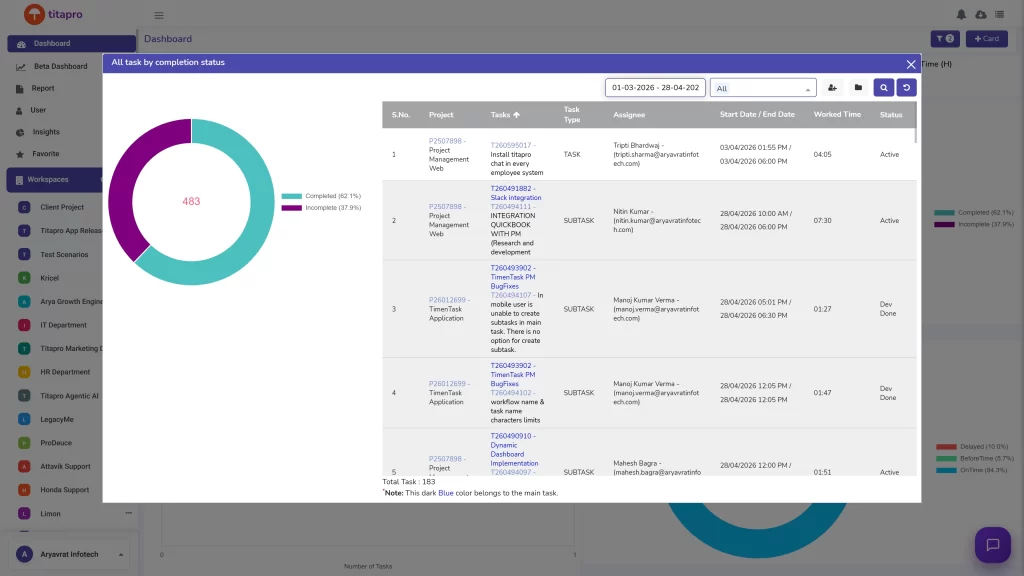
Employees should log time at the task level not just at the project level. Task-level tracking reveals which specific activities consume the most time, where delays occur, and how individual contributions roll up into overall project progress. With automated time tracking tools, this happens in the background without disrupting employee workflow.
Step 3: Monitor Application and Website Usage
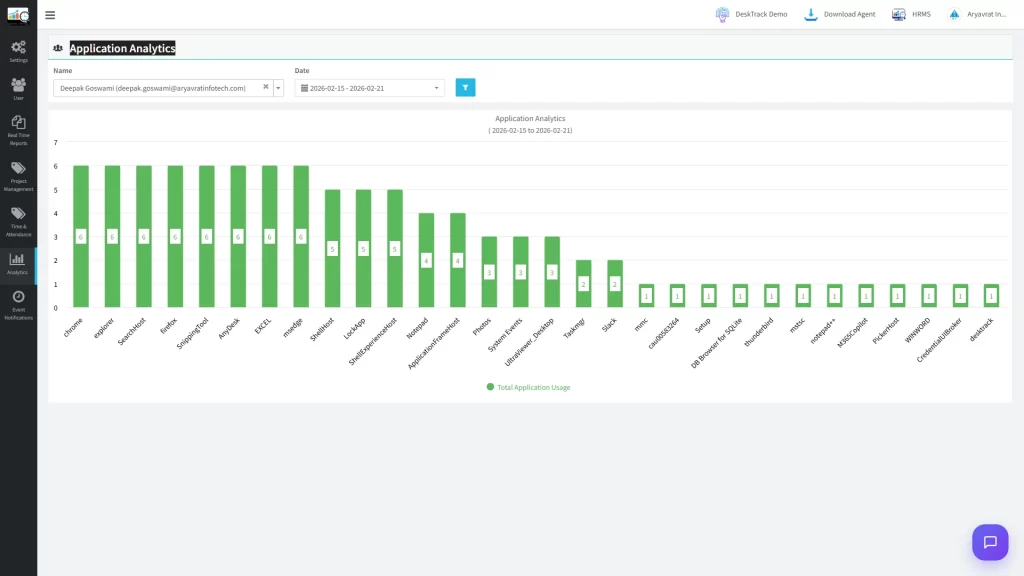
For knowledge workers and remote employees, application and URL tracking provides a deeper layer of insight. Time tracking software like DeskTrack automatically logs which applications are open and which websites are visited during work hours, giving managers an objective view of how digital work time is actually spent.
Step 4: Analyze Productive vs. Unproductive Time
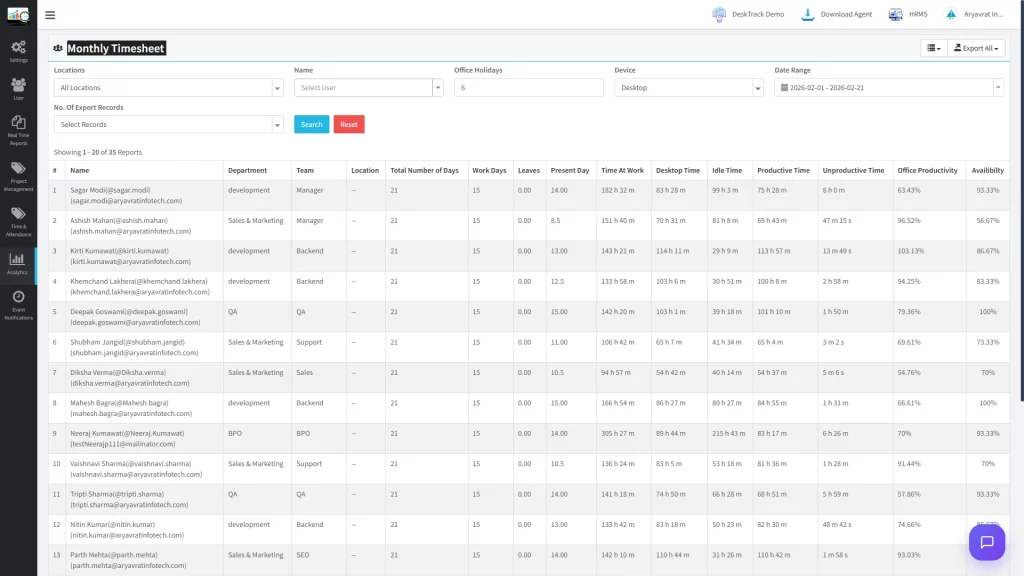
Not all logged hours are equally productive. Advanced time tracking software classifies activities as productive, neutral, or unproductive based on customizable rules. For example, time spent in project management tools or design software counts as productive, while time on entertainment sites is flagged. Reviewing this analysis weekly helps managers coach employees and teams improve their focus.
Step 5: Generate Reports for Better Decisions
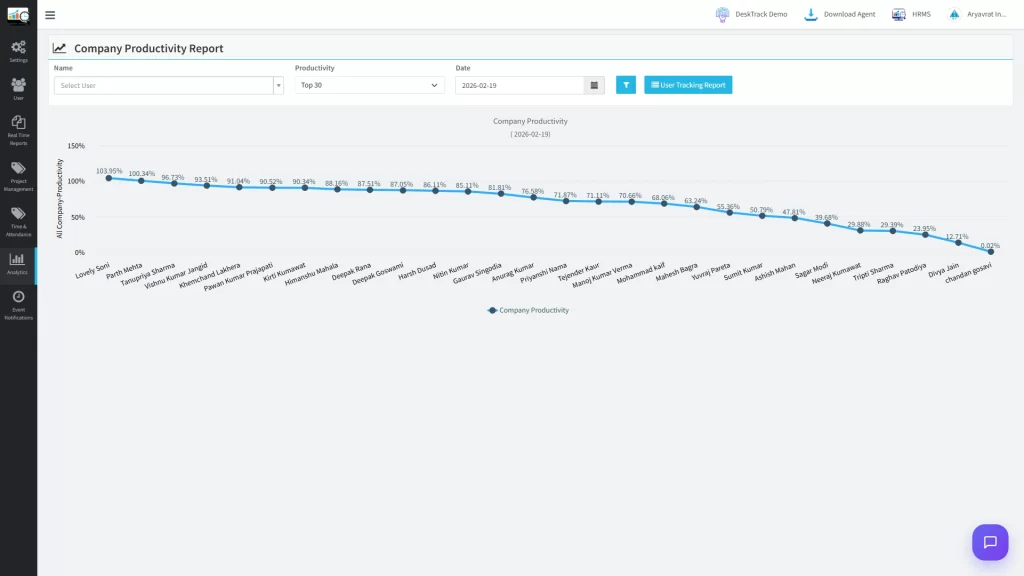
The real value of time tracking lies in its reporting. Consolidated reports on attendance, project time, productivity scores, productivity metrics, and application usage give business leaders the data they need to make confident decisions from staffing and project estimates to performance reviews and client billing.
Best Ways to Track Time Spent on Projects
Businesses have several options for how to track hours and project time. Each method has trade-offs in terms of accuracy, effort, and scalability.
| Method | Accuracy | Effort | Reporting | Scalability |
| Manual (pen & paper) | Low | High | None | Very Low |
| Timesheets (paper/Excel) | Low–Medium | High | Limited | Low |
| Spreadsheets (Google Sheets) | Medium | Medium | Manual | Low–Medium |
| Automated time tracking software | High | Low | Advanced | High |
Manual tracking and spreadsheets may work for very small teams, but they introduce human error, require constant upkeep, and break down completely at scale. Automated time tracking software is the best way to track time spent on projects for any business that values accuracy and efficiency.
Industry-Wise Benefits of Time Tracking
Time tracking is not a one-size-fits-all solution its benefits vary meaningfully by industry.
IT & Software Development
Development teams benefit enormously from granular time data. Sprint tracking becomes more accurate when actual task hours are logged rather than estimated. Billable hours are captured automatically, reducing revenue leakage in client-facing projects. Over time, historical time data improves project estimation, helping development managers quote projects more confidently and plan sprints more realistically.
Marketing Agencies
In an agency environment, every hour is billable or it should be. Time tracking enables campaign-level visibility into how team hours are allocated across clients, creative work, reporting, and account management. Accurate client billing eliminates under-charging and builds trust through transparent invoicing.
Construction Industry
Construction companies managing field crews and multiple job sites need precise workforce utilization data. Time tracking helps measure on-site productivity, allocate labor across projects, and identify idle time or scheduling inefficiencies. For contractors billing by labor hours, accurate time records are essential for client transparency and dispute resolution.
Healthcare Industry
Hospitals, clinics, and care facilities use time tracking to optimize staff scheduling and ensure compliance with labor regulations. Measuring how clinical and administrative staff spend their shifts helps identify operational inefficiencies, reduce overtime costs, and improve patient care quality through better resource planning.
Educational Institutions
Schools, universities, and training organizations use time tracking to monitor faculty productivity, track administrative workloads, and ensure resources are aligned with educational priorities. For institutions that bill by consulting or training hours, accurate time records also support revenue recognition and auditing requirements.
Common Time Tracking Mistakes to Avoid
Even well-intentioned time tracking initiatives fail when these common mistakes go unchecked:
- Tracking time after the fact: End-of-day or end-of-week time entry is notoriously inaccurate. Employees forget details, round hours, or simply skip entries. Real-time or automatic tracking eliminates this problem entirely.
- Using too broad a category system: If every task is logged under a single project, the data is useless for analysis. Define categories granularly enough to reveal patterns.
- Not training employees on the system: Adoption failure is the number one reason time tracking programs collapse. Employees need to understand why time tracking matters and how to use the tools correctly.
- Ignoring the data: Time tracking data that is collected but never reviewed or acted upon is wasted effort. Build a regular cadence of reporting and review into your management workflow.
- Treating tracking as surveillance rather than insight: If employees see time tracking as a punishment rather than a productivity tool, resistance will undermine the program. Frame it around outcomes and improvement, not monitoring.
Why Automated Time Tracking is Better than Manual Tracking
Manual time tracking was the only option for decades but today, automated solutions make it both unnecessary and inefficient. Here is why the best time tracking software consistently outperforms manual methods:
- Zero-effort logging: Automated employee monitoring software tracks time in the background, requiring no input from employees beyond logging in.
- Objective data: Application tracking and URL monitoring provide factual records of how computer time is spent, eliminating guesswork and disputes.
- Attendance management: Integrated attendance management software automatically records clock-in and clock-out times, reducing payroll errors and compliance risks.
- Productivity measurement: Employee productivity tracking software classifies activity as productive or unproductive, giving managers insight that manual timesheets can never provide.
- Performance visibility: Employee performance tracking becomes data-driven rather than subjective when backed by verified time and activity records.
For businesses managing distributed teams, hourly workers, or client-billing models, automated time tracking is not a luxury it is a competitive necessity.
How DeskTrack Helps Businesses Track Time Spent on Work
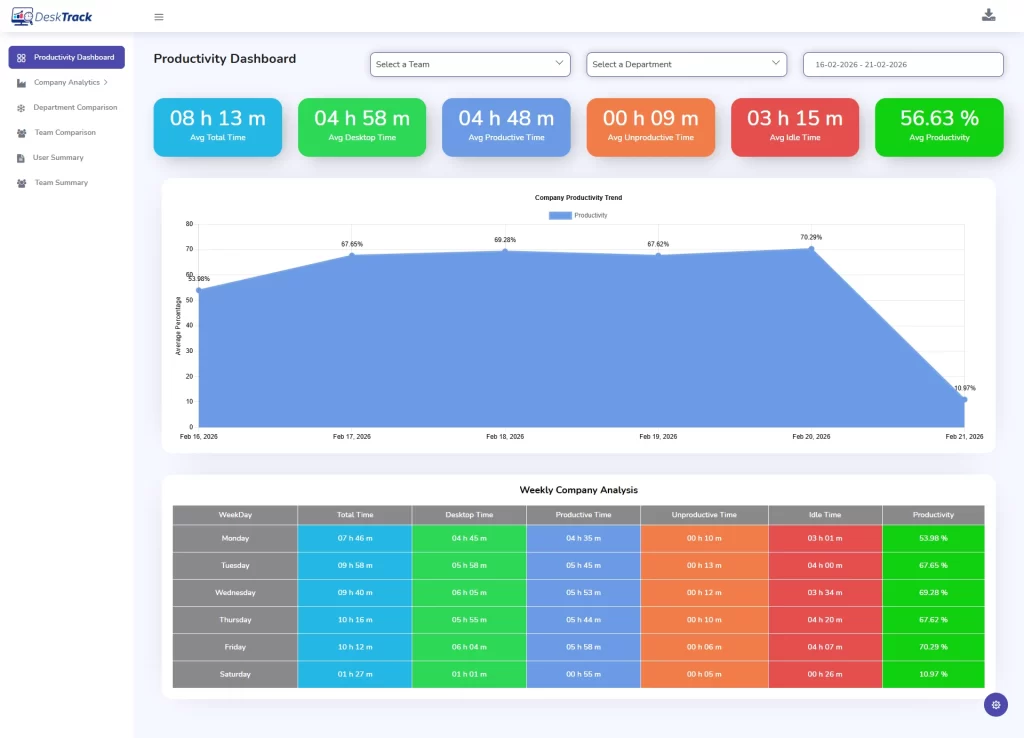
DeskTrack is a comprehensive automated time tracking and employee monitoring platform purpose-built for teams and businesses that need accurate, real-time visibility into how work time is spent. Here is how it supports every aspect of workforce time management:
- Automatic Time Tracking: DeskTrack silently records employee work hours from the moment they start working, eliminating manual entry and ensuring complete, accurate time records.
- Project Tracking: Assign time entries to projects, sub-projects, and tasks. Compare planned versus actual hours to keep projects on time and within budget.
- Attendance Tracking: Built-in attendance management records daily login and logout times, annual work hours calculation, and flags late arrivals, early departures, or absences automatically.
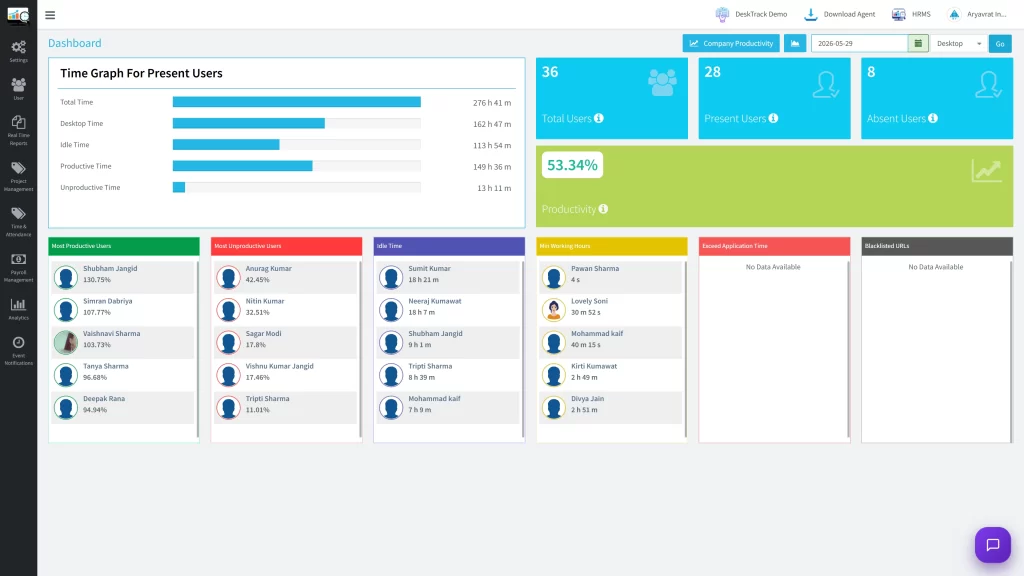
- Productivity Measurement: DeskTrack classifies all recorded activity as productive, neutral, or unproductive based on customizable rules, generating daily and weekly productivity scores for every employee.
- Application Tracking: Know exactly which applications employees are using and for how long from development tools and communication platforms to unrelated software.
- URL Tracking: Monitor website usage during work hours to identify distracting browsing patterns and ensure team focus during critical project phases.
- Reports & Analytics: From daily activity summaries to project-level profitability reports, DeskTrack’s analytics dashboard gives managers and business owners the intelligence to act confidently.
Whether you are a startup scaling your first remote team, a mid-sized agency managing multiple client accounts, or an enterprise optimizing workforce performance at scale, DeskTrack provides the time tracking infrastructure your business needs to grow smarter.
Conclusion
Understanding how to track time spent on work is one of the highest-leverage capabilities a business can develop. From improving team productivity and ensuring accurate payroll, to optimizing project profitability and building a culture of accountability the benefits are tangible, measurable, and achievable for businesses of any size.
The path forward is clear: move away from manual timesheets and spreadsheets, and invest in automated time tracking software that works in the background, delivers objective data, and scales as your team grows. Businesses that make this transition consistently report improvements in employee focus, project margins, and management confidence.
DeskTrack brings together automatic time tracking, project management, attendance, productivity analysis, and workforce analytics in a single platform giving your team and leadership the visibility they need to perform at their best. If you are ready to take control of how work time is spent in your organization, now is the time to start.
Frequently Asked Questions
Ans. The easiest way to track time automatically is with dedicated employee monitoring software like DeskTrack. Once installed, it runs in the background and logs all activity applications used, websites visited, time on tasks, and attendance without requiring employees to manually start or stop timers. This ensures complete and objective records without adding administrative burden to your team. Ans. The best way to track time spent on projects is through automated time tracking software that supports project hierarchies. Assign tasks to specific projects, log time automatically as employees work, and review project-level reports to monitor budget consumption, identify delays, and compare planned versus actual hours. Manual methods like spreadsheets are prone to errors and are not scalable beyond very small teams. Ans. Remote teams track working hours most effectively using cloud-based employee monitoring software. Tools like DeskTrack work across distributed teams regardless of location employees install the application on their work devices, and managers get centralized visibility into attendance, active hours, application usage, and productivity metrics from a single dashboard. Ans. Employee time tracking is important because it creates an objective record of how work hours are spent, supports accurate payroll and billing, drives accountability, and provides the data needed to improve team productivity. Without time tracking, businesses rely on estimates and memory both of which lead to costly errors in project management, client billing, and workforce planning. Ans. Time tracking software delivers measurable benefits across virtually every industry. IT and software development teams use it for sprint management and billable hour capture. Marketing agencies rely on it for client billing transparency. Construction companies use it for workforce utilization. Healthcare organizations use it for staff scheduling and compliance. Educational institutions use it to track faculty and administrative productivity. Any industry with project-based work, hourly billing, or distributed teams stands to gain significantly from automated time tracking.track-time-spent