I get asked about DeskTrack vs Toggl Track more often than almost any other comparison, usually by the same kind of caller: a founder or ops lead who started with Toggl Track three years ago because it was simple and free, and now has eighteen people on payroll and no real idea whether the hours logged match the hours worked. That gap between “time was logged” and “work actually happened” is the entire reason this comparison exists.
Both tools are legitimately good at what they were built for. Neither is a scam, a downgrade, or a red flag on a G2 page. But they were built to solve different problems, and picking the wrong one for your situation costs you months of switching later. Below is what I’ve learned running both with real teams, not a rewrite of either company’s features page.
Who this is for: business owners, HR managers, operations leads, agency owners, and remote team managers trying to decide whether to stick with Toggl Track, switch to DeskTrack, or realize halfway through reading that they actually need something in between.
Quick Comparison Table : DeskTrack vs Toggl Track
| Feature | DeskTrack | Toggl Track |
|---|---|---|
| Time Tracking | Automatic, background timer | Manual + automatic timer, user-controlled |
| Employee Monitoring | Yes, full activity monitoring | No, privacy-first by design |
| Screenshot Monitoring | Included, all plans | Not available on any plan |
| Productivity Tracking | Included (productivity reports, idle time) | Limited (time/revenue reports only) |
| Attendance Management | Included, all plans | Not available |
| URL Tracking | Included, uncapped | Tracks visited sites locally, not reported to admins by default |
| Application Tracking | Included | Limited desktop app usage only, Starter+ |
| Idle Time Detection | Included | Included (Free plan and up) |
| Reporting & Analytics | Team + individual productivity reports | Time, revenue, and profitability reports (Premium) |
| Project Management | Included, task/project-level tracking | Strong templates, budgets, fixed-fee tracking |
| Payroll Support | Built-in payroll & invoicing | Not built-in; exports to QuickBooks |
| Pricing | ~$5.99/user/month | Free (5 users) / $9–$18/user/month |
| Ease of Use | Straightforward, monitoring-first UI | Very clean, minimal, timer-first UI |
| Best For | Businesses needing oversight + attendance | Freelancers, agencies billing by the hour |
DeskTrack Overview
DeskTrack was built around a fairly blunt premise: most businesses don’t just want to know how long someone worked, they want to know what actually happened during those hours. So instead of stopping at a timer, DeskTrack layers on screenshot capture, app and URL tracking, idle-time detection, and less commonly bundled attendance and leave management, all under one login.
That last part matters more than it sounds like it should. A lot of monitoring tools hand you activity data and leave attendance, leave requests, and payroll to a separate HR system. DeskTrack folds those together, which is a real time-saver for small and mid-sized businesses that don’t want to run three subscriptions to answer one question: “is everyone actually working, present, and paid correctly?”
Best suited for: IT companies, agencies, remote-first teams, and any business that needs both productivity oversight and day-to-day attendance tracking without stitching together separate tools.
Toggl Track Overview
Toggl Track takes the opposite philosophy, and it’s worth taking that philosophy seriously rather than treating it as a missing feature. It tracks time cleanly, quickly, across desktop, mobile, and browser and deliberately stops short of anything that looks like monitoring. There’s no screenshot capture, no keystroke logging, and no admin dashboard showing which websites an employee visited. Toggl’s own positioning leans hard into this: employees control which tracked activity becomes a logged time entry, not the other way around.
Where Toggl Track earns its reputation is billing and project profitability. Its Project Management Software-adjacent features project templates, fixed-fee tracking, budget alerts, profitability reporting are genuinely strong once you’re on the Premium tier, and its 100+ integrations cover most of the tools agencies already use.
Best suited for: freelancers, consultants, and small teams whose core need is accurate, privacy-respecting time tracking tied to client billing not oversight of how the day was spent.
No Credit Card Required
Why Businesses Are Switching from
Toggl Track to DeskTrack?
Experience advanced employee monitoring, automated time tracking, detailed productivity reports, and complete workforce management.
DeskTrack vs Toggl Track: Detailed Feature Comparison
Time Tracking
Toggl Track’s timer is arguably the cleanest in the industry one click to start, one click to stop, with manual entry for anyone who forgets. DeskTrack’s tracking runs automatically in the background once installed, which removes the “did I forget to start the timer” problem entirely but gives employees less manual control over what gets logged. If your team is disciplined about starting timers and values that control, Toggl wins this round. If you’d rather remove the human step altogether, DeskTrack’s approach fits better.
Employee Monitoring
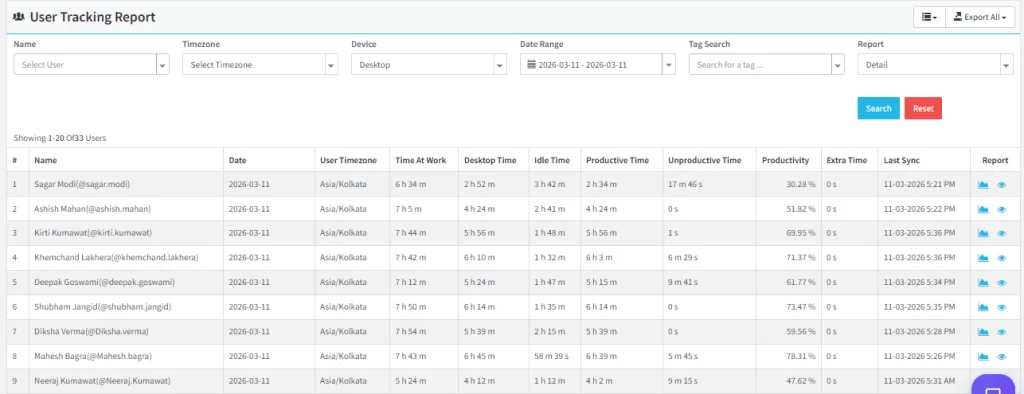
This is the category where the two tools genuinely aren’t competing for the same buyer. DeskTrack offers full Employee Monitoring Software activity levels, screen activity, app usage, and behavioral reporting. Toggl Track offers none of this, by design, and markets that absence as a feature rather than a gap. Neither approach is objectively correct; it depends entirely on whether your business needs oversight or trusts output alone.
Productivity Tracking
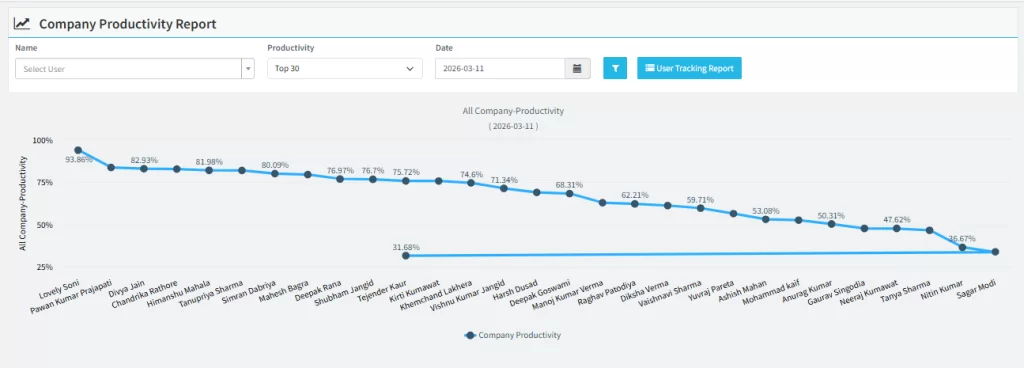
DeskTrack includes Productivity Monitoring Software as a core feature idle-time detection, productive-vs-unproductive app classification, and daily productivity scores per employee. Toggl Track’s version of “productivity” data is really revenue and time-allocation reporting: how many billable hours went where, and at what margin. If “productivity” means output quality and focus time to you, DeskTrack measures that directly. If it means profitability per project, Toggl’s Premium reporting is built exactly for that question.
Screenshot Monitoring
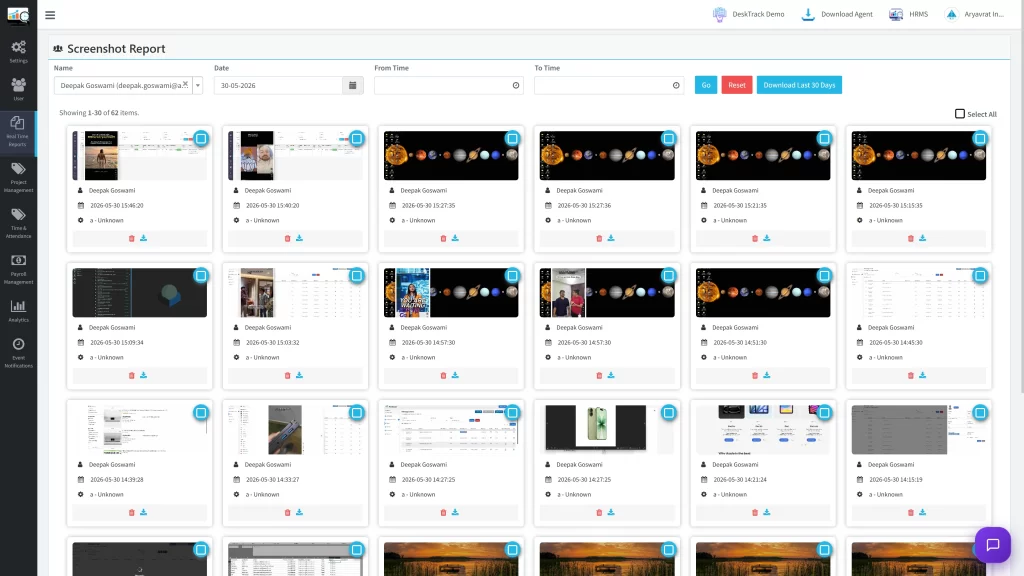
DeskTrack includes Screenshot Monitoring Software at configurable intervals across every plan. Toggl Track does not offer screenshot capture on any tier, at any price it’s a permanent design decision, not a missing add-on. Teams that need visual proof of work (common in outsourcing, BPOs, and client-billed development shops) will only find that in DeskTrack.
Attendance Management
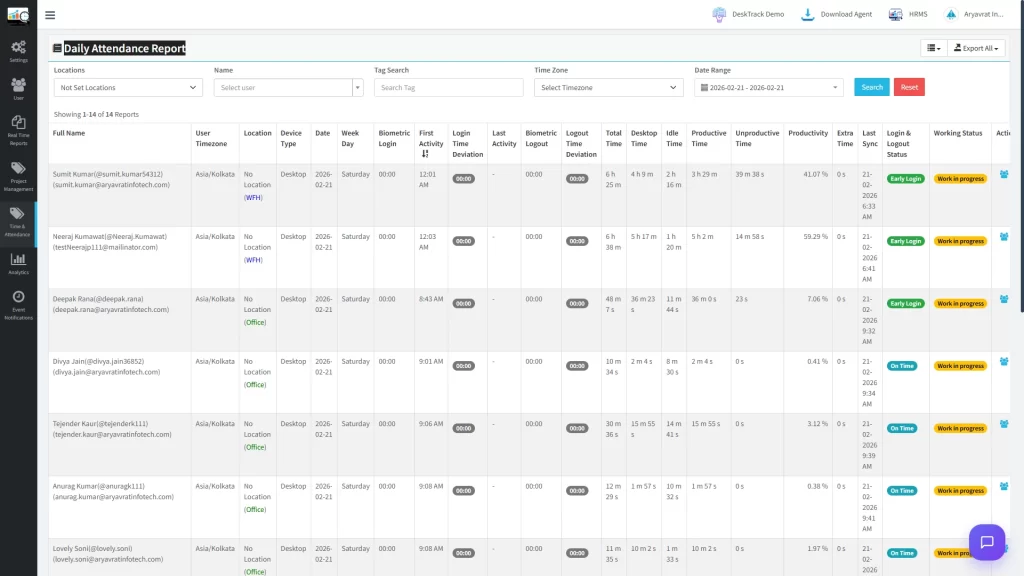
DeskTrack’s Attendance Management Software clock-in/out, shift tracking, leave requests and approvals is included from the entry plan. Toggl Track has no attendance module at all; it’s simply not part of what the product tries to do. Businesses that need one dashboard for hours, presence, and leave will find that gap in Toggl meaningful, especially once headcount passes 15–20 people and manual attendance tracking starts breaking down.
Application & URL Tracking
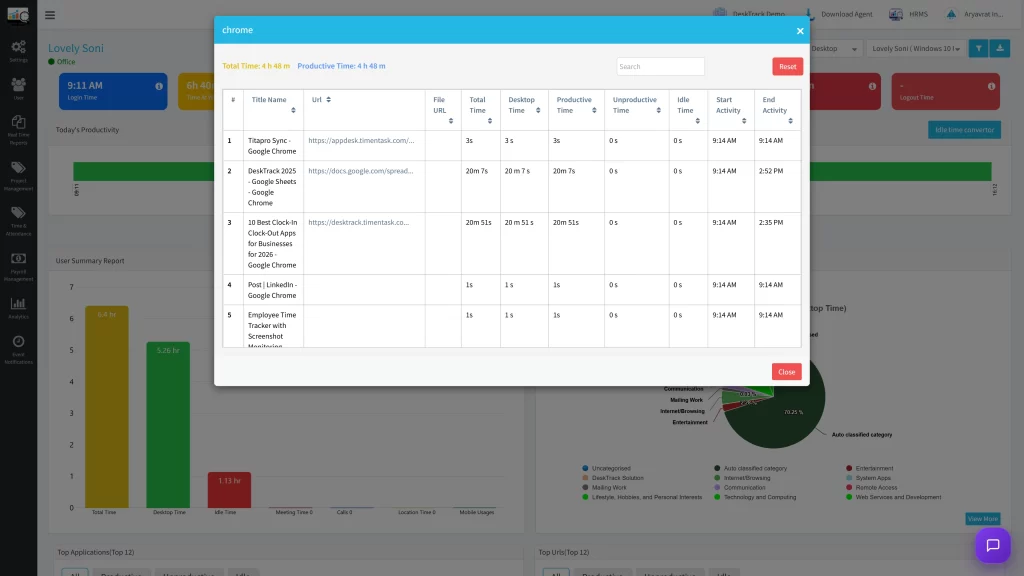
Both tools log app and site usage, but the intent differs sharply. DeskTrack reports this data to admins for oversight and policy enforcement flagging non-work sites, restricting distracting apps. Toggl Track’s desktop app timeline shows the employee which apps and sites they used, primarily as a self-awareness tool, and doesn’t push that data into an admin-facing monitoring report by default. Same underlying data category, nearly opposite purpose.
Reporting
Toggl Track’s Premium reporting profitability, labor cost, capacity, and utilization is more financially sophisticated than anything DeskTrack currently offers, and agencies managing dozens of client budgets will likely prefer it. DeskTrack’s reporting instead centers on workforce behavior: team performance summaries, idle-time patterns, and department-level productivity comparisons. Different reports for different questions “are we profitable on this project” versus “is this team actually working.”
Project Management
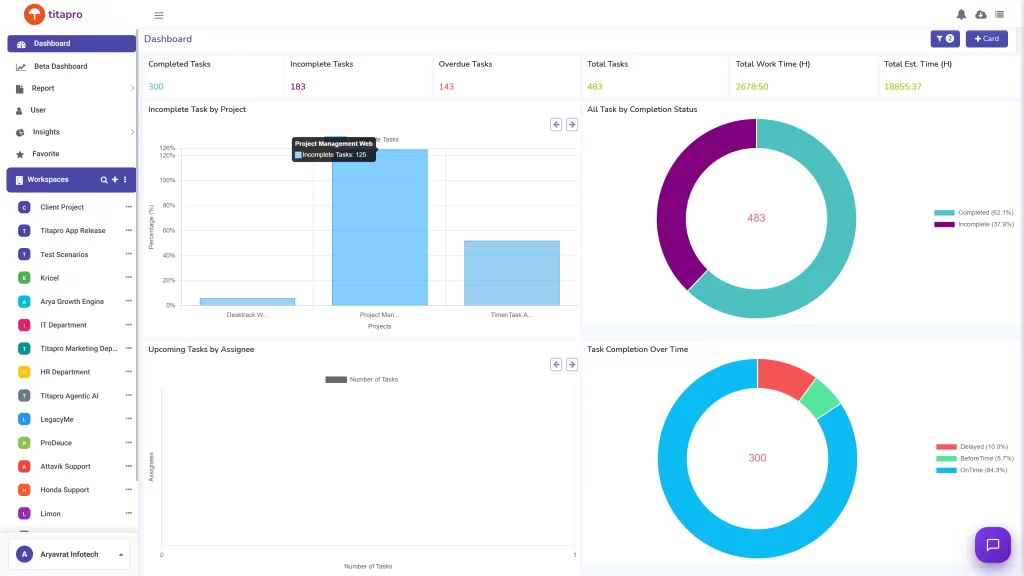
Toggl Track has invested heavily here: project templates, fixed-fee budgets, task-level estimates, and alerts when a project is running over. DeskTrack tracks time against projects and tasks too, but the Project Time Tracking experience is more reporting-oriented than planning-oriented. If project budgeting is your primary use case, Toggl’s tooling is more mature.
Ease of Use
Both are genuinely easy to set up most teams are running within an hour on either platform. Toggl Track’s interface is closer to a consumer app: minimal, fast, almost nothing to configure. DeskTrack’s dashboard has more surface area because it’s doing more (monitoring, attendance, DLP alerts), which means a slightly longer initial learning curve for admins, though end-user experience on both is straightforward.
Integrations
Toggl Track connects to 100+ tools through its browser extension and has native Jira, Salesforce, and Asana integrations at the Premium tier a real advantage for teams whose workflow already lives in those platforms. DeskTrack’s integration list is narrower, offset by built-in payroll and invoicing that removes the need for a separate connection in the first place.
Pricing
Toggl Track’s free plan (up to 5 users) is genuinely usable long-term for solo freelancers, not a crippled trial. Paid tiers run $9/user/month (Starter, annual) and $18/user/month (Premium, annual), scaling with the financial-reporting depth you need. DeskTrack starts lower, around $5.99/user/month, and bundles monitoring, attendance, and payroll into that single price rather than splitting them across tiers. For a small team wanting billing-focused time tracking, Toggl’s free plan is hard to beat. For a growing team wanting monitoring and attendance in one place, DeskTrack’s bundled pricing tends to come out ahead once you’d otherwise need multiple tools.
Current official pricing for both products changes periodically check Toggl Track’s pricing page and DeskTrack’s pricing page directly before budgeting.
Pros and Cons
DeskTrack
- ✅ Full employee monitoring, screenshots, and app/URL tracking included from the base plan
- ✅ Attendance and leave management built in no separate HR tool required
- ✅ Built-in payroll and invoicing
- ✅ Lower entry price for teams needing oversight and attendance together
- ❌ Smaller integration library than Toggl Track
- ❌ Project planning tools (templates, budgets) less developed than Toggl’s
- ❌ Not the right fit for teams that don’t want monitoring at all
Toggl Track
- ✅ Clean, fast, genuinely enjoyable interface
- ✅ Strong free plan for up to 5 users
- ✅ Excellent profitability and project-budget reporting at Premium
- ✅ 100+ integrations, including native Jira and Salesforce
- ❌ No employee monitoring, screenshots, or activity oversight, ever
- ❌ No attendance or leave management module
- ❌ Premium reporting features require the $18/user/month tier
Who Should Choose DeskTrack?
Ideal for:
- Remote teams where leadership needs visibility into actual work patterns, not just logged hours
- IT companies and outsourcing firms that need screenshot proof of work for client billing
- Agencies managing distributed contractors who also need attendance and leave tracked in one place
- Organizations that want Workforce Management Software monitoring, attendance, and payroll without running three separate subscriptions
- Businesses that have outgrown a basic Employee Time Management spreadsheet and need real oversight
Who Should Choose Toggl Track?
Ideal for:
- Freelancers and solo consultants who bill clients by the hour and want a fast, distraction-free timer
- Small teams (under 5–10 people) that don’t need monitoring, just accurate time-to-invoice tracking
- Agencies whose main pain point is project profitability and budget tracking, not workforce oversight
- Users who’ve explicitly decided monitoring isn’t right for their culture and want a tool built around that choice
Conclusion
There isn’t a universal winner here, and treating it like there is would misrepresent what each tool is actually for. If your business needs to know how hours were spent not just how many and wants attendance, leave, and monitoring under one roof, DeskTrack is the stronger fit, and it’s worth trying if you’ve been searching for a Toggl Track alternative because monitoring or attendance gaps have started causing real problems. If your team is small, trusted, and billing-focused, with project profitability as the main question you need answered, Toggl Track remains one of the best tools available for exactly that job. The honest move is to match the tool to the problem you actually have, not the one with the longer feature list.
Frequently Asked Questions (FAQ)
Ans. Neither is universally better. DeskTrack offers more workforce oversight — monitoring, screenshots, attendance — while Toggl Track offers cleaner billing and project-profitability reporting. The better choice depends on whether your priority is oversight or client billing. Ans. DeskTrack tends to fit remote and hybrid teams better when leadership wants visibility into actual work activity and needs attendance tracked without a separate system. Toggl Track works well for small remote teams that operate on trust and mainly need accurate billable hours. Ans. No, Toggl Track does not offer screenshots, keystroke logging, or activity monitoring on any plan — it’s a deliberate, permanent design choice, not a limitation of a lower tier. Ans. DeskTrack includes screenshot monitoring across all its plans. Toggl Track does not offer this feature at any pricing tier. Ans. If you’re only using Toggl for time tracking and billing, and monitoring isn’t a priority, there’s little reason to switch. If you’ve noticed attendance gaps, unclear productivity, or a need for screenshot verification that Toggl can’t provide, a trial of DeskTrack is worth running before renewing. Ans. Toggl Track’s free plan is unbeatable for teams under 5 people needing only time tracking. For teams that need monitoring and attendance together, DeskTrack’s bundled ~$5.99/user/month pricing is generally more cost-effective than adding a separate HR or monitoring tool on top of Toggl.desktrack-vs-toggl-track