Employee attendance should never be a guessing game.
Yet many organizations still rely on spreadsheets, manual punch cards, WhatsApp messages, or fragmented systems to track work hours. The result is predictable: payroll errors, attendance disputes, buddy punching, overtime leakage, and poor workforce visibility.
A modern clock in clock out app solves these problems by automating attendance tracking, validating employee work hours, and providing managers with real-time workforce insights.
For businesses managing remote teams, field staff, shift workers, retail employees, factory workers, or office-based professionals, choosing the right platform can directly impact productivity, payroll accuracy, compliance, and operational efficiency.
This guide examines the 10 best clock in clock out apps in 2026, helping business leaders identify the right solution based on company size, workforce structure, and operational goals.
What is a Clock In Clock Out App?
A clock in clock out app is a digital attendance tracking solution that records when employees start work, take breaks, switch shifts, and end their workday.
Unlike traditional punch cards or spreadsheets, modern systems provide:
- Automated attendance tracking
- Mobile clock-in and clock-out functionality
- GPS verification
- Shift scheduling
- Overtime tracking
- Payroll integration
- Productivity reporting
- Workforce analytics
An effective clock in clock out system creates a single source of truth for attendance and workforce management.
Key Business Outcomes
- Eliminate manual attendance administration
- Improve payroll accuracy
- Reduce buddy punching
- Prevent time theft
- Increase workforce visibility
- Simplify compliance reporting
Why Businesses Need a Clock In Clock Out App
Attendance data impacts far more than payroll.
It influences workforce planning, labor costs, productivity management, compliance reporting, and operational forecasting.
Organizations that still depend on manual attendance systems often experience:
- Missing timesheets
- Payroll discrepancies
- Attendance fraud
- Excessive overtime costs
- Limited workforce visibility
- Scheduling conflicts
A reliable clock in and out app creates operational accountability while reducing administrative workload.
Choosing the Right Clock In Clock Out Software by Business Size
Different organizations have different workforce challenges.
Small Businesses (5–50 Employees)
Smaller companies need simplicity and speed.
Primary goals include:
- Eliminate manual attendance tracking
- Simplify payroll processing
- Reduce buddy punching
- Improve workforce visibility
- Minimize administrative overhead
Best Fit: User-friendly software with attendance automation and automated payroll support.
Medium Businesses (50–500 Employees)
As teams expand, complexity increases.
Requirements typically include:
- Department-wise attendance visibility
- Multi-location workforce management
- Shift scheduling
- Overtime monitoring
- Trend analysis and planning
Best Fit: Platforms combining attendance, scheduling, reporting, and workforce analytics.
Enterprise Businesses (500+ Employees)
Large organizations require centralized control.
Common priorities include:
- Real-time workforce monitoring
- Compliance reporting
- Audit readiness
- ERP integrations
- Multi-country workforce management
- Enterprise-grade analytics
Best Fit: Scalable workforce management platforms with advanced reporting capabilities.
Industry-Specific Benefits of Clocking In and Out Systems
Different industries face different workforce challenges.
| Industry | Key Challenge | Required Features |
| IT & Software | Remote workforce visibility | Active vs idle time analysis, productivity reporting |
| BPO & Call Centers | Shift compliance | Attendance tracking, overtime monitoring |
| Construction | Distributed field teams | GPS clock-ins, location verification |
| Healthcare | Complex scheduling | Shift tracking, compliance support |
| Retail | Dynamic staffing | Shift swapping, scheduling optimization |
| Manufacturing | Multi-shift operations | Workforce monitoring, labor productivity reports |
Your team clocked in, Do you know how they’re doing?
Real-time attendance, productivity & shift management — in one place.
Comparison Table: Best Clock In Clock Out Apps 2026
| Software | Best For | GPS | Scheduling | Productivity Analytics |
| DeskTrack | Complete Workforce Visibility | Yes | Yes | Yes |
| Connecteam | Deskless Teams | Yes | Yes | Limited |
| Hubstaff | Remote Teams | Yes | Limited | Yes |
| QuickBooks Time | Payroll Management | Yes | Limited | No |
| Deputy | Shift Scheduling | Limited | Yes | Limited |
| When I Work | Rosters | Limited | Yes | No |
| Clockify | Basic Tracking | No | No | Limited |
| Toggl Track | Agencies | No | No | Limited |
| BambooHR | HR Operations | Limited | Limited | No |
| Rippling | Global Workforce | Yes | Yes | Limited |
Top 10 Best Clock-In Clock-Out Apps in 2026
1. DeskTrack
Best Overall for Attendance Tracking, Workforce Visibility, and Productivity Analytics
Most attendance solutions tell you when employees clock in.
DeskTrack goes several steps further.
It connects attendance tracking with workforce productivity and work hour standards, helping managers understand not only when employees worked but also how effectively work hours were utilized.
Key Features
1. Automated Login & Logout Tracking
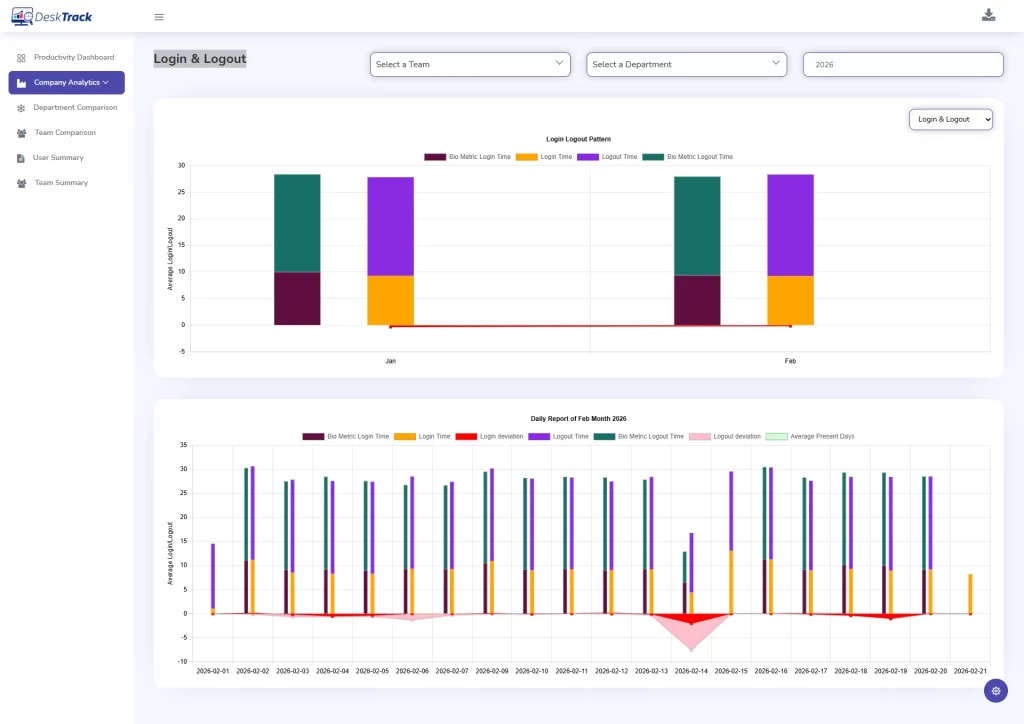
DeskTrack automatically records:
- Login times
- Logout times
- Working duration
- Attendance patterns
This removes manual reporting while improving accuracy.
2. Department-Level Productivity Analytics
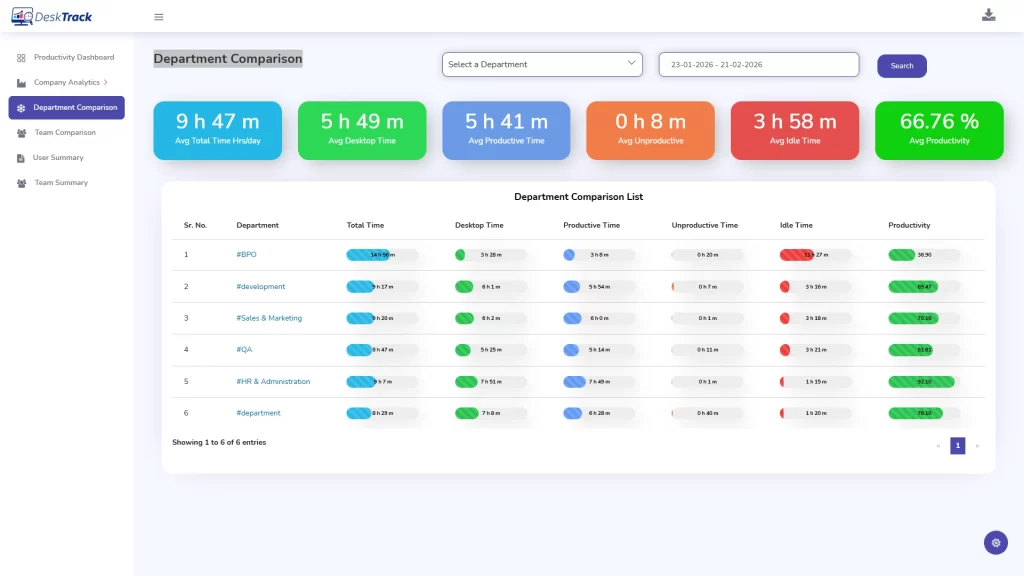
Managers can compare:
- Total hours
- Desktop time
- Productive time
- Idle time
This creates a complete operational picture across departments.
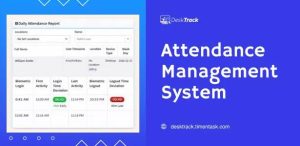
3. Daily Attendance Dashboard
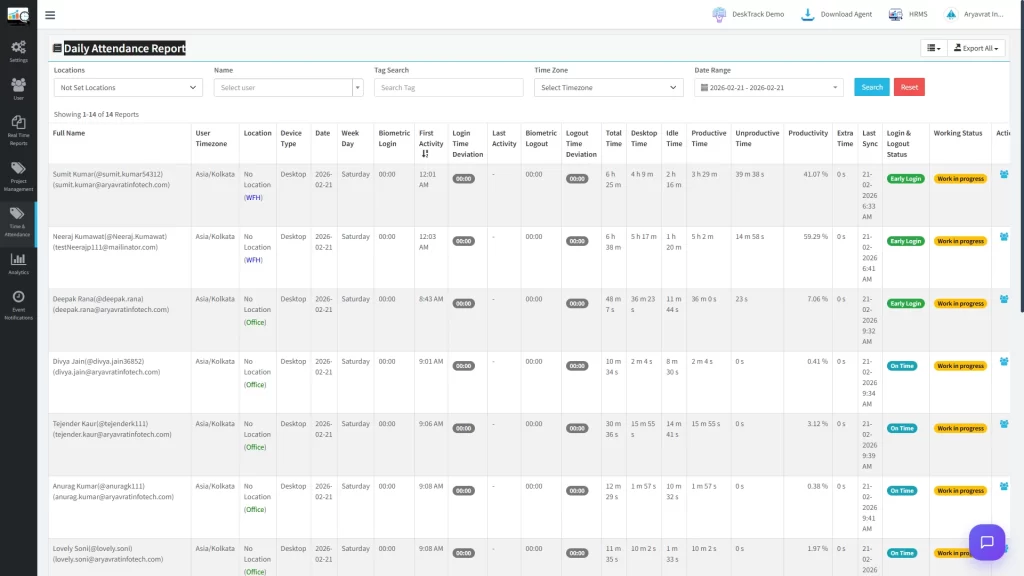
DeskTrack provides centralized attendance visibility, including:
- Employee status
- Attendance records
- Work location
- Login activity
- Shift information
4. Flexible Shift Scheduling
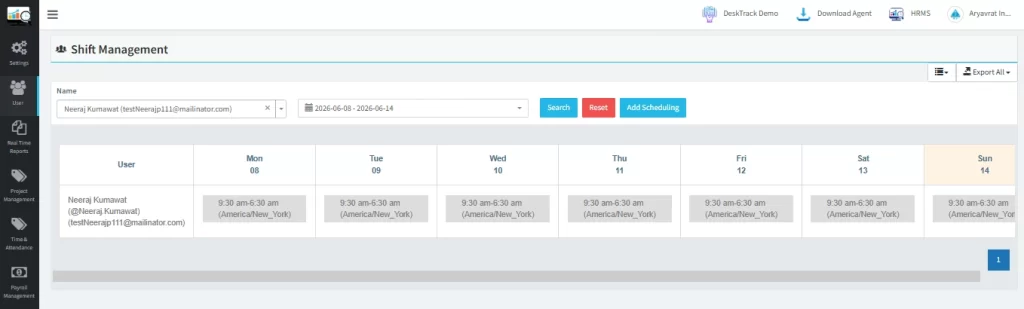
The built-in calendar system supports:
- Shift planning
- Roster management
- Schedule adjustments
- Attendance monitoring
DeskTrack combines attendance tracking, productivity analytics, workforce visibility, and scheduling into a single platform, making it one of the most complete workforce management solutions available today.
Why Organizations Choose DeskTrack
- Attendance + productivity in one platform
- Deep workforce visibility
- Automated reporting
- Remote, office, and field employee support
- Shift scheduling capabilities
- Strong operational analytics
Explore:
- Employee Attendance Tracking Software
- Employee Monitoring Software
- Workforce Management Software
- Payroll Tracker
2. Connecteam
Best for Mobile-First and Deskless Teams
Connecteam is designed for businesses managing field employees, service workers, and deskless teams.
Pros
- Excellent mobile experience
- GPS attendance tracking
- Team communication tools
- Employee checklists
Cons
- Reporting can become overwhelming for smaller businesses
- Advanced features require higher-tier plans
3. Hubstaff
Best for Remote Workforce Tracking
Hubstaff focuses heavily on remote team management and activity tracking.
Pros
- Activity monitoring
- Project tracking
- Automated invoicing
- Productivity reporting
Cons
- Monitoring features may feel intrusive
- Limited shift scheduling capabilities
4. QuickBooks Time
Best for Payroll-Centric Organizations
QuickBooks Time integrates closely with accounting and payroll workflows.
Pros
- Strong payroll synchronization
- GPS tracking
- Mobile accessibility
Cons
- Best suited for QuickBooks users
- Limited workforce productivity analytics
5. Deputy
Best for Shift-Based Businesses
Deputy specializes in workforce scheduling and labor compliance.
Pros
- Shift planning
- Labor compliance alerts
- Employee scheduling automation
Cons
- Initial setup can be complex
- Advanced scheduling requires training
6. When I Work
Best for Employee Scheduling
This platform focuses on roster visibility and workforce coordination.
Pros
- Shift swapping
- Time-off requests
- Team communication
Cons
- Reporting depth is limited
- Advanced analytics are minimal
7. Clockify
Best for Budget-Conscious Teams
Clockify offers straightforward time tracking functionality.
Pros
- Generous free plan
- Easy implementation
- Simple interface
Cons
- Limited workforce analytics
- Minimal productivity reporting
8. Toggl Track
Best for Agencies and Project-Based Teams
Toggl Track helps organizations understand where project time is spent.
Pros
- Excellent user experience
- Client-based tracking
- Project profitability insights
Cons
- Weak attendance management
- No advanced workforce scheduling
9. BambooHR
Best for HR-Centric Organizations
BambooHR combines HR management with attendance functionality.
Pros
- HR integration
- Leave management
- Employee records
Cons
- Attendance modules often require add-ons
- Not attendance-first software
10. Rippling
Best for Global Workforce Operations
Rippling combines HR, payroll, IT, and workforce administration.
Pros
- Global workforce support
- Compliance automation
- Payroll integration
Cons
- Premium pricing
- Can be excessive for small businesses
How to Choose the Best Clock In and Out App
Selecting the right platform requires evaluating your workforce structure.
Consider These Factors
1. Workforce Type
- Office employees
- Remote workers
- Field teams
- Shift-based employees
2. Payroll Integration
Ensure attendance data flows directly into payroll systems.
3. Reporting Depth
Basic attendance reports may not be enough as organizations scale.
4. Scheduling Needs
Shift-heavy businesses should prioritize scheduling functionality.
5. Productivity Visibility
Attendance tells you when employees worked.
Productivity metrics help determine how effectively time was used.
Frequently Asked Questions (FAQ)
Ans. Yes, Most modern solutions provide Android and iOS applications that allow employees to clock in and out from authorized locations. Ans. Most platforms use: These mechanisms help verify that the correct employee is clocking in. Ans. Not always, GPS tracking is particularly useful for construction, field service, logistics, and remote workforce environments. Office-based organizations may not require location verification. Ans. Yes, Modern platforms focus on attendance trends, productivity patterns, and work-hour consistency rather than intrusive employee surveillance.clock-in-clock-out