The corporate landscape looks vastly different today than it did a few years ago. In 2026, the debate over whether remote work is a permanent fixture of the American economy is officially over. Distributed, hybrid, and fully remote models have matured into standard operating procedures across the United States. Yet, a deeper, more agonizing friction point remains for leadership teams: how to track remote employees without creating a toxic culture of hyper-surveillance and systemic distrust.
If you are an HR director in Chicago, an operations manager in California, or a startup founder in Austin, you have likely felt this tension. You need clear operational visibility to keep projects on deadline, calculate client billing, and maintain accountability. But you also know that treating your team like digital inmates destroys morale, spikes employee turnover, and alienates your best performers.
Why Traditional Micromanagement Fails Remote Teams in 2026
In my 16 years of advising US businesses on HR technology, I have watched the evolution of workplace oversight. The early waves of remote management relied heavily on blunt-force surveillance tools. Managers wanted to see green “active” dots on Slack or Microsoft Teams all day. They demanded constant status updates and bought software that took rapid, random snapshots of employee screens.
Let me be entirely frank: that approach is dead. In 2026, aggressive micromanagement does not boost productivity; it ruins it.
A few years ago, I consulted for a mid-sized SaaS company based in Texas. Out of fear of hidden idle time, the executive team installed an aggressive monitoring platform that tracked every single mouse movement and penalized employees if they were inactive for more than three minutes. The results were disastrous. Within six months, their top software engineers quit, project velocity dropped, and the culture shifted into “productivity theater.” People spent more energy constantly wiggling their mice and faking activity than solving complex problems.
In the competitive American talent market, top performers expect autonomy. If you track a remote employee by watching their shoulder instead of their results, they will leave. Furthermore, heavy-handed tracking creates a massive exposure to legal and compliance issues under modern state privacy frameworks a risk no operational leader should take.
Key Principles: Track Outcomes and Activity, Not Every Keystroke
If you want to know how to track remote employee performance the right way, you must adjust the underlying philosophy of your management style. The goal is to move away from tracking presence and move toward tracking progress.
When you frame your approach around these four core principles, tracking changes from a tool of suspicion into a mechanism for team support:
- Prioritize Output Over Input: It shouldn’t matter if an employee finishes a five-hour project at 2:00 AM or 2:00 PM, as long as the work meets quality metrics and deadlines. Focus entirely on deliverables completed and key performance indicators (KPIs) hit.
- Insist on Absolute Transparency: Never monitor remote teams in secret. When implementing any operational system, tell your employees exactly what data is collected, why it is being collected, and how it helps the business operate smoothly.
- Treat Data as a Diagnostic Tool, Not a Weapon: If tracking metrics show an employee’s focused hours dropping, do not immediately write them up. Use that data to ask an open-ended question: Is this person experiencing burnout? Are they stuck behind a technical bottleneck? Do they need more training?
- Differentiate Between Processes and Outcomes: Different roles require different visibility strategies. A customer support team needs consistent shift coverage, while a strategic consulting team needs deep, uninterrupted blocks of thinking time. Your metrics must adapt accordingly.
Essential Metrics to Track Remote Employees Productively
To balance executive visibility with worker autonomy, you need to understand which metrics add true business value and which ones simply create friction.
The following matrix contrasts objective, healthy operational metrics against tracking practices that lean into micromanagement:
| Metric Category | Healthy Operational Examples | Micromanagement Danger Zones | Why the Distinction Matters |
| Time Allocation | Total focused hours per project; clear shift attendance patterns. | Counting every single mouse click; tracking exact keystroke frequency. | Mouse clicks don’t equal strategic thought. Tracking total project hours ensures accurate resourcing without policing physical movement. |
| Application Usage | Category logging (e.g., spending 6 hours in specialized design tools vs. communication apps). | Reading personal chat logs; viewing private browser histories. | Category logging validates that employees have the right tools to focus, without crossing privacy lines. |
| Output Delivery | Sprint milestones met; tickets closed; campaign launch deadlines hit. | Demanding random, hourly manual status reports over email. | Clear project tracking keeps teams aligned asynchronously, saving hours of disruptive check-in meetings. |
| Workplace Health | Analyzing overtime hours; tracking continuous late-night activity. | Penalizing workers for short breaks or minor afternoon lulls. | Looking at patterns helps identify systemic burnout risks before they turn into resignations. |
Best Tools and Strategies for 2026: The Balanced DeskTrack Approach
To implement these healthy parameters smoothly, you need software built with an ethical, privacy-first design. After reviewing and implementing dozens of platforms for clients across the country, I have found that DeskTrack offers a balanced alternative for organizations that want deep visibility without breaking employee trust.
DeskTrack is explicitly designed to handle the complex nuances of tracking work from home employees by focusing on silent background data collection rather than intrusive interruptions. Here is a look at how its features can be used to support an open, high-trust workforce:
Automatic Time Tracking and Idle Detection
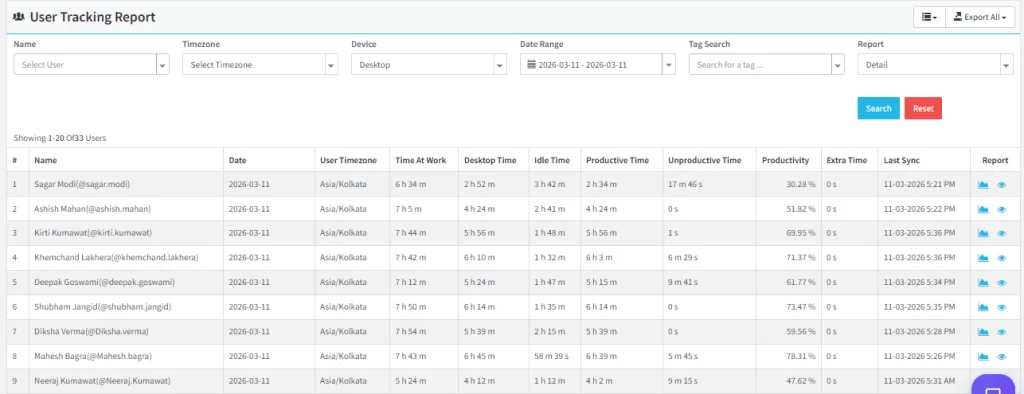
Instead of forcing employees to manually start and stop timers all day a process prone to human error and constant friction DeskTrack runs quietly in the background. It logs exactly how to track remote employees hours based on actual device interaction. If an employee steps away to grab a coffee or think through a problem, the idle detection system pauses the clock. This gives leadership highly accurate data for payroll and project costing while freeing the worker from manual bookkeeping.
App and URL Insights with Clear Privacy Boundaries
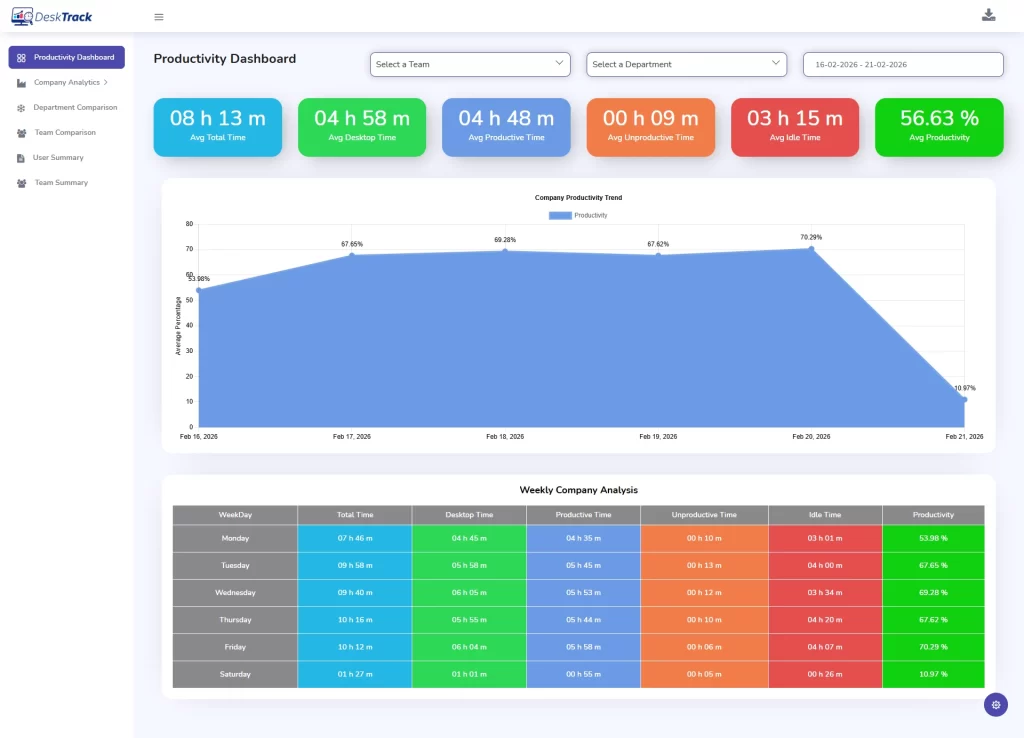
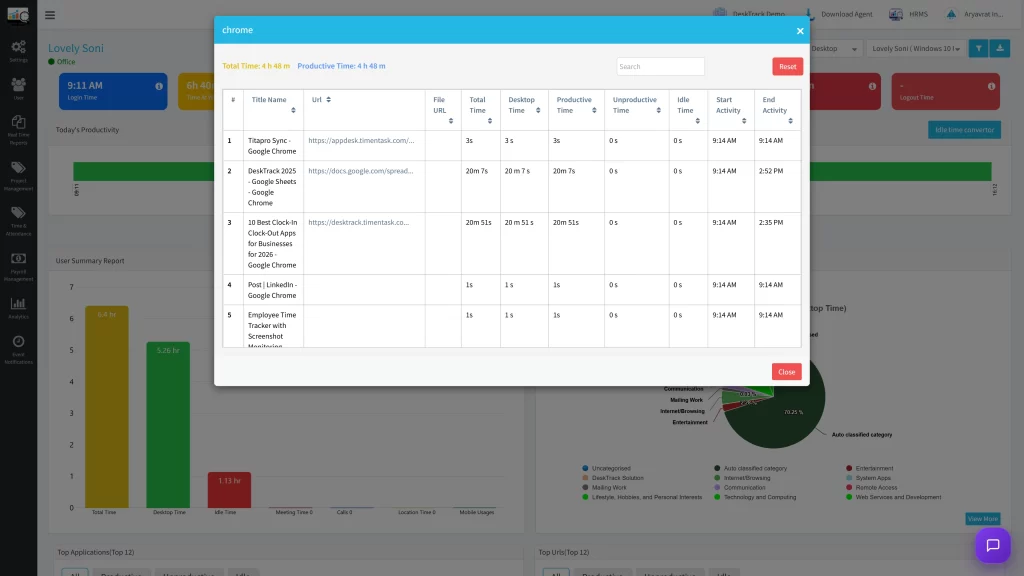
One of the biggest concerns for remote workers is privacy. DeskTrack solves this by focusing on application-level logging. It categorizes tools into “productive” vs. “non-productive” baskets based on specific roles (e.g., GitHub is productive for engineering; Canva is productive for design). This allows managers to see high-level productivity scores without having to look at individual screens or private messages.
Contextual Visual Verification
While continuous, real-time screen scraping destroys workplace morale, there are certain situations such as compliance mandates or training new hires where visual verification is necessary. DeskTrack includes an optional screenshot monitoring feature. However, experienced HR leaders configure this transparently, using blurred or infrequent captures to protect personal data while still verifying workflow accuracy when required.
AI-Powered Workforce Analytics
In 2026, the most effective tracking systems use machine learning to identify structural trends rather than individual slip-ups. DeskTrack’s underlying AI engines analyze team-wide behaviors to spot operational roadblocks. For example, if an entire digital marketing team sees a drop in focus scores on Thursdays, the system can pinpoint whether a long, mid-week sync meeting is draining energy and disrupting deep work blocks.
Industry-Specific Advice: Customizing Your Tracking Matrix
Every industry has its own unique operational challenges and bottlenecks when monitoring remote teams. A tracking strategy that works for a fast-paced customer support center will fail if applied to a commercial law firm or an engineering studio.
The table below breaks down the specific challenges and tracking benefits across the primary US sectors:
| US Industry Sector | Specific Operational Tracking Challenges | Core Benefits of Clean Remote Tracking |
| IT & Software Development | Distributed development sprints; keeping track of workload balances; avoiding missed release deadlines. | Provides clear visibility into sprint progress, helps balance resource allocation, and identifies development blockers early. |
| SaaS Companies | Aligning cross-functional remote teams; managing product, customer support, and sales roles simultaneously. | Offers role-specific performance insights and creates data-driven workforce strategies across departments. |
| Digital Marketing Agencies | Managing multiple client projects at once; tracking billable vs. non-billable client hours accurately. | Delivers precise project time tracking, builds transparent client reports, and increases overall campaign profitability. |
| BPO & Customer Support | Monitoring service quality across distributed locations; managing complex shift rotations and attendance. | Optimizes attendance management, tracks response-time standards, and maintains service quality remotely. |
| Consulting & Legal Services | Accurately logging billable consultant hours; ensuring clear visibility into case deliverables. | Generates indisputable client records, improves case transparency, and maximizes resource utilization. |
| Accounting & Finance | Managing time-sensitive, deadline-driven filing seasons; keeping strict operational accuracy. | Enhances workload planning during peak quarters and ensures accountability across complex financial tasks. |
| Education & EdTech | Coordinating distributed educators and administrative support staff across districts. | Streamlines administrative workflows and improves performance visibility across teaching modules. |
| Healthcare Administration | Managing remote billing and records teams; keeping operations consistent and compliant. | Enhances task management visibility while maintaining clean workflow consistency across departments. |
| E-commerce Businesses | Handling seasonal traffic spikes; managing support, marketing, and inventory teams concurrently. | Balances shifting workloads during holidays and improves cross-departmental resolution speeds. |
After reviewing and implementing dozens of platforms for clients across the country, I have found that DeskTrack offers a balanced alternative for organizations that want deep visibility without breaking employee trust. However, a complete workspace setup requires more than just monitoring; incorporating the best work from home apps for project collaboration and daily communication is equally essential to keep your distributed workforce aligned.
🎯Manage Performance Without Micromanagement
Manage employee leaves, approvals, attendance, and payroll from one platform. Understand how work gets done through smart tracking, automated reports, and real-time productivity analytics.
Step-by-Step Implementation Guide for US Businesses
Successfully rolling out a remote tracking system requires a deliberate, step-by-step approach. If you deploy software abruptly on a Friday afternoon without explanation, you risk triggering a wave of resignations.
Follow this proven, 7-step rollout framework to protect workplace culture and ensure clean data collection:
- Audit Your Current Workflow Friction: Identify exactly why you want to track remote workers. Are you losing margins on client projects? Are you missing product deadlines? Define your goals clearly before looking at software.
- Select a Privacy-First Platform: Choose a platform that balances tracking needs with employee privacy. Opt for systems like DeskTrack that favor background time analytics and category tracking over invasive surveillance habits.
- Draft a Direct, Transparent Policy: Put your tracking policy in writing. Document exactly what data is logged, the hours it is collected, and who has access to the metrics. Run this draft past your employment legal counsel to ensure compliance with changing state laws.
- Run an Open Leadership Alignment Meeting: Train your middle managers and team leads first. Ensure they understand that tracking data is meant for resource balancing and identifying roadblocks not a tool for punitive micromanagement.
- Launch a Transparent Pilot Program: Do not roll the software out to the entire company at once. Run a 30-day test with a small, collaborative department. Gather direct feedback regarding software performance and user experience.
- Deploy Universally with Open Training: Roll the system out company-wide. Host a transparent onboarding session where you share screens and show employees exactly what the software sees on their end. Emphasize that the system protects them from overwork and ensures fair recognition.
- Conduct Data-Driven Monthly Reviews: Review your company metrics monthly. Use these insights to adjust workloads, simplify clumsy operational processes, and celebrate teams that hit high output goals cleanly.
Common Pitfalls and Legal/Privacy Considerations
Deploying workforce tracking in the United States requires navigating a shifting legal landscape. Operations leaders often make the mistake of assuming that because a tool is technically capable of tracking something, it is legally or culturally smart to use it.
The Legal Framework: ECPA and State Mandates
At the federal level, the Electronic Communications Privacy Act (ECPA) gives employers broad latitude to monitor activity on company-owned hardware and networks for legitimate business purposes. However, state laws vary widely and are becoming increasingly strict:
- Notification Requirements: States like Delaware, Connecticut, and New York require employers to provide clear, written notice to all employees prior to implementing electronic monitoring.
- The California Framework: Under the California Consumer Privacy Act (CCPA) and its updates, employees in California have expanded rights regarding how their personal behavioral data is collected, stored, and managed.
- FLSA Compliance: The Fair Labor Standards Act (FLSA) requires accurate hour tracking for non-exempt employees to ensure correct overtime pay. Automated time tracking can protect your business against wage-and-hour disputes by providing an indisputable record of actual time worked.
According to the U.S. Department of Labor (DOL), maintaining accurate records of hours worked is a foundational legal requirement for all interstate commerce businesses.
Organizations like the Society for Human Resource Management (SHRM) consistently recommend that any tracking strategy rely on explicit, written employee consent to mitigate legal risks and preserve trust.
Real Success Stories: Lessons from the Field
Case Study 1: Reclaiming Margins in a Florida Creative Studio
A digital marketing agency in Florida with 35 remote employees was consistently missing project profitability targets. The founder suspected team members were slacking off. After implementing DeskTrack in absolute transparency, the data revealed a completely different story.
The team wasn’t lazy; they were drowning in internal communication. Employees were spending an average of 4.5 hours a day in Slack and internal meetings, leaving very little time for client work. By identifying this bottleneck, the agency cut back on internal meetings, protected deep-work hours, and saw a quick 22% increase in billable utilization all without micromanaging a single person.
Case Study 2: Solving the Burnout Bottleneck in an Illinois IT Group
An IT services firm in Illinois was struggling with high turnover among its remote systems engineers. Management assumed the team wanted higher pay. However, background time analytics showed that due to global client distributions, engineers were routinely logging back into systems at 10:00 PM to handle updates, despite already working a full day.
The metrics allowed the HR director to see this pattern clearly. Instead of punishing the late logs, the firm restructured its shift patterns, implemented a clear rotating on-call schedule, and stabilized employee retention within one quarter.
Conclusion
Tracking remote employees doesn’t mean choosing between visibility and team morale. True operational excellence in 2026 relies on data-driven management frameworks that measure outcomes rather than counting keystrokes. By focusing on clear metrics, respecting privacy boundaries, and using automated background software, you can build an accountable, productive remote team that scales effortlessly.
Ready to gain deep operational clarity while protecting your workplace culture? Discover how DeskTrack can transform your workforce management.
Frequently Asked Questions (FAQ)
Ans. The key is absolute transparency. Share your screen during onboarding, show them exactly what data the software collects, and give employees direct access to their own dashboards. When teams see that the data is used to protect them from unfair workloads and streamline operations, trust stays intact. Ans. Yes, provided you choose an enterprise-grade platform. Look for platforms that offer end-to-end encryption, multi-factor authentication, and customizable logging controls. For sensitive roles, you can turn off screenshot features entirely to keep patient or financial data protected. Ans. Treat the data as a conversation starter, not a disciplinary verdict. Set up a casual 1-on-1 check-in. Share the metrics openly and ask if they are running into technical issues, dealing with project roadblocks, or experiencing burnout. Ans. Absolutely, When leadership looks at company-wide application analytics and realizes teams are spending 20 hours a week on Zoom or Slack, it provides the quantitative proof needed to cut down on sync meetings and preserve productive focus periods. Ans. Not if your software is configured properly. Modern background trackers simply log active time blocks whenever they happen throughout the day. This allows parents, caregivers, and asynchronous workers to step away when needed and log back in later without hurting their performance scores.how-to-track-remote