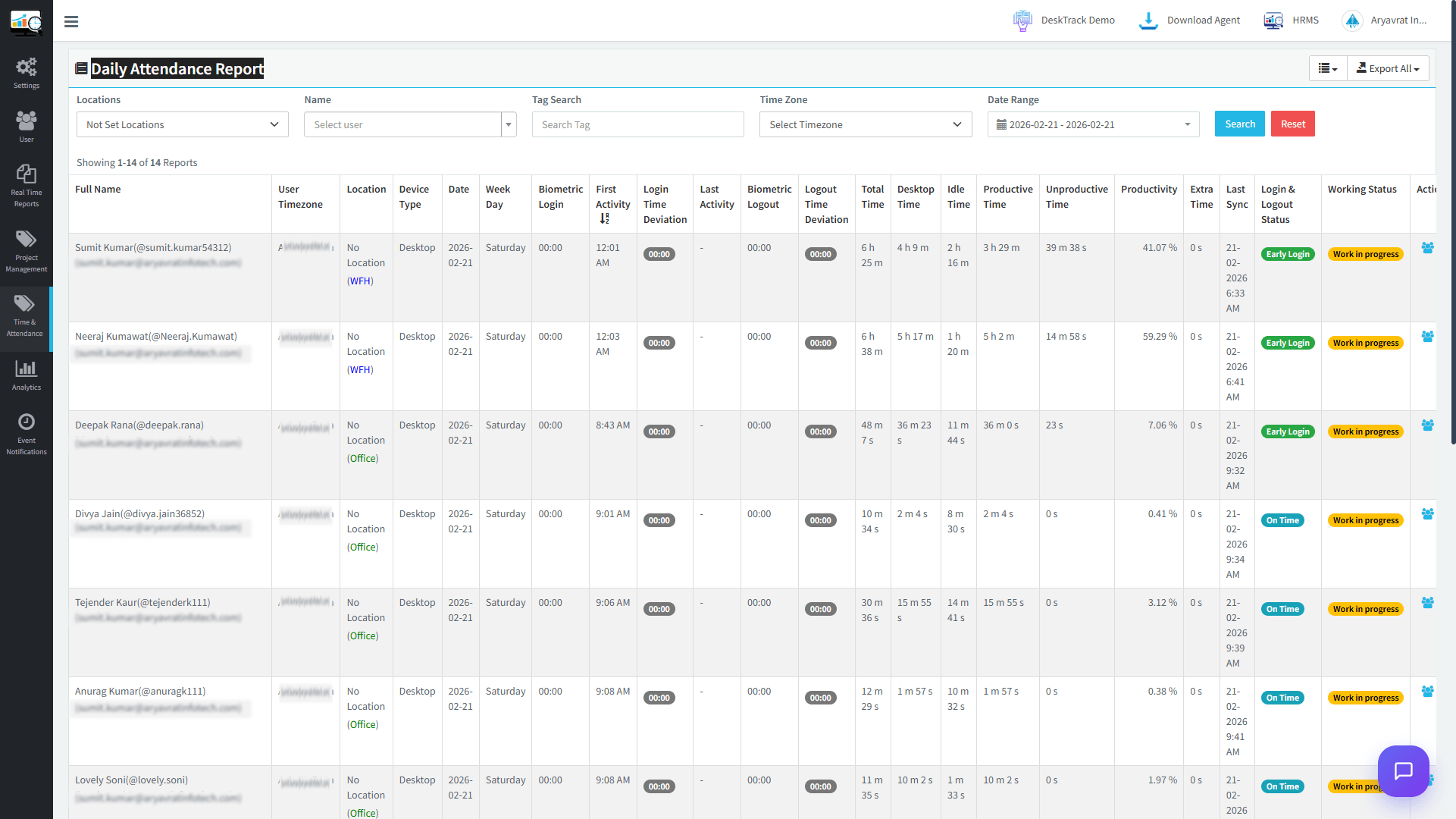
Workforce management around the world has changed dramatically. Hybrid schedules, remote teams, flexible shifts, and compliance requirements make manual attendance logs outdated and risky. Businesses today need a modern attendance management system that provides real-time visibility, accurate reporting, compliance tracking, and productivity insights.
In this all-in-one guide, we’ll explain:
- What an attendance management system is
- Why businesses are shifting to online attendance management systems
- Key features of employee attendance monitoring systems
- How attendance integrates with productivity tracking
- How to choose the right attendance management system software
What are the Common Mistakes Founders Make With Attendance Management?
Founders often struggle with attendance by prioritizing manual trust over scalable automation. This oversight creates significant payroll leakage and compliance risks. Avoiding these common mistakes ensures that growing companies maintain operational integrity while scaling their diverse, modern workforces.
Frequent Errors:
- Manual Over-Reliance: Using spreadsheets that invite human error and lack real-time visibility.
- Ignoring Compliance: Failing to maintain audit-ready records required by the Fair Labor Standards Act.
- Separating Output: Tracking “clock-ins” without measuring actual productivity or digital engagement levels.
- Neglecting Scalability: Choosing basic tools that cannot support rapid hiring or international expansion.
- Inconsistent Policies: Lacking clear rules for remote work, leading to confusion and unfairness.
What Is an Attendance Management System?
An attendance management system is a robust digital platform designed to monitor employee working hours. It accurately tracks login times, logout sessions, and leave records. This streamlined tool ensures precise presence recording, effectively enhancing workplace productivity and simplifying complex payroll processing.
Unlike manual registers or spreadsheets, modern systems use:
- Cloud-based tracking
- Real-time login and logout monitoring
- Automated time calculations
- Integrated payroll reporting
- Compliance dashboards
This ensures a balance between accountability and privacy.
Track More Than Employee Attendance ➡
Why Businesses Are Moving to Online Attendance Monitoring Systems
Remote and hybrid work shifts have accelerated the adoption of online attendance monitoring systems. This digital model effectively tracks employee hours, simplifies leave management, and ensures accurate payroll. It is a vital tool for modern businesses aiming for seamless operational efficiency.
Key Drivers in 2026:
- Remote workforce expansion
- Compliance with overtime regulations
- Payroll accuracy requirements
- Need for workforce analytics
- Reduction of time theft and buddy punching
Fact: According to Gallup, hybrid and remote work arrangements remain common across organizations, increasing the demand for digital attendance visibility.
Traditional attendance methods cannot handle teams in different places efficiently. An online employee attendance monitoring system solves this gap with centralized dashboards accessible from anywhere.
Download this accurate and reliable Attendance Management System Audit Checklist to identify the specific bottlenecks holding your performance back today!Attendance Management System Audit Checklist
What are the Core Features of a Modern Attendance Management System Software?
A powerful 2026 attendance system serves as your operational heartbeat, moving beyond digital punch cards. To dominate the international market, your software must prioritize deep automation over simple logging. This transition ensures peak efficiency and provides critical data-driven workforce insights:
1. Real-Time Login & Logout Tracking
Modern systems eliminate the “guesstimate” of manual entry by capturing the exact second an employee starts or ends their workday.
- Multi-Device Sync: Allows users to clock in via desktop, mobile app, or dedicated biometric hardware.
- Geofencing Protection: Ensures employees are actually at the job site or a designated remote location before they can log in.
- Status Indicators: Gives managers a live “who’s in” dashboard to see active versus idle staff instantly.
2. Automated Time Calculations
Manual math is the leading cause of payroll disputes. Automation ensures that every minute worked is a minute paid, precisely according to your company policy.
- Round-Up Rules: Custom settings to handle grace periods (e.g., rounding 8:02 AM to 8:00 AM).
- Overtime Triggers: Automatically shifts rates once an employee crosses the 40-hour weekly threshold.
- Break Tracking: Deducts unpaid lunch hours or logs paid breaks without manual intervention.
3. Leave & Holiday Management
Managing absences is just as critical as managing presence. An all-in-one tool prevents staffing shortages and ensures fair distribution of time off.
- Self-Service Portals: Employees can request PTO or sick leave directly through the app.
- Accrual Engines: Automatically calculates how much vacation time an employee has earned based on their tenure.
- Blackout Dates: Prevents leave requests during peak business periods or major company events.
4. Compliance Reporting
In the regulatory environment, having “audit-ready” data is a necessity to protect against wage and hour litigation.
- FLSA Alignment: Generates specific reports required for Fair Labor Standards Act audits.
- Digital Signatures: Allows employees to electronically “sign off” on their weekly hours to confirm accuracy.
- Data Retention: Automatically archives attendance records for the legally mandated number of years.
5. Cloud-Based Accessibility
The “online” nature of modern systems means your data isn’t trapped on a single office server. It’s available wherever your leadership team happens to be.
- Universal Login: Secure access from any web browser or authorized device.
- Instant Sync: If a field worker logs in via mobile, the HR manager in the head office sees it immediately.
- Zero Infrastructure: No need for expensive on-site servers; the software provider handles security and updates.
6. Integration with Payroll & HR Systems
Your attendance data shouldn’t live in a silo. It needs to “talk” to the rest of your tech stack to maximize efficiency.
- Payroll Bridging: Exports data directly to platforms like Gusto, ADP, or QuickBooks with one click.
- HRIS Sync: Pulls employee profiles, departments, and roles directly from your HR management software.
- Productivity Link: Connects with computer monitoring tools to verify that attendance matches actual digital output.
How Productivity-Integrated Systems Became Well-Known?
Modern businesses no longer separate attendance from productivity. Simply knowing an employee logged in at 9:00 AM does not reveal their effectiveness. Integration allows managers to bridge the gap between presence and actual output, ensuring every hour contributes to growth.
This is where:
- Computer Monitoring Software
- Screenshot monitoring software
- Employee productivity tracking software
- Become essential complements to attendance tools.
A time and attendance management system integrated with productivity tracking provides:
- Application usage insights
- Idle time breakdown
- Active vs inactive hours
- Task-level reporting
- Performance analytics dashboards
This integrated approach helps leaders answer critical questions:
- Are employees present but disengaged?
- Is the workload balanced across departments?
- Where are productivity bottlenecks forming?
What are the Pros & Cons of Attendance Management System Software?
Selecting an attendance management system offers transformative benefits while presenting specific implementation challenges. Balancing automated precision with workplace culture is key. This evaluation highlights the core advantages and potential drawbacks to consider when integrating these digital tools into your modern business.
Core Advantages:
- Eliminates Time Theft: Prevents “buddy punching” and ensures accurate payroll.
- Boosts Productivity: Integrates activity monitoring to bridge the gap between presence and output.
- Legal Compliance: Provides non-editable audit trails for FLSA and labor law protection.
- Operational Visibility: Offers real-time dashboards for managing remote and hybrid teams.
- Reduces Admin Burden: Automates complex calculations, freeing HR for strategic tasks.
Implementation Challenges:
- Privacy Concerns: Some employees may feel over-monitored by productivity tracking features.
- Initial Setup: Requires a time investment for software integration and staff training.
- Technical Dependency: Relies on consistent internet connectivity for real-time cloud syncing.
- Cost Factor: Higher-end systems with biometric or AI features require ongoing subscription fees.
This ensures a balance between accountability and privacy.
See How DeskTrack Tracks Attendance ➡
What are the Differences Between Basic Attendance & Advanced Attendance Monitoring?
Advanced staff attendance systems offer far more than simple clock-in records—they provide essential reliability. By automating data collection and reporting, these platforms eliminate inconsistencies, foster workplace transparency, and ensure your business operations remain efficient, compliant, and consistently high-performing:
| Feature | Basic System | Advanced Employee Attendance Monitoring System |
| Login Tracking | Manual Entry | Automatic |
| Remote Support | Limited | Full Cloud Access |
| Payroll Integration | Often Separate | Integrated |
| Productivity Tracking | None | Included |
| Screenshot Monitoring | No | Available |
| Reporting | Static | Real-Time Analytics |
Why Small and Mid-Sized Businesses Need Attendance Automation?
Startups and growing businesses often underestimate the impact of attendance inefficiencies. Implementing automated tracking eliminates manual errors and boosts productivity. This digital transition ensures your organization remains competitive, providing the critical data needed for sustainable scaling in the global market.
Common risks include:
- Payroll inflation due to inaccurate hours
- Time theft
- Unmonitored remote employees
- Poor resource allocation
- Inconsistent overtime tracking
According to the American Payroll Association, time theft can cost businesses a significant percentage of payroll expenses annually.
An automated attendance management system software helps reduce these risks while increasing accountability.
How to Choose the Right Attendance Management System for Employees?
Selecting the right attendance management system is a smart choice for operational efficiency. In 2026, “one-size-fits-all” no longer works for a modern, diverse workforce. Tailored solutions ensure precise tracking and better employee engagement, which are essential for long-term growth:
1. Scalability
A system must be able to handle your current employee count while growing easily as your business grows across new departments or locations.
- User Capacity: Ensure the software supports a growing database without lagging.
- Feature Tiering: Look for platforms that allow you to unlock advanced modules (like AI forecasting) only when needed.
- Global Support: If you plan to expand internationally, the system must handle multiple time zones and currencies.
2. Remote & Hybrid Compatibility
With the rise of distributed work, your tracking tool must be as mobile as your employees, bridging the gap between the office and the home.
- Geofencing: Creates virtual boundaries where employees can “punch in” via mobile.
- Offline Mode: Essential for field workers in areas with poor connectivity; data syncs once back online.
- Hybrid Dashboards: Gives managers a single view of both on-site and remote attendance status.
3. Automation Level
The primary goal of a 2026 system is to remove the “human element” from data entry, reducing errors and saving HR teams hundreds of hours.
- Auto-Clocking: Uses Wi-Fi or Bluetooth “handshakes” to log attendance automatically.
- Biometric Sync: Integrates with touchless facial recognition or iris scanners for high-security areas.
- Direct Payroll Sync: Automatically pushes verified hours into payroll software to eliminate manual exports.
4. Reporting & Analytics
Raw data is useless without context. The best systems turn clock-in logs into high-level business intelligence.
- Trend Identification: Spot patterns in habitual tardiness or burnout before they affect the team.
- Labor Costing: Real-time tracking of how much is being spent on overtime versus regular hours.
- Predictive Alerts: AI-driven notifications that warn managers about potential staffing shortages.
5. Security & Data Privacy
Raw data is useless without context. The best systems turn clock-in logs into high-level business intelligence.
- Trend Identification: Spot patterns in habitual tardiness or burnout before they affect the team.
- Labor Costing: Real-time tracking of how much is being spent on overtime versus regular hours.
- Predictive Alerts: AI-driven notifications that warn managers about potential staffing shortages.
Still Managing Attendance the Old Way?
Why Not Switch to a Smarter, Automated Solution?
How DeskTrack Enhances Attendance and Productivity Management?
DeskTrack offers more than a standard attendance management system. It integrates real-time productivity monitoring with automated time logs. This comprehensive platform provides deep insights into employee performance and streamlines HR workflows. It ensures your business achieves maximum operational efficiency daily.
It combines:
- Employee attendance management system
- Online employee attendance monitoring system
- Employee login and logout management system
- Time and attendance management system
- Computer Monitoring Software
- Screenshot monitoring software
- Employee productivity tracking software
DeskTrack enables businesses to:
- Track attendance automatically
- Monitor desktop activity
- Capture real-time productivity data
- Generate performance reports
- Improve workforce accountability
By integrating attendance tracking with productivity analytics, DeskTrack provides operational clarity — helping businesses move from simple presence monitoring to performance-driven workforce management.
Conclusion
In 2026, attendance tracking is no longer just about knowing who showed up. It’s about understanding how time is spent, ensuring compliance, and maximizing productivity. This holistic view provides critical insights, fostering a more efficient and accountable modern workforce.
A modern attendance management system for employees should combine:
- Automation
- Real-time reporting
- Compliance support
- Productivity monitoring
Businesses that invest in intelligent workforce systems gain stronger control, higher efficiency, and measurable performance improvements.
Frequently Asked Questions (FAQs)
Ans. It is a digital framework used to document the presence, absence, and working hours of a workforce. It moves beyond paper logs to provide a centralized record of labor. Ans. This is a cloud-based solution that allows managers to oversee employee attendance from anywhere in the world via the internet. Ans. By providing a clear picture of how time is spent, these systems allow leadership to eliminate bottlenecks and ensure accountability. Ans. Yes, most modern platforms are built specifically to help companies adhere to federal and state regulations, such as the Fair Labor Standards Act (FLSA). Ans. While they often work together, they measure different metrics: one focuses on “being there,” while the other focuses on “doing work.” Ans. Yes, high-end solutions often merge these capabilities to create a comprehensive view of the digital workspace.attendance-management-system