Small businesses need employee time tracking software that accurately records work hours, improves productivity, and simplifies workforce management. The best solution depends on your requirements, but DeskTrack, Clockify, Hubstaff, Time Doctor, Toggl Track, and QuickBooks Time are among the leading options, each catering to different business needs such as automatic time tracking, employee monitoring, payroll integration, and project management.
Quick Comparison: Best Employee Time Tracking Software for Small Businesses
| Software | Best For | Starting Price | Free Plan | Time Tracking | Productivity Monitoring | Attendance | Project Tracking |
| DeskTrack | Growing small businesses | Contact Sales | Free Trial | ✅ | ✅ | ✅ | ✅ |
| Clockify | Free time tracking | Free | ✅ | ✅ | Basic | ❌ | ✅ |
| Hubstaff | Remote & field teams | Paid | Trial | ✅ | ✅ | Limited | ✅ |
| Time Doctor | Productivity analytics | Paid | Trial | ✅ | ✅ | ❌ | Limited |
| Toggl Track | Freelancers & agencies | Free/Paid | ✅ | ✅ | Basic | ❌ | ✅ |
| QuickBooks Time | Payroll management | Paid | Trial | ✅ | Basic | ✅ | Limited |
How We Evaluated These Employee Time Tracking Tools
To make this comparison useful for small businesses, we evaluated each software based on:
- Ease of setup and usability
- Time tracking accuracy
- Employee productivity monitoring
- Attendance management
- Project and task tracking
- Reporting and analytics
- Payroll and third-party integrations
- Scalability for growing teams
- Value for money
- Customer ratings and market reputation
Rather than ranking one product as the “winner” for everyone, this guide highlights where each tool performs best.
Not Sure Which Time Tracking Software is Right for You?
We’ve compared features, automation, reporting, and integrations to make your decision easier.
Which Employee Time Tracking Software is Best for Small Businesses?
There is no universal “best” software because every business has different priorities.
- DeskTrack is a strong option for businesses looking to combine automatic time tracking, attendance management, productivity monitoring, and project tracking within a single platform.
- Clockify is ideal for businesses looking for a free and straightforward time tracker.
- Hubstaff is well-suited for managing remote and field employees with GPS tracking and activity monitoring.
- Time Doctor focuses on detailed productivity insights and employee performance analytics.
- Toggl Track is popular among freelancers and agencies because of its simple interface.
- QuickBooks Time works well for organizations that want payroll and accounting integration.
1. DeskTrack – Best Overall for Growing Small Businesses
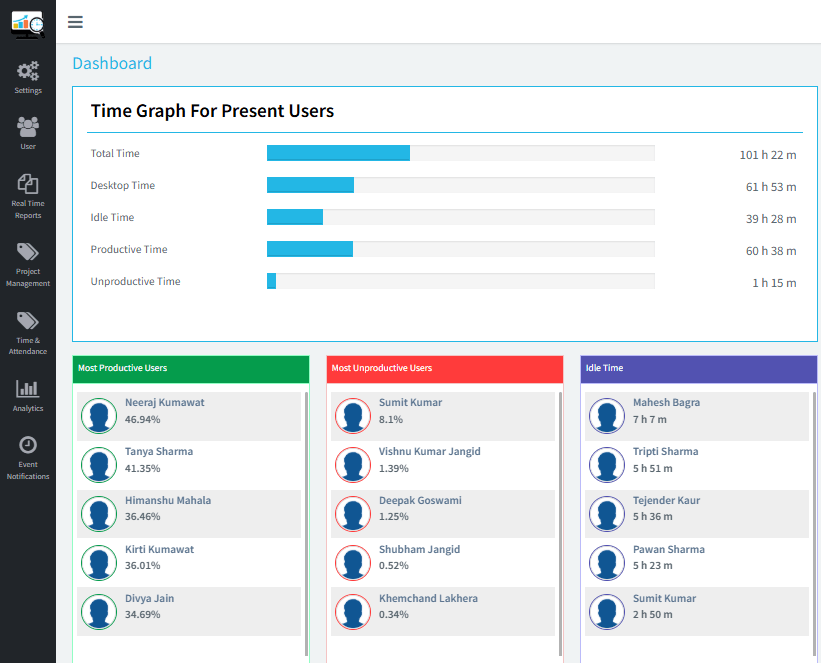
Best for: Businesses that want time tracking, attendance, employee productivity monitoring, and project management in one platform.
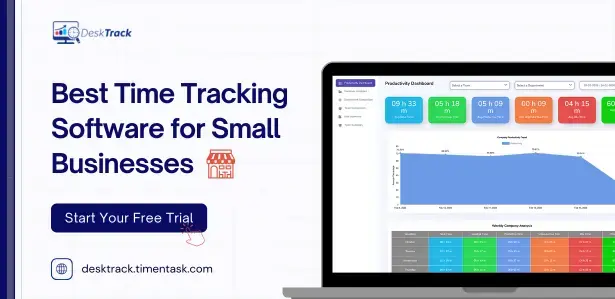
DeskTrack is an all-in-one workforce management solution designed to help small businesses improve productivity and streamline employee management. It automatically records work hours, tracks attendance, monitors application and website usage, and generates detailed productivity reports. Whether your team works from the office, remotely, or follows a hybrid model, DeskTrack provides real-time insights that help managers optimize performance and make informed decisions.
Key Features
- Automatic time tracking
- Attendance management
- Project tracking
- Application and website usage reports
- Screenshot capture
- Idle time tracking
- Productivity reports
- Team performance analytics
Pros
- Combines multiple workforce management features
- Suitable for office, remote, and hybrid teams
- Advanced productivity and attendance reports
- Centralized dashboard for easy monitoring
Cons
- Advanced monitoring features may be more than businesses needing only basic time tracking.
2. Clockify – Best Free Employee Time Tracking Software
Best for: Startups and businesses with limited budgets.
Clockify is a popular free time tracking solution that allows businesses to track employee work hours, projects, and billable time without significant upfront costs. Its simple interface and unlimited-user free plan make it an attractive option for startups and growing teams. However, organizations looking for advanced productivity monitoring or attendance management may need additional tools.
Pros
- Free plan available
- Unlimited users
- Easy-to-use interface
- Good reporting
Cons
- Limited employee productivity monitoring
- No built-in attendance management
3. Hubstaff – Best for Remote Teams

Best for: Distributed teams, field staff, and businesses with remote employees.
Hubstaff is designed for businesses managing remote or mobile workforces. It combines time tracking with GPS location tracking, activity monitoring, and payroll integrations, making it easier to manage employees working from different locations. It is particularly useful for companies that need visibility into remote team performance.
Pros
- GPS tracking
- Activity monitoring
- Payroll integrations
- Mobile app
Cons
- Monitoring features may not suit every workplace culture.
4. Time Doctor – Best for Productivity Monitoring
Best for: Companies focused on understanding employee productivity.
Time Doctor provides detailed insights into how employees spend their workday by tracking applications, websites, and productive versus unproductive time. It helps managers identify workflow bottlenecks and improve team efficiency. While it excels in productivity analytics, it offers fewer attendance management features than some competitors.
Pros
- Website and application tracking
- Productivity analytics
- Employee performance reports
Cons
- Limited attendance management compared to some alternatives.
5. Toggl Track – Best for Freelancers and Agencies
Best for: Freelancers, consultants, and creative agencies.
Toggl Track is known for its clean interface and simple approach to time tracking. It enables users to track project hours, generate reports, and manage billable time with minimal setup. Its ease of use makes it ideal for freelancers and agencies, although businesses seeking workforce monitoring capabilities may find it limited.
Pros
- Clean interface
- Simple time tracking
- Project-based reporting
Cons
- Basic workforce monitoring features.
6. QuickBooks Time – Best for Payroll Integration
Best for: Businesses already using QuickBooks for accounting.
QuickBooks Time is a robust time tracking solution that integrates seamlessly with QuickBooks accounting software. It offers GPS tracking, employee scheduling, and payroll synchronization, helping businesses simplify payroll processing. It is a strong choice for organizations already invested in the QuickBooks ecosystem.
Pros
- Payroll integration
- GPS tracking
- Scheduling
- Mobile app
Cons
- More suitable for QuickBooks users than businesses using other accounting systems.
Feature Comparison : Best Employee Time Tracking Software for Small Businesses
| Feature | DeskTrack | Clockify | Hubstaff | Time Doctor | Toggl Track | QuickBooks Time |
| Automatic Time Tracking | ✅ | ✅ | ✅ | ✅ | ✅ | ✅ |
| Attendance Tracking | ✅ | ❌ | Limited | ❌ | ❌ | ✅ |
| Productivity Monitoring | ✅ | Basic | ✅ | ✅ | Basic | Basic |
| Website & App Usage | ✅ | ❌ | ✅ | ✅ | ❌ | ❌ |
| Project Tracking | ✅ | ✅ | ✅ | Limited | ✅ | Limited |
| Screenshots | ✅ | ❌ | ✅ | ✅ | ❌ | ❌ |
Which Software is Best Based on your Business Needs?
| Business Need | Recommended Software |
| Best Overall | DeskTrack |
| Best Free Software | Clockify |
| Best for Remote Teams | Hubstaff |
| Best for Productivity Monitoring | Time Doctor |
| Best for Freelancers | Toggl Track |
| Best for Payroll Integration | QuickBooks Time |
How to Choose the Right Employee Time Tracking Software
Before making your decision, consider these questions:
- Do you need only time tracking or a complete workforce management solution?
- Are your employees office-based, remote, or hybrid?
- Is attendance tracking important?
- Do you require project management features?
- Will the software integrate with your payroll system?
- Do you need employee productivity reports?
- How many employees will use the software?
- Does the pricing fit your budget?
Conclusion
The best employee time tracking software depends on your organization’s workflow, budget, and management style. Clockify is a practical choice for businesses that need a free solution, Hubstaff is well suited for remote teams, Time Doctor excels in productivity analytics, Toggl Track works well for freelancers, and QuickBooks Time integrates effectively with payroll systems. For businesses seeking an all-in-one solution that combines automatic time tracking, attendance management, employee productivity monitoring, and project tracking, DeskTrack is a strong option to evaluate alongside these established alternatives.
Frequently Asked Questions (FAQ)
Ans. The best software depends on your priorities. Clockify is a good choice for businesses seeking a free time tracker, while Hubstaff and Time Doctor provide advanced productivity monitoring. Businesses looking for a solution that combines time tracking, attendance, productivity insights, and project tracking may find DeskTrack to be a suitable option. Ans. Free software can be sufficient for basic time tracking. However, businesses that need attendance management, project tracking, or productivity analytics often benefit from more comprehensive solutions. Ans. Hubstaff is commonly chosen for GPS and remote workforce management, while DeskTrack provides automatic time tracking and productivity reporting for office, remote, and hybrid teams. Ans. Yes, Time tracking software helps businesses understand how work hours are spent, identify workflow bottlenecks, improve project planning, and reduce manual payroll errors.time-tracking-for-small-business