Try DeskTrack FREE for 15 days — No credit card required. Sign Up Now

Top 10 Knowledge Base Software in 2026: Reviewed & Compared

Knowledge Base Software

Employees running here and there to find the relevant information, data scattered, and chaos and confusion everywhere. This is the situation with every business that has not yet implemented a knowledge base software or is still looking for the ideal tool to organize business information. If you are also one of them, then you have found your ideal knowledge management software in this blog. Let’s get started.  

live-demo

Top 10 Knowledge Base Software for 2026: Summarized

In a hurry? No problem. We have got you covered with a summary of the top 10 knowledge base software solutions for 2026.

Software Name Best For Most Affordable Paid Plan User Rating
DeskTrack Best overall $5.99/user/month 5/5
Stonly Interactive knowledge bases Quote on contact 4.3/5
Zoho Desk Combining AI and self-service $4.68/user/month 4.5/5
Trainual Internal knowledge Quote on contact 4.8/5
Guru AI search $25/user/month 4.9/5
Monday Service AI-powered knowledge management $26/user/month 4.6/5
iSpring LMS Removing information organization silos $4.46/user/month 4.7/5
Desk365 Turning tickets into help articles $12/agent/month 4.9/5
Notion Team wikis $10/user/month 4.7/5
Confluence Team collaboration $5.42/user/month 4.5/5

How to Choose Ideal Knowledge Base Software for Your Business?

If you have the time, resources, and teams for it, here’s what you should look for when choosing the ideal knowledge base software for your business. Moreover, these prerequisites even apply to your search for the ideal time tracking software with screenshots

  • Scalability
  • Integrations
  • Customizablity
  • Ease of use
  • Onboarding and implementation support
  • Cost
  • Security safeguards
  • Software support

Top 10 Knowledge Base Software for 2026

In case you lack the time to research the best knowledge database software, we did that part for you. Here’s our shortlist of the top 10 knowledge base software for 2026. 

  • DeskTrack
  • Stonly
  • Zoho Desk
  • Trainual
  • Guru
  • Monday Service
  • iSpring LMS
  • Desk365
  • Notion
  • Confluence 

1. DeskTrack – Best Overall

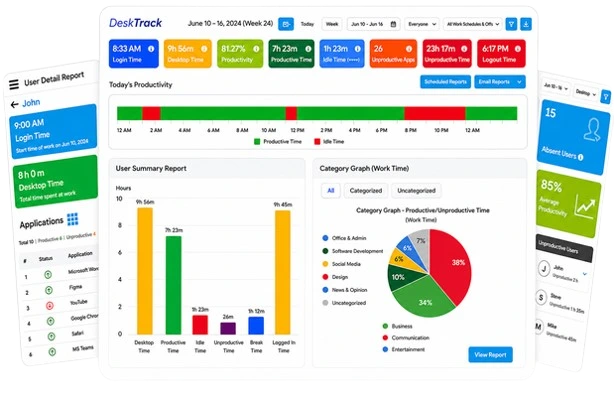
DeskTrack is primarily an employee monitoring software solution. However, its information management functionality is also top-notch. The tool can store large amounts of employee data, such as their work activity logs, hours, and much more. Likewise, pulling up the right data is also simple with its user-friendly dashboards and search filters.     

Key Features:

  • Configurable KPIs
  • Search filters to find the exact data that you are looking for within seconds.
  • A large cloud database to store employee information with added security
  • Configurable user information
  • Editable leave requests and adjustments
  • Reports, analytics, and insights  

2. Stonly – Best for Interactive Knowledge Bases

Stonly made it to our list because of how it tailors interactive knowledge guides that adjust to every user’s preference. With this information management tool, you can break down complex processes into simpler step-by-step workflows. 

Key Features:

  • Knowledge base content editor
  • Contextual in-app help
  • Insight & analytics dashboard  

3. Zoho Desk – Best for Integrating Self-Service & AI

Not only is Zoho Desk an advanced knowledge database software solution, but it’s also AI-powered. Yes, you read that right. Its AI assistant helps a lot in content organization and provides instant customer support.     

Key Features:

  • Omnichannel support
  • Customizable dashboards
  • Automation tools

Read Also: 10 Best Attendance Management System Software for 2026

4. Trainual – Best for Internal Knowledge

The reason you see Trainual here is because of how it makes tutorials and learning easily accessible. Its AI-powered search, again, makes it faster to find answers without rummaging through multiple files and folders. 

Key Features:

  • AI-powered content generation
  • Document importing capabilities
  • Customizable templates

5. Guru – Best for AI Search

Guru’s AI-powered knowledge management software collects all your business data and interconnects it. This way, your information doesn’t remain scattered anymore, making it quick to find when you need it the most. 

Key Features:

  • AI content assist
  • Announcements
  • AI-recommended experts

6. Monday Service – Best for AI-Powered Knowledge Management

As the name suggests, this knowledge base software is your perfect companion to centralize the data of your business. Overall, it streamlines service delivery via:

Key Features:

  • Automation
  • Predictive insights
  • Document management

7. iSpring LMS – Best for Removing Information Organization Silos

This cloud-based online training platform is one of the best for businesses of all sizes. From onboarding to offboarding, it has the right information for every stage of an employee’s journey.

Key Features:

  • Personalized development plans
  • Gamification elements
  • Customizable branding

8. Desk365 – Best for Turning Tickets into Help Articles

Want to automate workflows and enhance productivity? Desk365 might be the ideal helpdesk software solution for you. Check out its key features below.

Key Features:

  • Category-level access
  • Instant search
  • Drag-and-drop organization

9. Notion – Best for Team Wikis

Notion’s workspace software is ideal for large businesses and teams, as it brings together project management, knowledge sharing, and note-taking into a single platform.   

Key Features:

  • Document management
  • Version history
  • Offline access

10. Confluence – Best for Team Collaboration

You get a centralized space for creating and sharing content with Confluence. That makes this knowledge base software a good tool for collaboration.  

Key Features:

  • A rich text editor
  • Page versioning supported
  • Multiple templates 

check-prices

What is Knowledge Base Software?

Knowledge base software, also known as knowledge management software, is a centralized information database for businesses to collect, store, categorize, and organize their data. The tool’s search functionality and filters make it even simpler and quicker to find the most relevant information.     

Key Features of Knowledge Base Software

These are the key functionalities that make knowledge database tools work.

  • Search Functionality: The first intent of knowledge database software is to eliminate information silos. Since the software correctly sorts your data, searching it automatically becomes simpler. Furthermore, filters make it even faster for you to find the most relevant data. 
  • Content Categorization: With the right knowledge software deployed, your content will also be stored under the correct index. This makes it easier to find the most relevant information. 
  • User Access Controls: Not everyone should have access to another person’s information within your organization. Thus, we recommend looking for a business database tool that provides user access permissions. 
  • Customizable Templates: In case you don’t know where to start or just want to save more time, you can use customizable templates available in your knowledge base software.  
  • Reporting & Analytics: This functionality is for getting insights into how your employees interact with the knowledge base. Overall, this helps you optimize content to suit all your teams’ requirements. 
  • Feedback Collection: This feature helps resolve any issues you have with the tool faster. Since you will be directly submitting feedback, there will be minimal calling, and the app will be improved for all customers. 
  • Community Forums: These forums have useful information about the knowledge tool, including updates, bug fixes, usage guides, and more. 
  • Multilingual Support: This ensures that everyone can easily understand and use the software. Multilingual support is a great feature for global customers and workers who can’t understand English, no matter how hard they try. 
  • Content Version Control: This feature ensures that regardless of the version in which you made the original content, it will be accessible on even the latest version of the tool. A convenient functionality if you ask us.

Read Also: Productivity vs Efficiency: Know the Difference

How Knowledge Base Software Benefits Your Business

Implementing an ideal knowledge tool in your organization will provide you with these benefits. 

  • Improved Information Access: With your knowledge base system in place, there is no need to run here and there to get the data you need. The most relevant information becomes one search away.
  • Consistent Support Experience: Your customers will also enjoy consistent support because you will have the right information needed to solve their issues. Especially when you need it the most. 
  • Increased Collaboration: Since there will be no hassle in finding the right information, your teams can easily collaborate on work. This will improve efficiency, productivity, and profitability. Not drastically, though.  
  • Better Decision-Making: Having real-time insights into your content helps you make better decisions to make it more relevant to your audience. Another way to make better decisions to improve efficiency is to use workforce management software.
  • Scalability: Since the knowledge management software is scalable to adapt to your growing business needs, you won’t have to think about investing in other tools. This saves you a lot of money.
  • Content Accuracy: Thanks to insights into how your customers interact with your brand information and content, you will have no hassle optimizing it to suit the new market trends.    

Contact us

What is Trending in Knowledge Base Software?

Here’s what’s new in the world of knowledge base software and solutions.

  • AI-Driven Content Suggestions: AI is the latest trend in everything. Whether it’s the best employee productivity tools or knowledge base software. Integrated artificial intelligence tools analyze content better and even provide smart suggestions to make it more relevant.    
  • Personalized User Experiences: The latest knowledge base software can be personalized to suit the preferences of your employees. For example, multi-language access for every individual user. 
  • Enhanced Insights & Analytics: With the integration of modern technology, such as AI, your knowledge management tool can even give you deeper and more detailed insights into your content’s performance. 
  • Voice Search: Searching for relevant information becomes even better with the voice search capabilities of knowledge management software for businesses. It is a useful upgrade for busy managers, as they just have to speak into the microphone to get the data they want.
  • Community-Driven Content Creation: This upgrade helps tailor, for example, your brand content to different communities. What this does is help you market your products and services globally without hurting the sentiments of your consumers.  

DeskTrack Makes Your Workday More Enjoyable

A productive workday is more enjoyable, and that’s what DeskTrack aims for. Implementing the tool indirectly makes the workday more satisfactory for you and your employees. It monitors and maximizes the productivity levels of your employees where it matters. Improve employee productivity beyond your expectations with the all-in-one workforce management solution. 

Frequently Asked Questions (FAQ)

Q. Compare Different Types of Knowledge Base Software Solutions?

Ans. Knowledge management software solutions for businesses have 2 types.

  • External knowledge base software helps with customer support and services. 
  • Internal knowledge base software helps you tackle your employees’ need for information.

Q. What are the key Features to Look For in Knowledge Base Software?

Ans. Here’s what makes knowledge management software solutions work. 

  • Search Functionality
  • Content Categorization
  • User Access Controls
  • Customizable Templates
  • Reporting & Analytics
  • Feedback Collection
  • Community Forums 
  • Multilingual Support 
  • Content Version Control

Q. Which is the Best Knowledge Base Software for Small Businesses?

Ans. These are our top picks for the best knowledge management software for small businesses.

  • DeskTrack
  • Stonly
  • Zoho Desk
  • Trainual
  • Guru
  • Monday Service
  • iSpring LMS
  • Desk365
  • Notion
  • Confluence 

Leave a Reply

Your email address will not be published. Required fields are marked *

Employee Monitoring

Improve employee focus and efficiency.

Get Free Trial

Screenshot Monitoring

Prevent insider threats and optimize workflows.

Get Free Trial

Productivity Monitoring

Know how productive your employees are.

Get Free Trial

Desktop Monitoring

Get real-time insights into the online and offline activities.

Get Free Trial

Field Employee Tracking

Know what your teams are doing on and off the field.

Get Free Trial

Attendance Software

Prevent absenteeism and boost productivity.

Get Free Trial

Search Blogs

Recent Blogs

Productivity vs Efficiency: Know the Difference

Need to know the difference between efficiency and productivity? We will tell you all you require knowing. Plus, we will also reveal the top way to maximize bot...

10 Best Attendance Management System Software for 2026

Seeking the ideal attendance management system for your new business in 2026? It’s right here. We will help you find the top attendance tracker for you. 

What is Insubordination at Work & How to Deal with it in 2026?

Are you seeking the most effective way to address insubordination at work? It’s right here. We will explain what work insubordination is and how to manage it...