Picture this. It’s Thursday afternoon. A client emails asking for a delivery update on a campaign that was supposed to ship Tuesday. You open Slack. There are 63 unread messages across three channels, half of which are people asking each other the same question in different rooms. Someone shared a Google Sheet three weeks ago that might have the answer but no one’s updated it since the second sprint started. Your team lead is in a meeting. The deadline is tomorrow.
This isn’t a story about a dysfunctional team. It’s a story about what happens when good teams try to run real projects without the right project management software in place.
In 2026, the tools available to fix this problem are better than they’ve ever been. The choice, however, is harder because there are more of them, they all claim to do everything, and the gap between what a tool promises in a demo and what it actually delivers in month three is wider than most people expect.
This guide cuts through that. We evaluated 25 of the leading project management software options available right now looking at feature depth, real-team usability, pricing honesty, and the specific problems each tool actually solves so you can make the decision with clear eyes.
DeskTrack leads this list. Not because it’s the flashiest or the most talked-about on LinkedIn. Because for teams that need project tracking, time visibility, and workforce accountability in a single place, nothing else in this list does all three without forcing you to stitch together a dozen integrations.
Quick Summary: Which Project Management Software is Right for You?
| Tool | Best For | Free Plan | Built-in Time Tracking | Key Differentiator |
| DeskTrack | IT, agencies, consulting, remote teams | Yes (limited users) | Yes, automatic capture | Only tool combining PM + productivity monitoring + billable time in one platform |
| Asana | Cross-functional teams, marketing | Yes (limited features) | No (via integration) | Portfolio and Goals features for company-wide alignment |
| ClickUp | Tech teams, tool consolidation | Yes (generous) | Yes, native | Feature breadth; attempts to replace every other tool |
| Monday.com | Operations, sales, HR workflows | No | No (via integration) | Customisable work OS with accessible automation |
| Jira | Software development, agile teams | Yes (up to 10 users) | No (via integration) | Deepest agile/Scrum support in the market |
What is Project Management Software?
Project management software is a digital platform that helps teams plan work, assign tasks, track progress, manage deadlines, and collaborate all in one place. It replaces the fragmented combination of emails, spreadsheets, and messaging apps that most teams outgrow within their first year of real operational scale.
Modern project management software goes well beyond simple to-do lists. The better platforms handle resource allocation, workload balancing, time tracking, budget monitoring, and reporting giving managers the visibility they need to catch problems before they become crises. For distributed and remote teams especially, a good PM tool is the operational backbone that keeps everyone aligned without requiring a daily standup to find out where things actually stand.
What does project management software actually do day-to-day?
In practice, it becomes the single source of truth for your team’s work. Task assignments, deadlines, dependencies, time logs, file attachments, and status updates live in one place so when a client asks for a progress update, the answer is one click away instead of three Slack messages and a prayer.
Why Spreadsheets and WhatsApp Don’t Cut It Anymore
Most teams don’t start with a project management tool. They start with a shared spreadsheet and a WhatsApp group. For the first few months maybe even the first year this works fine. Projects are small, the team is tight, and everyone can hold the full picture in their head.
Then something changes. A second client. A third project running simultaneously. A hire or two. And suddenly the spreadsheet has seventeen versions saved in different folders, nobody can agree on which one is current, and the WhatsApp group has become so noisy that actual decisions are getting buried under memes and off-topic threads.
The breakdown usually surfaces through the same seven problems, every time:
Project delays that nobody saw coming because no one had visibility into how tasks were actually progressing until it was too late to course-correct. A milestone that looked fine on a spreadsheet turns out to have been stuck for six days because a dependency nobody documented wasn’t cleared.
Lack of accountability — when tasks live in a shared sheet, the psychological ownership is murky. “I thought Priya was doing that.” “I thought you were.” In a PM tool with clear assignees and due dates, that conversation disappears.
Missed deadlines — usually a downstream effect of the above. When no one is tracking actual hours spent versus hours estimated, deadline slippage is invisible until it’s a crisis.
Inaccurate time tracking — this one hits revenue directly. Teams doing client work frequently under-bill because they have no record of actual hours worked. The time lived in people’s heads and never made it onto an invoice.
Budget overruns — related to the above, but broader. When you can’t see what’s being spent on a project in real time, you find out you’ve overrun when the project is already over.
Poor resource allocation — one person is slammed while another has capacity. Nobody knows, because there’s no single view of who is working on what.
Manual reporting — a project manager spending three hours every Friday building a status report from scattered inputs is a project manager not doing anything else. That time adds up. According to the Project Management Institute’s 2024 Pulse of the Profession report, organisations with poor project visibility waste an average of 11.4% of investment due to poor performance.
The tools in this list exist to solve exactly these problems. The question is which one solves the combination that matters most to your team.
What to Look For Before You Choose
The wrong way to evaluate project management software is to open each website and read the features list. Every tool claims to do everything. The right way is to start with the problems you actually have and work backwards.
That said, there are five criteria that separate the tools worth your time from the ones that look good in a demo and frustrate people six months in.
Real-time visibility- Can you tell, right now, how far along every active project is? Not based on what team members manually typed into a status field yesterday based on actual, up-to-date work data. This is where tools with automatic time capture (rather than manual time entry) pull ahead significantly.
Task and dependency management that doesn’t require a training course- Some tools and Jira is the obvious example have enormous power. They also have enormous complexity. If your team spends more time managing the PM tool than doing the actual work, something has gone wrong. Look for tools where adoption happens without a two-day onboarding session.
Time tracking that’s built in, not bolted on- A surprising number of PM tools treat time tracking as an afterthought a field you fill in manually at the end of the day. For any team doing client billing, project costing, or productivity analysis, that’s not enough. You want automatic capture, or at minimum, a timer that runs while the work happens.
Reporting that answers questions humans actually ask. “How profitable was this project?” “Which team member is running for hours?” “Which clients are generating the most rework?” These are the questions managers actually need answered. If your reporting module requires an Excel export and two hours of manual formatting to answer them, it’s not serving you.
Pricing that doesn’t punish growth. Several tools in this market use per-seat pricing that becomes genuinely expensive once a team reaches 20–30 people. Check the pricing at the size you’ll actually be in 18 months, not the size you are today. The sticker shock of discovering your PM tool costs as much as a junior hire is real, and it happens more often than vendors advertise.
Pro Tip: Before trialling any tool, map out the three reporting questions you ask most frequently as a manager. Then test whether the tool can answer each one in under 60 seconds without manual work. That single test will eliminate half your shortlist.
Top 25 Project Management Software for 2026
1. DeskTrack
There’s a category of team that most project management tools weren’t really built for: the ones who need to know not just what is being worked on, but how long it’s actually taking, whether the time is being spent productively, and whether the project will be profitable when it’s done. For those teams IT firms, agencies, consulting practices, any business where time is the raw material of revenue DeskTrack is where the conversation should start.
DeskTrack began as an employee productivity and time tracking platform and evolved into a full project management solution. That origin matters, because it means time tracking isn’t a feature tacked onto a PM tool it’s the foundation everything else is built on.
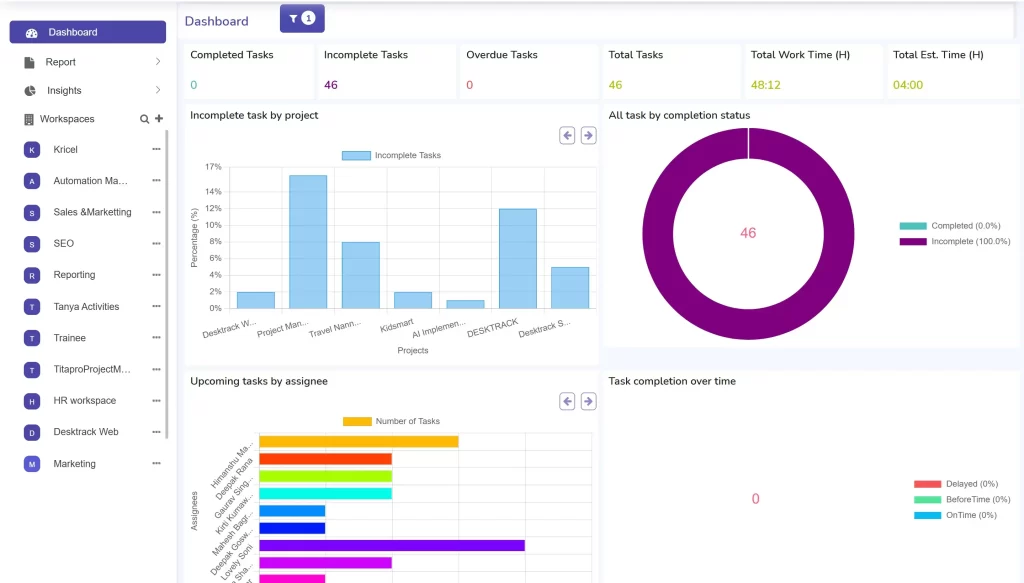
Here’s what that looks like in practice. When a team member opens their laptop and starts working on a project task, DeskTrack is already capturing the activity apps used, websites visited, time elapsed. There’s no “remember to log your hours” culture to build. The data exists automatically. By the time a project wraps, managers have a complete record of actual hours worked per task, per person, and per project and can compare that against the estimate with a single report.
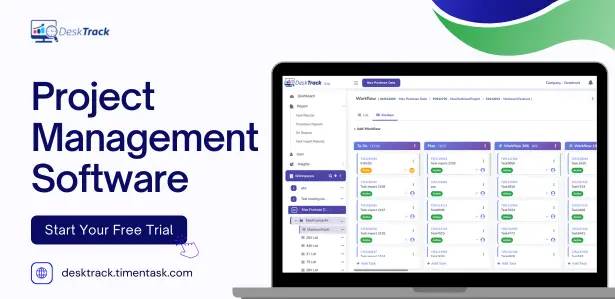
The project management module itself handles task creation, assignment, deadlines, and status tracking in a clean interface that most team members get comfortable with in under a day. What distinguishes it from pure-play PM tools is the layer of productivity intelligence underneath: you can see not just that a task is 70% complete, but how many hours have been invested in getting there, which applications dominated that time, and whether the pace suggests the deadline is realistic.
For IT and software development teams, DeskTrack supports sprint-level task management with billable hours tracking so the question “how many hours did we actually bill this month versus how many we estimated?” becomes a report, not a forensic investigation. Marketing agencies use it to manage client projects alongside time-to-profitability reporting, which transforms the retrospective conversation from “I think we made money on that one” to “we made 22% margin and here’s where the overrun came from.”
Construction managers appreciate the attendance and field-time tracking, which brings site-level accountability into the same platform as project timelines. Consulting firms get automated timesheets that feed directly into client billing. BPO and call centres use it for productivity monitoring tied to project-based work allocation. For remote and hybrid teams, the real-time activity view replaces the management anxiety that comes from not being able to see who’s actually working.
Pricing is structured to be accessible for small teams and scale cleanly to enterprise, with role-based hierarchy management and multi-workspace support for larger organisations.
Best for: IT firms, agencies, consulting, remote teams any business where billable hours, project profitability, and employee productivity need to live in the same platform.
Standout feature: Automatic time capture with app and URL tracking, tied directly to project and task records. Free plan: Yes, with limited users.
Pricing: Starts from a competitive per-user rate; enterprise pricing available on request.
2. Asana
Asana is the PM tool most teams land on when they outgrow spreadsheets for the first time. The interface is clean, task management is intuitive, and the learning curve is genuinely low. Project views list, board, timeline, calendar give teams multiple lenses on the same work.
Best for: Marketing teams, cross-functional project teams, organisations running multiple parallel workstreams. Key features: Task dependencies, project templates, automation rules, workload view, Goals for company-wide OKR tracking. Reporting is solid, though it leans toward project health rather than time economics.
What we like: The portfolio view for managing multiple projects simultaneously is one of the best in the category. Pricing: Free tier available; paid plans from around $10.99/user/month.
3. Monday.com
Monday.com built its reputation on visual flexibility. The core concept a “work OS” where every team can build their own workflows resonates with operations leaders who’ve been burned by tools that force their processes into a fixed structure.
Best for: Operations teams, sales pipeline management, HR workflows, and any team that needs a highly customisable workspace.
Key features: Customisable column types, automations, integrations with 200+ tools, dashboards that aggregate data across boards. The visual boards are genuinely satisfying to use.
What we like: The automation builder is one of the most accessible in the market you don’t need to be technical to set up meaningful workflow triggers.
Pricing: No meaningful free plan; paid plans from around $9/seat/month for small teams.
4. ClickUp
ClickUp’s pitch is essentially “replace every other app.” Ambitious. In practice, it delivers more of that promise than most competitors but the breadth of features can overwhelm teams who just want to manage projects without choosing between 11 different task views.
Best for: Tech-forward teams, startups, and teams actively trying to consolidate tools.
Key features: Docs, whiteboards, sprints, goals, time tracking (built in), chat, custom fields, and more views than you’ll ever need. The native time tracking is better than most PM tools offer.
What we like: Genuinely impressive feature-to-price ratio, especially on the free plan.
Pricing: Free plan is among the most generous in the category; paid from $7/user/month.
5. Jira
Jira is the industry standard for software development teams. Full stop. If your team runs agile, uses story points, needs custom workflows per project type, and has the appetite to configure a complex tool, Jira delivers more depth than almost anything else in this list.
Best for: Software development, DevOps, QA teams specifically those running agile or Scrum methodologies. Key features: Sprint planning, backlog management, bug tracking, roadmaps, advanced workflow automation, deep developer tool integrations (GitHub, Bitbucket, Confluence).
What we like: The depth of agile support is unmatched for engineering teams.
Pricing: Free for up to 10 users; standard from $7.75/user/month.
6. Trello
Honestly, Trello is better suited for personal productivity and small informal teams than it is for actual organisational project management. That’s not a knock it’s the right tool for the right context. The Kanban board is elegant, setup takes minutes, and for tracking a handful of ongoing tasks, it’s hard to beat.
Best for: Freelancers, very small teams (under 5), personal project tracking, simple workflows.
Key features: Kanban boards, Power-Ups (integrations), Butler automation for repetitive tasks, mobile app that’s genuinely good.
What we like: You can have a working board set up before your coffee finishes brewing.
Pricing: Free plan is usable; paid from $5/user/month.
7. Notion
Notion sits in an interesting middle space it’s simultaneously a wiki, a database, a project tracker, and a document editor. For teams that think in connected information rather than linear task lists, it clicks. For teams that just need to track a project, it can feel like being handed a blank canvas when you want a template.
Best for: Knowledge-heavy teams, product teams, startups that want documentation and project tracking in one place.
Key features: Databases with multiple views, linked records, collaborative docs, templates, AI writing assistant built in.
What we like: The flexibility genuinely is remarkable you can build almost any workflow if you invest the setup time.
Pricing: Free for individuals; teams from $8/user/month.
8. Basecamp
Basecamp takes a deliberately opinionated stance: fewer features, simpler structure, less noise. After years of feature-creep fatigue in the PM software market, that approach resonates with a specific kind of team typically agencies and small businesses that want a tool people will actually use, not the most powerful tool available.
Best for: Agencies, remote-first teams, small businesses that prioritise communication and simplicity over feature depth.
Key features: To-dos, message boards, schedules, automatic check-ins, file storage, client portals. Everything in one flat structure.
What we like: The client portal feature genuinely reduces email back-and-forth with external stakeholders.
Pricing: Flat $15/user/month (or $299/month for unlimited users a significant value at scale).
9. Wrike
Wrike positions itself in the enterprise market, and it earns that positioning. The reporting capabilities, approval workflows, and resource management depth put it ahead of most mid-market tools.
Best for: Enterprise teams, professional services firms, marketing operations at larger companies.
Key features: Gantt charts, workload charts, request forms, advanced analytics, Wrike Proof for visual proofing. Strong on workflow automation.
What we like: The resource management view gives visibility across team capacity in a way that genuinely helps managers allocate work intelligently.
Pricing: Free for limited use; paid from $9.80/user/month.
10. Smartsheet
Smartsheet works for people who think in spreadsheets but need the collaboration and automation capabilities that Excel simply doesn’t offer. The grid-based interface feels familiar while adding project management structure underneath.
Best for: Operations teams, project managers from a finance or operations background, teams running complex cross-departmental projects.
Key features: Grid, Gantt, card, and calendar views, workflow automation, resource management, dashboards. What we like: The formula-based approach feels native to teams who live in Excel the adoption barrier is lower than most PM tools.
Pricing: No free plan; from $9/user/month.
11. Teamwork
Teamwork is built specifically for client-facing teams agencies, consultancies, any team that runs projects for external clients rather than internal stakeholders. The client invoicing, retainer management, and profitability tracking features go further than almost anything else in this price range.
Best for: Creative agencies, digital agencies, consulting firms doing client project work.
Key features: Time tracking, invoicing, client portals, retainer management, project profitability reporting, resource scheduling.
What we like: The client portal and invoicing integration makes it feel like one platform instead of a PM tool plus a billing tool plus a CRM.
Pricing: Free for up to 5 users; paid from $5.99/user/month.
12. Zoho Projects
Zoho Projects makes the most sense if you’re already in the Zoho ecosystem CRM, Books, Desk, or any of the other Zoho applications. The native integrations make it stickier than it would otherwise be. As a standalone PM tool, it’s solid but doesn’t stand out dramatically.
Best for: Businesses already using Zoho CRM, Zoho Books, or other Zoho products.
Key features: Task management, Gantt charts, issue tracking, time tracking, resource utilisation, budget tracking. What we like: The pricing is genuinely competitive, especially for Indian market teams where Zoho has deep local support infrastructure.
Pricing: Free for up to 3 users; paid from $4/user/month.
13. Microsoft Project
Microsoft Project is the legacy standard and legacy is the right word. It’s powerful, it’s deeply capable for complex project planning, and it integrates with the Micros
oft 365 ecosystem in ways that matter for enterprise IT teams. It also carries significant complexity and a pricing structure that doesn’t make sense for smaller organisations.
Best for: Enterprise IT project management, construction project planning, large-scale programme management. Key features: Advanced Gantt charts, resource management, portfolio project management, Power BI integration. What we like: For project managers with professional PM certifications, the depth maps to industry-standard methodology.
Pricing: From $10/user/month for cloud version.
14. Airtable
Airtable is a database first, project management tool second and understanding that distinction matters before adopting it. The ability to structure information as relational data gives it capabilities that traditional PM tools can’t match for certain use cases, particularly content operations, product catalogues, and cross-referenced workflows.
Best for: Content teams, product operations, data-heavy project workflows, teams who need flexible database views.
Key features: Relational database structure, multiple view types, automations, extensions marketplace, Interface Designer.
What we like: The Interface Designer lets non-technical users build custom dashboards on top of shared data. Pricing: Free plan available; paid from $10/seat/month.
15. Linear
Linear quietly became the favourite PM tool of engineering teams who found Jira too heavy. The speed of the interface keyboard-first, fast load times, minimal friction is a genuine differentiator in a category where most tools feel like they were designed by a committee.
Best for: Software development teams, product engineering, fast-moving startups.
Key features: Issue tracking, cycle management (Linear’s take on sprints), roadmaps, triage workflows, Git integrations.
What we like: The interface speed. It sounds trivial. After six months of using a tool where opening an issue takes two seconds, you’ll notice it’s not trivial at all.
Pricing: Free for small teams; paid from $8/user/month.
16. Height
Height is a newer entrant that’s earned attention for its AI-powered task management features. Built-in AI that can generate subtasks, write task descriptions, and surface dependencies makes it worth watching. Still maturing, but the trajectory is promising.
Best for: Tech-forward teams willing to adopt early-stage tools for productivity gains.
Key features: AI-assisted project management, custom attributes, multi-layer task hierarchies, collaboration threads.
What we like: The AI integration feels genuinely useful rather than bolted-on.
Pricing: Free plan available; paid plans competitive.
17. Nifty
Nifty targets the “too many tabs open” problem project management, docs, chat, and goals in a single interface. It’s positioned as a ClickUp alternative for teams who want tool consolidation without ClickUp’s complexity ceiling.
Best for: Small to mid-sized teams wanting an all-in-one workspace without the learning curve.
Key features: Milestones, task management, doc collaboration, team chat, reporting.
What we like: Milestones as a first-class feature (rather than an afterthought) give project-level progress visibility in a way most tools don’t prioritise.
Pricing: Free plan available; paid from $3.90/user/month.
18. ProofHub
ProofHub is particularly strong for teams that do visual work design, marketing production, content creation. The proofing and annotation features reduce the email back-and-forth around creative feedback significantly.
Best for: Design agencies, marketing production teams, content teams doing visual work.
Key features: Online proofing, discussion threads, custom roles, Gantt charts, time tracking, project reports.
What we like: Flat pricing (not per-user) makes budgeting predictable as teams grow.
Pricing: Flat plans from $45/month genuinely good value at 20+ users.
19. Hive
Hive takes a flexible approach to project views teams can switch between Gantt, Kanban, table, and calendar depending on how they prefer to work. The AI features, introduced in recent releases, are still finding their footing but show real promise for repetitive task management.
Best for: Teams that switch between project methodologies, agencies managing varied client work.
Key features: Multiple project views, time tracking, analytics, AI assistant, integrations with Slack and Zoom. What we like: The native time tracking and the analytics module work well together for teams needing client billing data.
Pricing: Free plan available; paid from $5/user/month.
20. Todoist for Teams
Most people know Todoist as a personal task manager. The Teams version extends this into shared projects, delegation, and collaboration. It’s not a full PM suite but for small teams with relatively simple project needs, the familiar interface and low friction make it a reasonable choice.
Best for: Small teams (under 15), professional services, teams migrating from personal task managers.
Key features: Task delegation, shared projects, recurring tasks, priority flags, productivity tracking.
What we like: The simplicity. Not every team needs a project management platform some need a really good task manager, and Todoist delivers that.
Pricing: Free tier; Business from $6/user/month.
21. Paymo
Paymo is built for the invoicing-to-project cycle, making it a natural fit for freelancers and small agencies who need to track time, bill clients, and manage projects without stitching together separate tools.
Best for: Freelancers, small agencies, consultants who invoice by the hour.
Key features: Time tracking, invoicing, project templates, Kanban boards, Gantt charts, leave management.
What we like: The time tracking to invoice workflow is seamless arguably the tightest in this list for pure client billing use cases.
Pricing: Free for one user; paid from $4.97/user/month.
22. Workzone
Workzone has been in the market longer than many of the tools in this list and it shows in the maturity of the feature set. The focus on project templates, request management, and workload balancing makes it solid for marketing operations and creative teams.
Best for: Marketing departments, creative teams, organisations with high project request volumes.
Key features: Project templates, task dependencies, time tracking, workload management, custom reporting.
What we like: The project request intake system reduces the “how do I submit a new project?” friction that marketing teams deal with constantly.
Pricing: From $24/user/month higher end, positioned as a premium option.
23. Freedcamp
Freedcamp is worth knowing about specifically for budget-conscious teams and startups that need solid project management basics without ongoing subscription costs. The free plan is among the most capable in the market.
Best for: Startups, non-profits, small teams with tight budgets.
Key features: Task management, milestones, time tracking, file sharing, Gantt charts (paid), invoicing (paid).
What we like: The breadth of the free plan it’s genuinely usable, not a crippled trial.
Pricing: Free plan robust; paid from $1.49/user/month.
24. GanttPro
The name telegraphs the focus. GanttPro is a Gantt chart tool that also handles broader project management and if Gantt-based planning is central to how your team manages complex, interdependent projects, it’s among the best-in-class for that specific job.
Best for: Construction, engineering, event management, any team managing complex timelines with many dependencies.
Key features: Interactive Gantt charts, task dependencies, resource management, project templates, export capabilities.
What we like: The Gantt interface is genuinely the most polished and intuitive in the list for timeline-heavy projects.
Pricing: From $7.99/user/month.
25. Forecast
Forecast brings AI into resource planning and project scheduling in a way that’s ahead of where most tools are in 2026. It uses historical project data to predict timelines, flag resource conflicts before they happen, and surface risks early. Still newer to many teams, but the forward-looking feature set makes it a serious option for organisations that run many simultaneous projects.
Best for: Professional services firms, mid-to-large agencies, project management offices running portfolio-level operations.
Key features: AI-powered scheduling, resource management, time tracking, financial tracking, project health indicators.
What we like: The AI scheduling genuinely changes how managers think about capacity planning instead of reacting to overruns, they can anticipate them.
Pricing: From $29/seat/month premium positioned, but the ROI case is real for teams running 10+ simultaneous projects.
How DeskTrack’s Project Management Module Stands Apart
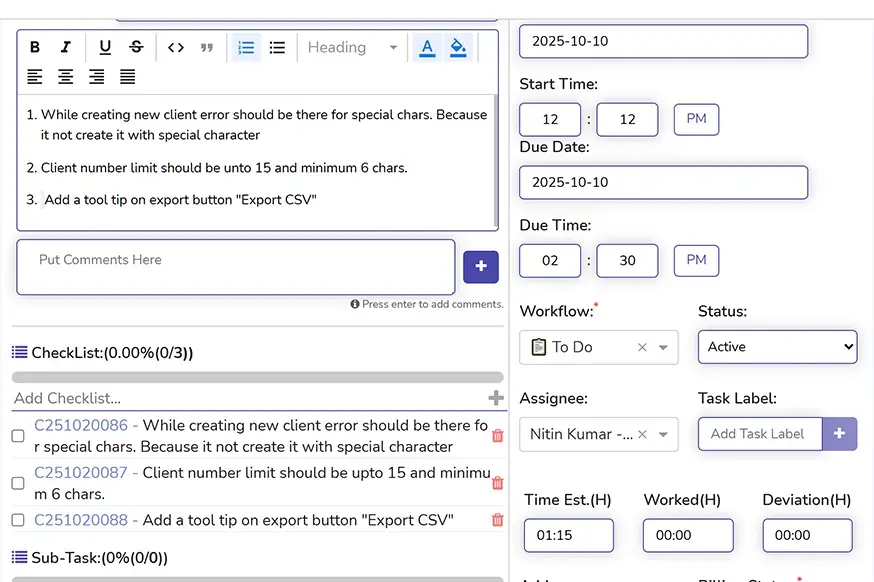
Most project management tools are built around the assumption that team members will accurately report their own time and progress. It’s a reasonable assumption until you work with real teams for long enough to know it doesn’t hold.
People forget to log hours. They underestimate time spent. They mark tasks complete before they’ve tied up loose ends. Not out of dishonesty out of the friction of manual reporting layered on top of actual work. When the day ends and someone asks you to estimate how long you spent debugging a specific issue, the honest answer is “I genuinely don’t remember.”
DeskTrack removes that problem at the source. The time capture is automatic. When a developer is in VS Code working on a sprint task, that time is being recorded tied to the project, the task, and the specific application being used. When a designer is in Figma on a client deliverable, the same thing is happening. No timers to start. No end-of-day memory exercise. The data is there, accurate, from the moment work began.
This changes what’s possible in project management in ways that matter:
Project profitability becomes a real metric, not an estimate. When you know the actual hours invested in a project not the rounded approximation from manual timesheets you can calculate margin honestly. For agencies and consulting firms, this is the difference between knowing which clients are profitable and guessing.
Deadline risk becomes visible early. If a task was estimated at 8 hours and 12 have already been invested with the deliverable still in progress, DeskTrack surfaces that. A manager can intervene, adjust scope, or reallocate resources before the deadline becomes a post-mortem.
The productivity data tells you what manual reporting misses. Which applications is the team actually spending time in? Is development time going into the right repositories? Is support time bleeding into delivery work? These are questions most PM tools can’t answer because they don’t have the underlying data. DeskTrack has it.
Did You Know? Teams using DeskTrack’s automatic time capture report that actual hours logged are on average 18–23% higher than what was manually self-reported meaning they were systematically underpricing client work before having accurate data.
For remote and hybrid teams specifically, the activity visibility replaces the ambient awareness that comes from being in the same office. Managers aren’t micromanaging they’re seeing what the data shows about work patterns, and using that to have more useful conversations about capacity and focus.
The attendance module connects to the project module, so HR and operations aren’t working from separate systems. Attendance exceptions, leave, and overtime all flow into the same platform that’s tracking project progress and billable time. For mid-sized and enterprise organisations, that consolidation reduces administrative overhead that most teams don’t realise they’re carrying until it’s gone.
Which Tool is Right for Your Business Size?
The honest answer is that business size is a proxy for the real question, which is: what problems are acute enough that you need software to solve them right now?
That said, size does correlate with certain patterns and those patterns suggest certain tools.
Small businesses (5–50 employees) usually need team visibility, simple task assignment, and accurate time tracking without a complex implementation. The priority is adoption speed a tool five people won’t use is worse than a simpler tool they’ll actually open every morning. DeskTrack works well here because the setup is fast and the automatic time capture removes the “remember to log your hours” enforcement problem that kills PM tool adoption in small teams. ClickUp’s free plan is worth a hard look too. Trello if the projects are genuinely simple.
Mid-sized businesses (50–500 employees) are dealing with department-level project management, resource conflicts across teams, and reporting that needs to roll up to leadership. At this scale, the question of whether time tracking integrates with project data becomes revenue-critical not just operationally useful. DeskTrack handles this well. Wrike and Teamwork are strong alternatives depending on whether your business is client-facing or primarily internal.
Enterprise businesses (500+ employees) need role-based access, multiple workspace management, executive dashboards, and the ability to manage a portfolio of projects not just individual ones. Governance, SSO, and security compliance become non-negotiables. DeskTrack’s enterprise tier covers this alongside the productivity monitoring and project profitability analytics that matter at this scale. Microsoft Project and Wrike are the other serious options for large-scale programme management.
Conclusion
In 2026, the teams that outperform their competitors aren’t working harder. They’re working with better information about where their time is actually going, which projects are actually profitable, and which problems need to be fixed before they compound.
Project management software gives you that information. The right project management software gives you all of it without requiring your team to spend 30 minutes a day feeding data into a system that should be doing the capturing automatically.
Most of the 25 tools in this list will help you manage projects better than a spreadsheet. DeskTrack will help you manage projects and understand your team’s time and productivity in ways the others simply don’t offer. That combination for IT firms, agencies, consulting practices, and any team where billable time is the business is worth 30 minutes of your time to see it in action.
Frequently Asked Questions
project-management-software
Ans. For teams that need project management, time tracking, and productivity monitoring in a single platform, DeskTrack is the strongest option in 2026. For teams with primarily collaborative project needs, Asana and ClickUp both offer excellent free tiers and strong task management. The “best” tool depends on what your team needs most — feature depth, simplicity, billing integration, or agile support.
Ans. Task management software focuses on individual to-do items, assignments, and personal productivity. Project management software encompasses the broader lifecycle — planning, resourcing, timeline management, budget tracking, team collaboration, and progress reporting. The distinction matters because a task manager tells you what to do; a project management platform tells you whether the project as a whole is on track, on time, and on budget.
Ans. DeskTrack combines automatic time tracking, task management, project reporting, and employee productivity monitoring in one platform. Teams can create projects, assign tasks, set deadlines, and track progress — while simultaneously capturing actual hours worked per task automatically. This gives managers both project visibility and productivity data, which most PM tools don’t offer together. The result is accurate project costing, better deadline prediction, and billable hours tracking that doesn’t depend on manual self-reporting.
Ans. Consistently, yes — with the caveat that implementation matters as much as the tool. The PMI’s research consistently shows that organisations using PM software complete more projects on time and within budget than those relying on informal coordination. The mechanism is straightforward: visibility into what’s being worked on and how progress is tracking enables earlier intervention when things go off-track.
Ans. Yes, DeskTrack offers a 14-day free trial with full access to the project management module, time tracking, productivity monitoring, and reporting features. No credit card required to start. For larger teams or specific use cases, a personalised demo is available to walk through the platform in the context of your workflow.