

Time Tracking Software That Fills Itself Out

Stop Wasting Time on Manual Employee Time Tracking. While other employee time tracking solutions rely on manual clicks or surveillance, DeskTrack stands out by having automated timesheets that log every hour.

Start Your 15-Day Free Trial

No Credit Card Needed * Set Up in 5 Minutes.

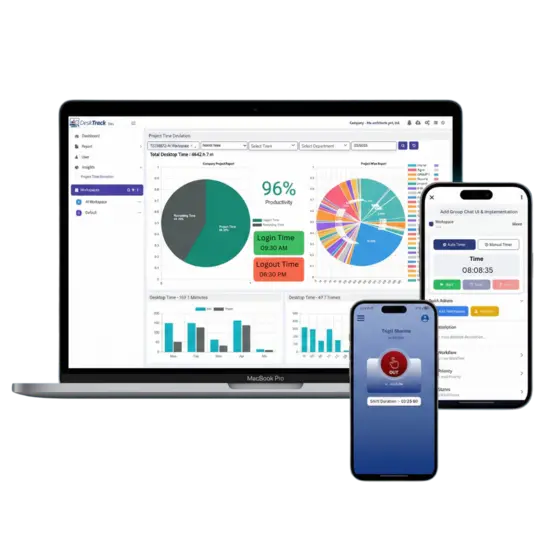
DeskTrack analytics dashboard displaying top applications and URLs usage with productivity category graphs for employees.

More Than 1000+ Companies Worldwide Trust DeskTrack

ajantapharmae
greycell
amura
signicent
trukker
markscan

Best Time Tracking Software: Features for Every Need

DeskTrack promises to offer features for every need and use case. Flexible to suit your needs. Scalable to your business growth. Our intuitive features effectively track time so that you don’t have to.

Feature Clockify ActivTrak Time Doctor DeskTrack
Best Time Tracking Software
Data Entry Manual Start/Stop Background Only Manual and automatic 100% Automatic
Activity Detail Basic Projects Screenshots Only Slightly detailed App, URL & File Names
Privacy Feel Trust-based “Big Brother” Privacy certified Transparency & Ownership
Bottom Line High Human Error Employee Turnover Intrusive monitoring Maximum Billable Hours

How Our Time Tracking Software Works?

Our time tracking software is flexible enough to blend with any workflow.

Agencies

For Agencies

Don’t Lose Billable Hours to Manual Entry Errors

Agencies survive by billing by the hour. Manual start/stop timers leave your team susceptible to forgetting to record smaller tasks, such as sending client emails, making quick file edits or answering unexpected phone calls, for which billable hours must be invoiced.

DeskTrack's automatic time tracking software captures every online and offline computer activity automatically. Our timesheet logging feature then logs every activity, giving agencies using DeskTrack an immediate 15-20% billable revenue increase as our software automatically captures work done on computers.

Managers feel relieved as they don’t have to chase timesheets anymore. Managers and employees can now go home on time.
Remote Teams

For Remote Teams

Establish Trust Through Clarity

Managers relying on "spying" tools that focus on random screenshots or activity levels as an attempt to monitor productivity can create massive remote work failure. Such intrusive surveillance tools lower morale significantly while prompting top performers to leave.

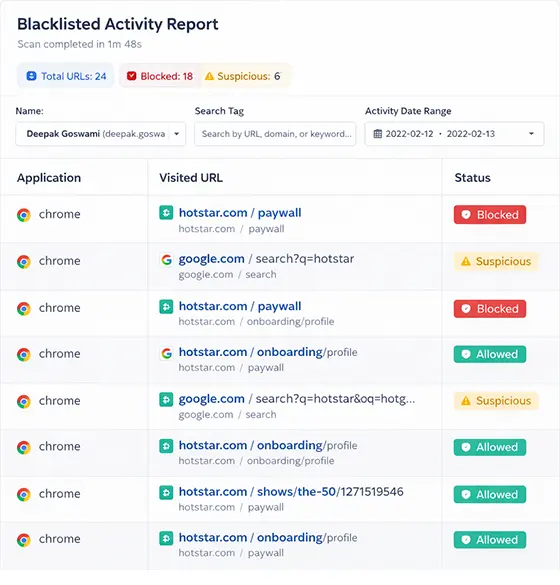
DeskTrack offers contextful monitoring. By tracking document titles, URLs and app usage, DeskTrack highlights achievements over activities. Growing teams use our employee time tracking system to foster an environment of autonomy and employee ownership of data. Managers get back the confidence that their teams are performing to their level best.

Employees retain ownership of their data while managers receive clear proof of work — without invading privacy.

How DeskTrack Can Help You With Its Powerful Features?

Our customizable features were specifically created with you in mind: time management, productivity tracking and business expansion are all within reach.

  • Automated Task Timer
    Automated Task Timer
  • Real-Time Timesheets
    Real-Time Timesheets
  • Idle Hours Tracking
    Idle Time Tracking
  • Mobile & Remote Work Tracking
    Mobile & Remote Work Tracking
  • Offline Tracking
    Offline Tracking
  • Anywhere Time Tracking
    Advanced Reporting & Analytics

Automated Task Timer

It gives you a way to track every minute down to the second, play back past hours without manually entering data, pause them midstream if need be and resume with just one click - no manual entry necessary! It means 0% errors and 100% happy employees.

  • Flexibly start/stop/pause a web timer to capture every minute in the task time tracking software.
  • Don’t worry if you miss anything. The online employee time tracking software has your back.

Real-Time Timesheets

Timesheets update in real-time. Approve with one click to save time on administrative work. That is, more time to work and even take short breaks when necessary.

  • The time tracking software for teams automatically generates timesheets on your watch.
  • The time tracking software for employees also lets you double-check and edit the values for pinpoint precision.

Idle Time Tracking

Automatically detect breaks and idle time to capture accurate productivity metrics. Exclude lunch breaks when tracking idle time to increase accuracy. Overall, you get relaxed employees who perform better work without burning themselves out.

  • The work time tracking software lets you know for how long your employees were staring at their screens in real-time.
  • The software for time tracking also lets you set an idle time limit. It also warns in real-time if your employees cross it.

Mobile & Remote Work Tracking

For a seamless tracking experience, DeskTrack provides real-time tracking from anywhere - iOS, Android, Windows, macOS and Linux--Wherever your team goes, DeskTrack tags along.

  • Whenever and wherever you need work hours data, the employee time tracking software provides it.
  • Conveniently track time from anywhere with the online employee time tracking software.

Offline Tracking

DeskTrack tracks time offline, then syncs automatically once back online. In short, no data loss. So, you will never have to worry about employees retaliating due to not receiving their salaries, because DeskTrack rules this possibility out.

  • Your employees cannot stop the remote employee time tracking software from functioning by switching the internet off.
  • Don’t worry about the data getting lost. Our time tracking software app will sync the data once the system is back online.

Advanced Reporting & Analytics

Exportable reports provide deep insights, show where time goes by, and identify obstructions in production processes to streamline them further. DeskTrack’s advanced reporting and analytics ensure overwhelm-free workflows.

  • DeskTrack’s time tracking software provides detailed insights that also help you identify the who, why, and when behind inefficiencies.
  • Streamline workflows without even having to get up from your seat using the software for time tracking.

Privacy-Enabled Automated Time Tracking with In-Depth Analytics

DeskTrack’s time tracking software takes the administrative workload off your head. With DeskTrack’s time tracking software, there is no need to wait for any update. No manual logging or chasing timesheets, remembering anything, and worrying about employee privacy issues, leaving you with more time to relax and focus on work that matters.

No Need to Chase Employees for Timesheets

Our time tracking system acts as your memory. DeskTrack offers an online time tracking for employees solution that logs every billable second with ease - eliminating "timer amnesia." No more guesswork--just the most efficient time tracking program for modern teams.

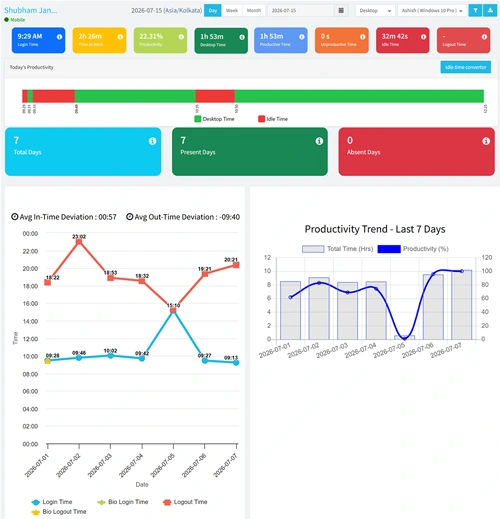
DeskTrack automated timesheet reports and employee login-logout pattern graph for accurate attendance tracking.
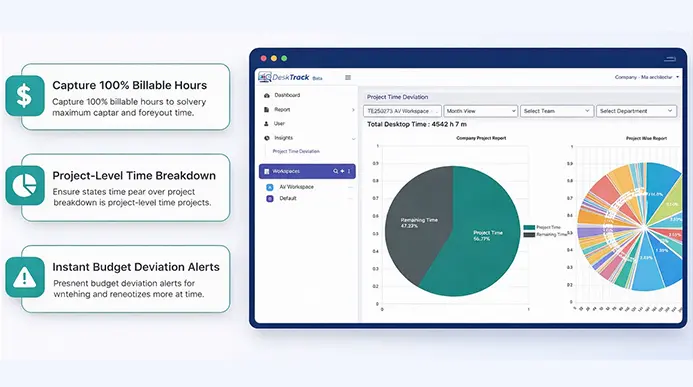
DeskTrack user cost report interface showing desktop budget, productive time, and billable minute tracking.

Never Lose a Billable Minute

Our time tracker software ensures the capture of work time data even if it gets missed, providing your team with an accurate "Set and Forget it" service.

Productive Teams

It’s the time tracking software that empowers your people. Your team stays productive while DeskTrack takes care of everything else! No need to interrupt or check-in constantly.

Real-time team productivity dashboard showing 69.29 percent productivity, total users, and list of most productive employees.
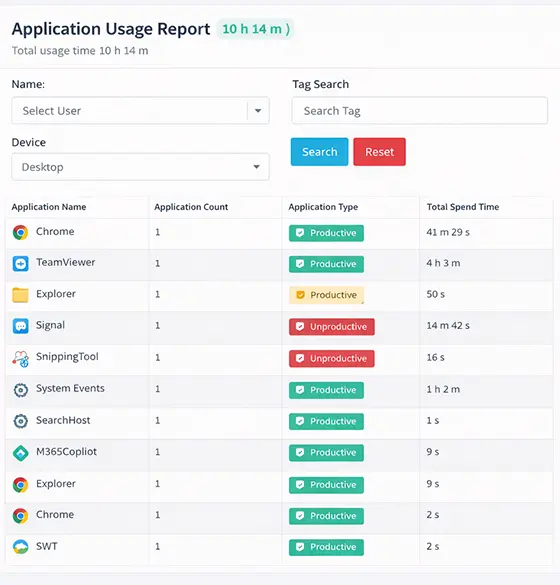
Document-level tracking report showing time spent on specific .docx and .psd files within the employee tracking system.

Document-Level Tracking

Keep tabs on exactly which .docx or .psd file was active within your employee time tracking system. Save time in areas where it is actually being wasted. It’s a win-win for both employees and managers.

Remote Employee Time Tracking

Ideal for teams working across time zones who require time tracking without micromanaging employees' workdays. Provide clients with complete transparency by providing logs that demonstrate precisely what was accomplished. Now everyone is satisfied, spreading a good word about you around the world.

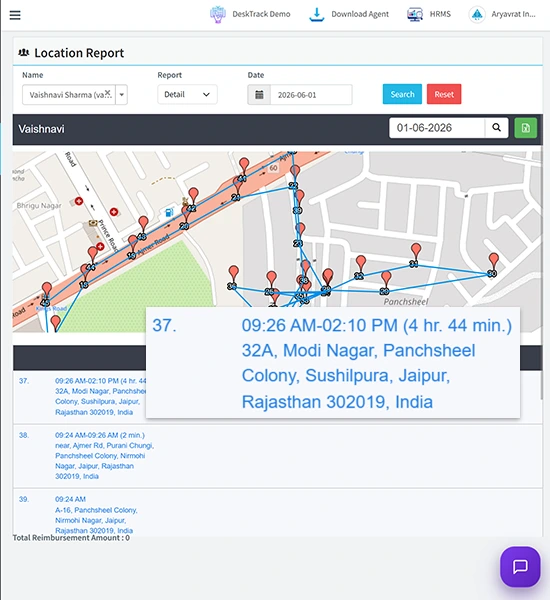
DeskTrack remote employee time tracking interface showing real-time GPS location history and route maps for field teams.
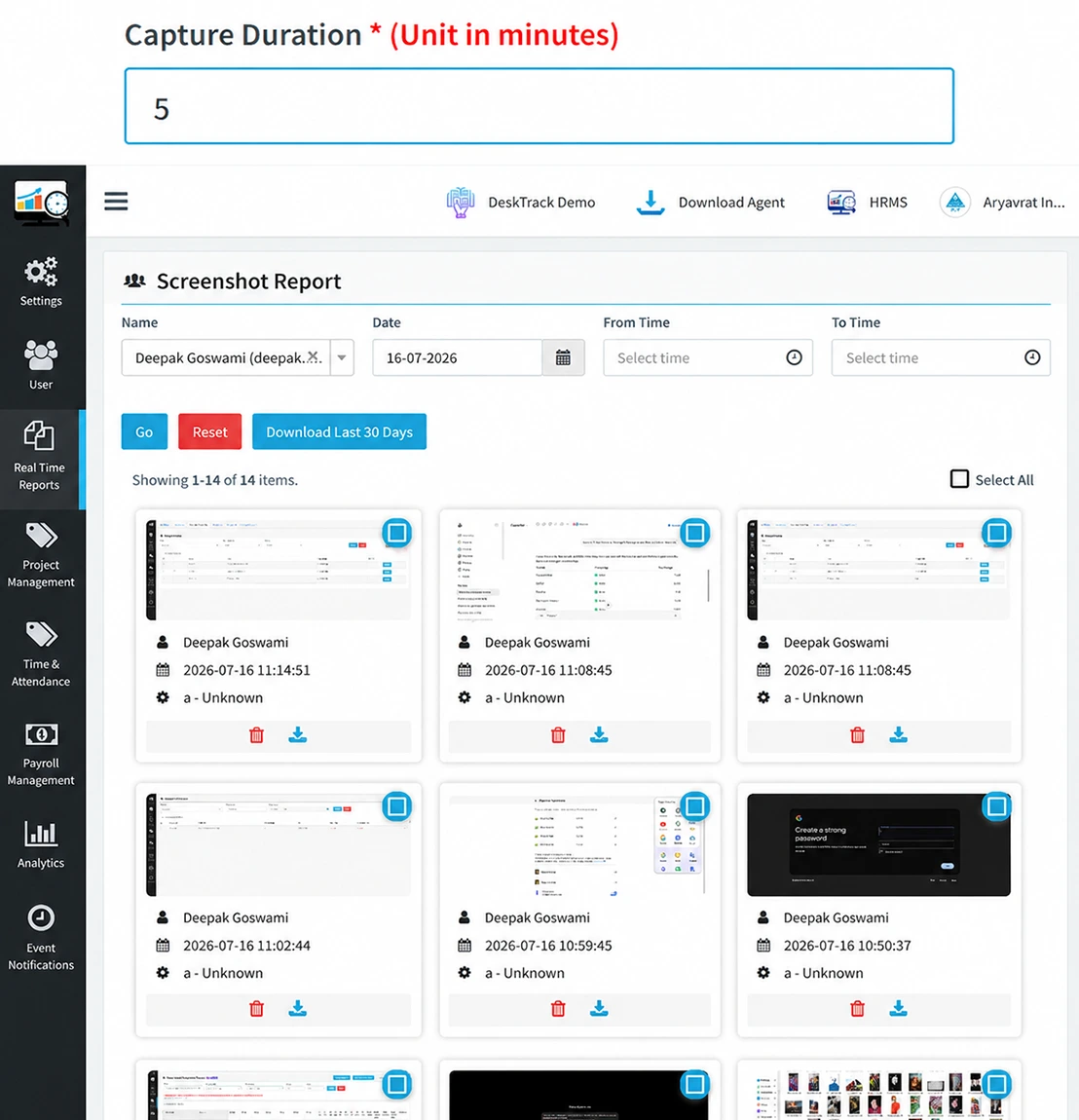
DeskTrack ethical tracking interface showing automated employee screenshot reports with customizable frequency and on-off settings.

Ethical Tracking

Our employee time tracker promotes an environment of accountability. Turn screenshots (organization-wide) on/off, customize frequency, and flexibly track time.

Seamless Synchronization

Our time tracking software app syncs directly with ZingHR, Project Management, Jira, and others for seamless syncing and 4 hours weekly administration savings. That’s a lot of bonuses, rewards, recognition, and incentives to offer your hard-working people.

DeskTrack seamless synchronization settings showing integrations with Jira, Zoho, and ZingHR for automated data syncing.

Real Results from Real Companies

Why take our word for it? See how real companies have got real results using our software for tracking time.

Tech Startup

Tech Startup

We saved 50% costs on administrative and mundane tasks, revenue increased, and we are getting more projects.

Results: Annual savings of $50,000

Digital Agency

Digital Agency

Billing accuracy increased from 92% to 99.8%; clients are happier, and we invoice faster!

Results: Increase of 15% in billable hours

Enterprise

Enterprise

Real-time insights helped us identify productivity gaps. Team efficiency increased by 30%.

Results: An $200,000 productivity gain

How to Start Tracking Time Accurately?

Follow these five simple steps to implement and start accurately tracking work time using our time tracking software. However, you will only get a five-minute break while it is installing.

shape Use Employee Time Tracking Software
Step
1
Register

Simply sign up for a free trial here on our website.

Step
2
Download & Install

Get our time tracking software app installed on your desktop computer - with flexible cloud and on-premise options available to you.

Step
3
Add Employees

Invite members of your team into the employee time tracking system.

Step
4
Configure

Take advantage of our user-friendly configuration tool to tailor our time track software specifically to your workflow needs.

Step
5
Implement

Automate time tracking of employees and teams and see their happy faces.

Time Tracking Software That Works Everywhere

DeskTrack's time tracking software works seamlessly across platforms: Windows, macOS, iOS, Android and Linux.

Mac

Mac

Windows

Windows

Linux

Linux

Android

Android

Desktop

Desktop

Mobile

Mobile

Remote Server

Remote Server

Terminal Server

Terminal Server

Meet Our Founder

What are Our Clients Saying?

Don’t just take our word for it. Hear from our satisfied clients why DeskTrack’s employee monitoring software is trusted by 8000+ organizations worldwide.

★★★★★

Awesome!

Works Smoothly without any interruptions, convenient and easy monitoring, visualizations and reports for quick overview

Vagisha P. Research Associate
★★★★★

Overall good

Helps in identifying the productivity of the employees and where they are spending their overall day, helped in increasing the productivity of the company based on8 months of deployment

Shaily D. Information Technology and Services
★★★★★

Easy to monitor remote team

It helps us to track time, attendance, productivity of the employees in this online work from home scenario

Nupur J. Education Management
★★★★★

Nice application

Overall experience is good, as i am getting the all my users activity of their system.

Daleep S. IT Department
★★★★★

Vermmillion

Very good software these are dropbox features

Pradeep G. Marketing and Advertising
★★★★★

Desktrack Provides Ease of Management

I have a good experience with this tool and its been using 1 year . Gives the accurate data what we are looking for it

Thazeem U. Senior IT operations
★★★★★

Very helpful

Employee know someone is keeping a track hence they started to work with more sincerity which resulted into more productivity.

Yasmin P. HR Manager
★★★★★

Easy to monitor remote team with DeskTrack

Easy to use with detailed reporting and analytics allowing users to track their time spent.

Nupur J. Asst Mgr- HR
★★★★★

Good tracking software for measuring the productivity

In work from home, how much time my team was spending on the system was the toughest task because there are several task monitoring software is available but tracking and monitoring were not available to us. Desktrack simply solved this issue.

Rakesh S. Project Manager
★★★★★

Easy tracking tool

Easy to use, I like desktop screen capturing, support is good, very accurate Overall good system monitoring tool.

Vivekanand D. System Admin
★★★★★

Good product at affordable pricing

The overall experience with the Desktrack was excellent. Faced some issues in the starting but then after resolution, it was working perfectly fine.

Ankit A. Recruitment Manager
★★★★★

The software has reduced the manual workload.

we are happy to share feedback for your software Time Saving and essay to use

Amit G. Airlines/Aviation (CEO)
★★★★★

Nice application

Overall experience is good, as i am getting the all my users activity of their system.

Daleep S. IT Department
★★★★★

Feature list feedback

Great. Able to track the employees productivity and blacklisting urls

Manisha J. Instructional designer
★★★★★

DeskTrack - For daily use in Enterprise

It summarizes work done by employee every day

Ritesh T. Computer Software

Frequently Asked Questions

Everything you need to know about the Desktrack.

You can follow the following parameters while choosing employee time tracking software:
  • Look after the needs of the company
  • Check compatibility and features
  • Consider ease of use for employees
  • Evaluate security features
  • Ensure team task tracking capability
  • Assess interface and usability
  • Availability of support

Here’s why 8000+ businesses around the world have implemented DeskTrack:
Point of Emphasis DeskTrack Manual Timesheets
Data Accuracy 100% precise data Prone to errors
Time Utilization Saves time and money with automation Time-consuming
Data Security Secure and centralized Bulky and easily lost

DeskTrack is the best time tracking software used by businesses worldwide. All features work in real-time to streamline workflows.

It integrates with 100+ tools and apps, including payroll, to optimize processes, eliminate inefficiencies, and boost employee productivity.

  • Configure rules, goals, and KPIs
  • Tracking starts when the system switches on
  • Tracks URLs, files, apps, and activities
  • Generates detailed performance reports

Time tracking software helps employees manage time effectively and improve productivity.
  • View idle and working hours
  • Identify and shortlist top performers

Yes, DeskTrack works offline and tracks all activities. Once the internet is restored, data is automatically synchronized online.

DeskTrack starts tracking when the device is switched on, stops when inactive, and works automatically without manual entries.

  • Train employees properly
  • Track ethically with written consent
  • Avoid tracking during breaks or non-work hours
  • Update software to stay FLSA compliant

  • Business Consultancy
  • Marketing & Advertisement
  • IT & SaaS
  • Healthcare
  • Lawyers
  • Accountants
  • Freelancers
  • Remote Teams

15-Days Free Trial with DeskTrack
A Time Tracking Software

No credit card is required.

loader