Let us ask you a question. Where is your fieldwork crew during work hours? You will probably say that it’s an obvious question. They are on the job site, hard at work. However, are you sure of that? Some of your field workers might be elsewhere slacking off, but you will never know unless you start tracking. On the other hand, if you have not implemented the best way to track field employees in real-time, then you might not be paying fairly to your remaining loyal people. If you are experiencing any of these issues, then continue reading.
What is Real-Time Field Employee Tracking?
Real-time field employee tracking involves keeping updates on the location, work hours, and routes of fieldwork employees. This data helps managers and executives analyze workflow patterns and make informed decisions.
| DeskTrack Fact |
| There are many ways you can realize this information. However, a feasible method is to use tools, such as DeskTrack’s time tracking software. Moreover, we will also discuss other options. |
Why Businesses Need to Track Field Employees in Real-Time?
As we mentioned before, real-time field employee data helps managers and executives analyze workflow patterns and make informed decisions. Furthermore, field employee tracking also ensures:
-
- Optimized workflows
- Improved staff accountability
- Accurate and fair wage payment
- Better responsibility
- Improved Efficiency & Work-Time Utilization
Read More: All You Need to Know About Field Employee Tracking Apps
What are the Different Field Staff Tracking Methods?
There are multiple methods to monitor field staff. However, only one is the most feasible, efficient, and precise option for all workflows and industries.
1. The Honor System
In short, it is employee trust over everything else. What you are doing here is giving your crew the freedom to report their work hours to you. Employees will mostly tell you estimates because looking at the stopwatch for this will distract them from work. However, the estimates can be off by an hour, or in the worst-case scenario, your workers intentionally informed you of overtime, while in reality, they didn’t even complete the shift.
2. Kiosks & Punch Cards
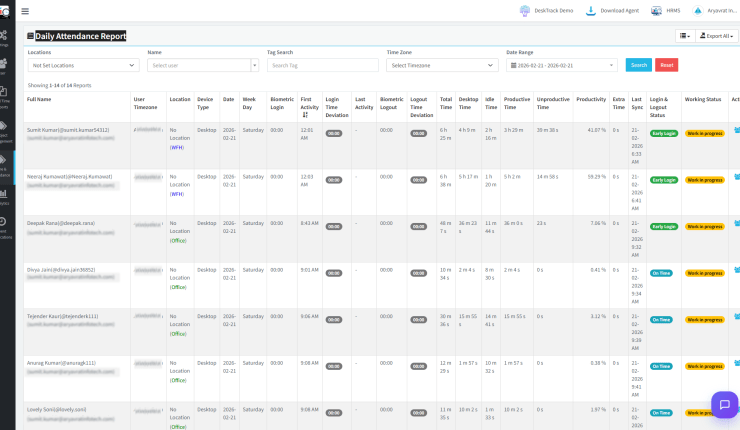
This is the same story. However, with technology in the mix. Workers have to punch a card during in-time and out-time at a specific kiosk at the job site. This will provide you with some idea of employee hours. Why some idea? Because loyal employees will show discipline in this task, while others will sit out 30 minutes to clock out. That is, unless you have a tool, such as DeskTrack, which prevents this with biometric integration and logout/login time deviation reports.
3. GPS Tracking
In layman’s terms, it’s called location tracking for employees. When you track field employees using smartphone GPS or a GPS application, it becomes simple to know the location and route of employees. This lets you properly analyze:
- The time workers spent on the job site.
- The time it took your crew to reach the job site.
- The time workers took to reach the next site.
This one’s better. However, we still need a way to monitor field staff without micromanaging.
4. Field Employee Tracking Software (Recommended)
We are not saying that the above methods are bad. However, they don’t provide as much clarity as field employee tracking software solutions, such as DeskTrack. The first advantage is that these applications automatically track fieldwork employee location and time. However, that’s not all:
- You get real-time work-time utilization, location, and route updates.
- In case of an accident, they can tap a button to send alerts to nearby colleagues and managers.
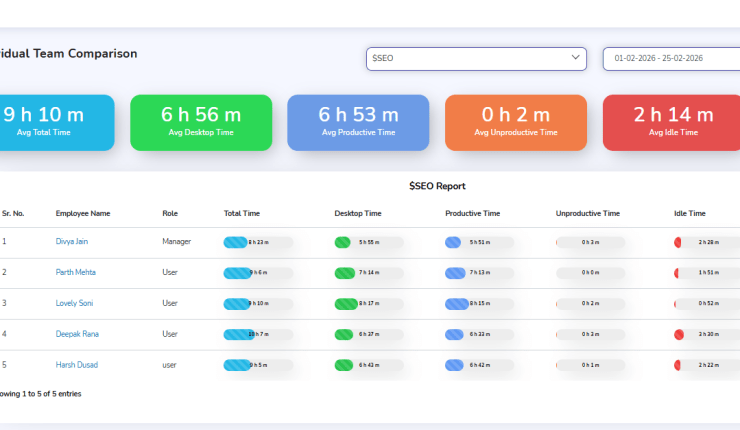
- Team leaders can view detailed reports to identify and fill work gaps.
- Team leaders can also see task completion statuses directly from the mobile app.
All these features surely boost worker productivity consistently. Overall, this matches efficiency with expectations, gradually increasing your business’s profitability.
Need 100% Visibility of Your Field Employees?
See your employees’ real-time location, routes, and task status on a single, easy-to-use dashboard.
How Does Field Employee Tracking Software Work?
The GPS feature is the backbone of the software for real-time tracking of the field workforce. Here’s how companies track field employees using the tool.
- Firstly, managers configure the tool with KPIs, such as the number of sites to visit in a workday.
- Then they configure the GPS tracking functionality accordingly.
- Now, finally, you need to wrap up with the notification and alert settings. Now you have to trigger the app to start tracking field employees.
- The software will:
- Clock the employees in and out based on their location
- Track and report employee time, route, and location.
However, with tools such as DeskTrack, you will also get clarity on how much work was done at a particular site. Moreover, here are some practical use cases of field employee tracking software.
|
For verifying that caregivers are at the correct location. |
|
For identifying the crew location. It is essential for the right workers to be at the right site at the right time. |
|
For simplifying the attendance monitoring of temporary staff who often rotate shifts and change venues. |
Real Life Case Study: Tracking Field Employees in Real-Time
A construction SME with about 300 employees had been recently struggling with bloated expenses. Their main issue was a lack of a source of data regarding employee hours. So, they had no other choice but to believe in estimates. However, things started to escalate when employees began quitting due to unfair judgment. Here’s how it went.
1. Business Background
First, the business highlighted its scope, its exact number of people, and the primary challenge it was facing.
- Industry: Construction
- No of Employees: 280
- Main Challenge: The primary issue that the company wanted to tackle was attendance and time tracking inefficiency. Since they were manually tracking employees, there was no way for them to verify whether the information was correct or not. Furthermore, they had no way to analyze work patterns to find pain points for improving efficiency. In short, they had no source of truth.
2. The Problem
Without a proper field employee tracking software solution in place, it was rapidly facing these issues.
- No Visibility: The managers had no clarity on where their employees were and what they were doing. Plus, in the worst-case scenario, they had no proof to argue with client complaints, such as the worker did not reach the job site on time or was not present there as expected.
- Manual Attendance: The company lost millions of dollars every year, and they had no idea why. Manual attendance tracking is not only prone to errors, but it can also lead to buddy punching, which is expensive for businesses around the world.
- Delays or Inefficiencies: The issue of manual attendance tracking above led to time-consuming payroll (due to checking and rechecking). It delayed wages, which caused tension among their human resources. Eventually, some of the organization’s top people got tired of this and quit. This further added to the financial and reputational loss of the business.
3. The Solution
Fortunately, they came to us in the nick of time. After evaluating the organization’s situation, we recommended that they try DeskTrack. The results were outstanding.
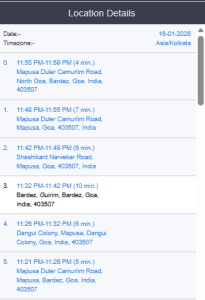
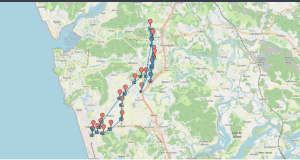
- Real-Time Location Dashboard: The software to track field employees in real time’s location dashboard is accurate to every 500m. This enables it to show precise data every time. Hence, the real-time employee tracking tool helped managers significantly improve employee accountability.
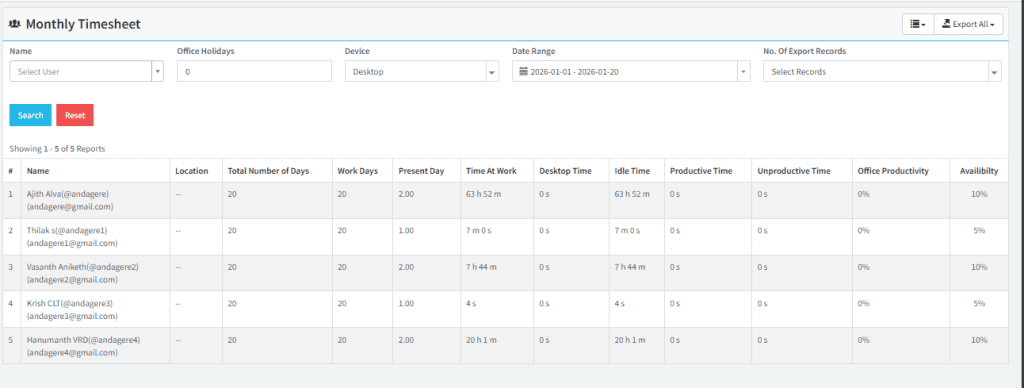
Attendance Tab: The real-time attendance screen shows who is available and who is not. Furthermore, it also shows data of workers on half-day shifts. This helped the company schedule its workdays without compromising on employee availability.
- Task Status Interface: DeskTrack’s GPS tracking software not only tracked, but also showed the task status in real-time. This helped the organization spot delays, inefficiencies, and optimize work processes to improve efficiency.
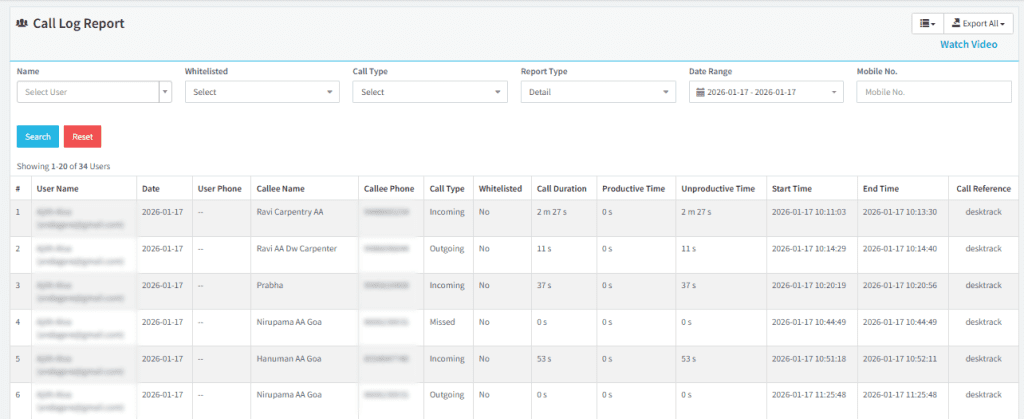
- Call Log Report: The managers were also able to identify which field employees were wasting time talking to friends and family members using DeskTrack’s call log reports. This helped the organization figure out how much call time they should allow their employees to ensure streamlined processes.
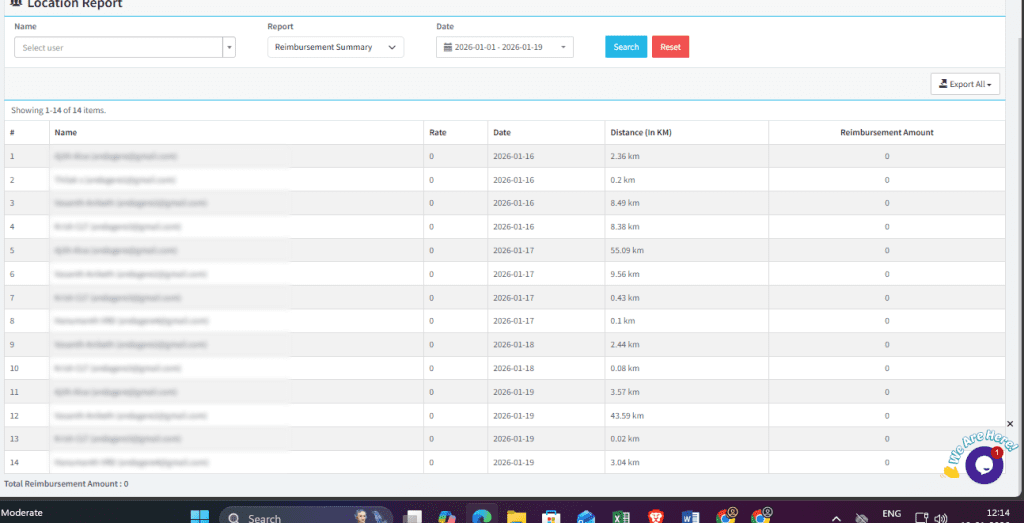
- Reimbursement Summary: The company was also able to save costs by maintaining budgets using the tool’s reimbursement summary. Since it shows clear data on travel distance, rate, and the reimbursement due, managers were able to make informed decisions. This ensured that employees were paid the right amount, not more, nor less. Overall, it again reduced the organization’s expenses.
Which is the Best Monitoring Software for Fieldwork, Remote & In-Office Employees?
So, that covers your field workforce. However, what about a solution that also monitors your in-office, hybrid, and remote employees and teams? No need to buy multiple tools when one software solution can do the job of them all. DeskTrack’s employee monitoring software is flexible and scalable enough to adapt to your growing business requirements with features such as:
- Real-time app, URL, and file usage tracking (for remote employees)
- Screenshot monitoring prevents insider threats.
- Integration with project management, accounting, and biometric attendance tools.
- Real-time time tracking with login/logout time deviations to prevent unnecessary project delays and unauthorized overtime.
Implementing these features automates all the tracking and monitoring, saving you time and reducing costs. Eventually, the result is maximum profitability for you. Try now and know the reason behind 8000+ organizations trusting it.
Frequently Asked Questions (FAQ’s)
field-employees-tracking
Ans. There are various methods to monitor field staff, including:
- The Honor System
- Kiosks & Punch Cards
- GPS Tracking
- Field Employee Tracking Software (Recommended)
Ans. The best way to track employees’ time is with time tracking software. That’s because it automatically does this task, leaving you with enough hours to focus on more important work.
Ans. Use employee monitoring software to track staff work. It logs the online and offline activities of employees over time. Plus, it either automatically or based on your configurations, categorizes the work into productive and unproductive. Overall, analyzing this data provides the clarity you need to improve accountability, responsibility, and efficiency.
Ans. Sales executives also have to commute a lot, going from door to door to sell and promote products. So, you need to track their efficiency. Here’s how GPS tracking helps.
- Install the GPS tool in every employee’s work phone.
- Use your fieldwork software to track locations in real-time.
- Advanced software also provides you with routes for more clarity.