Modern workplaces are busier than ever. Calendars are full. Slack notifications never stop. Employees are “active” all day. However, output doesn’t always reflect effort. So the real question leaders should ask is: Where is the time actually going? What hidden productivity leaks are draining focus, increasing task-switching, and quietly reducing results? You must see where your team’s time goes. Without this, low productivity will stay confusing and hard to fix.

Where does time go at work?

Is your organization missing deadlines despite long hours? The issue isn’t laziness. It is likely hidden productivity leaks. In this detailed guide for US businesses, we’ll break down:

  • What productivity leaks are
  • The most common productivity drains
  • Meeting overhead analysis
  • Idle time breakdown
  • Switching costs between tasks
  • How productivity tracking software provides real answers
  • Methods to close those gaps strategically

Let’s dive deep.

What Are Productivity Leaks?

Productivity leaks are invisible time losses that traditional performance reviews miss. They often occur through:

  • Unnecessary meetings
  • Task switching
  • Digital distractions
  • Idle system time
  • Untracked browsing
  • Manual reporting of operational inefficiencies

While Gallup reports that disengagement costs the US economy billions, the real culprit is often unmeasured workflow problems. Without structured data, productivity issues remain vague assumptions rather than measurable realities.

Where Does Time Go at Work

Download this accurate and reliable Where Does Time Go at Work to identify the specific bottlenecks holding your performance back today!

Where Does Time Go at Work

Why US Companies Are Facing Decreased Productivity

Despite more workplace tools than ever, US organizations are experiencing rising burnout and performance differences.

Microsoft research shows employees spend too much time in meetings. This leaves little time for deep, focused work.

This imbalance creates:

  • Context scattering
  • Reduced attention spans
  • Longer task completion cycles
  • Increased stress
  • Decision fatigue

The result? Decreased productivity masked by constant activity.

Common Productivity Drains in Modern Workplaces

Let’s break down the biggest hidden drains on team efficiency.

1. Digital Distractions

The average knowledge worker toggles between apps dozens — sometimes hundreds — of times per day. Common distractions include:

  • Email notifications
  • Messaging apps
  • Social media
  • News browsing
  • Unrelated research

A University of California, Irvine research shows that interruptions are costly. It can take over 20 minutes to refocus on a task after being interrupted. Consequently, even brief distractions have a growing cost. With desktop activity tracking, businesses can identify:

  • Excessive app switching
  • Time spent on non-work URLs
  • Workplace Distraction Statistics by Department

Without data, these productivity leaks go unnoticed.

2. Unstructured Workflows

When teams lack clarity, time is wasted on:

  • Clarification emails
  • Redundant work
  • Approval bottlenecks
  • Misaligned priorities

Without structured time tracking software, managers cannot analyze:

  • Time spent per project
  • Resource allocation gaps
  • Workload imbalance

This results in silent waste.

Button: Get Visibility Into Your Team’s Time

3 Manual Reporting Overhead

Manual timesheets introduce:

  • Estimation errors
  • End-of-week guesswork
  • Administrative burden
  • Delayed reporting

Employees spend time reporting work instead of doing work. Automatic Time Tracking Software removes this problem. It quietly and accurately tracks time.

Get Visibility Into Your Team’s Time ➡

Meeting Overhead Analysis: The Silent Productivity Killer

According to our time spent in meetings data, meetings are one of the most significant productivity leaks in US organizations.

According to Harvard Business Review, excessive meetings reduce deep work time and increase stress levels.

1. The True Cost of Meetings

Consider this scenario:

  • 1-hour meeting
  • 8 attendees
  • Average hourly cost: $50

That single meeting costs $400 in labor — not including preparation or follow-ups. Multiply that across departments weekly.

The cost is staggering.

Signs of Meeting-Driven Decreased Productivity

Watch for:

  • Recurring status meetings without decisions
  • No clear agenda
  • A lack of measurable outcome
  • Participants multitasking

Using productivity tracking software, companies can:

  • Measure time spent in meeting apps
  • Compare meeting time vs focused work
  • Identify over-scheduled departments

This transforms meetings from assumptions into measurable data.

Idle Time Breakdown: What It Really Means

Idle time isn’t always laziness; it often stems from:

  • Approval bottlenecks
  • System delays
  • Context switching pauses
  • Mental resets between tasks

Left unmanaged, these pauses become significant productivity leaks that drain hours from the workweek.

1. Understanding Idle Patterns

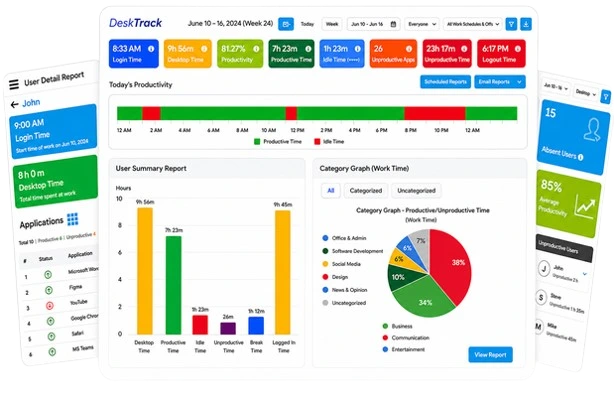
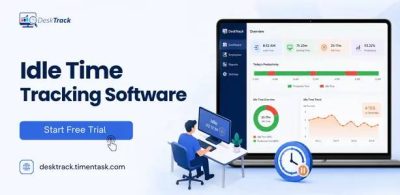
Through desktop activity tracking, organizations can see:

  • Active vs idle hours
  • Productivity dips during certain times
  • Idle spikes before or after meetings
  • Department-level idle comparisons

This data feeds directly into a structured productivity report.

Without this breakdown, managers rely on guesswork.

2. The Cost of Invisible Downtime

If 20 employees lose just 30 minutes daily to unstructured idle time:

  • That equals 10 lost labor hours per day
  • 50 hours per week
  • 200+ hours per month

This directly contributes to productivity loss at work.

Reduce Idle Time & Costs Now ➡

Switching Costs Between Tasks

Task switching is one of the most underestimated productivity leaks.

According to the American Psychological Association, multitasking reduces efficiency and increases error rates.

1

1. Cognitive Switching Costs

Each time an employee switches tasks:

  • Brain resets context
  • Focus drops temporarily
  • Completion time increases
  • Error probability rises

Frequent switching between:

  • Email
  • Slack
  • CRM systems
  • Reporting dashboards

destroys deep work drive.

2. Measuring Switching Behavior

With URL tracking software and desktop activity tracking, businesses can identify:

  • High app-switch frequency
  • Broken up workflows
  • Excessive browser tab switching
  • Repetitive micro-interruptions

These patterns explain why teams feel busy but underperform.

Are Productivity Leaks Draining Your Team’s Workday Without You Realizing It?

Stop guessing where time goes at work and start fixing what’s slowing your team down with DeskTrack.

Get Started Free

Where Does Time Go at Work? A Data Perspective

In many US companies, workday time distribution often looks like:

  • 30–35% meetings
  • 15–25% communication tools
  • 10–20% idle time
  • 15–25% task switching cost
  • Remaining time for focused work

Ultimately, without structured measurement, leaders cannot optimize this allocation. That’s where time tracking software for teams becomes essential.

How Productivity Tracking Software Solves the Problem

Modern productivity monitoring tools provide visibility that spreadsheets cannot.

1. Real-Time Data Collection

Through Automatic Time Tracking Software, organizations can:

  • Capture work hours automatically
  • Track active vs idle time
  • Monitor application usage
  • Generate structured productivity reports through workplace productivity analysis.

No manual entry required.

2. URL Tracking for Behavioral Insights

With URL tracking software, companies can:

  • Categorize websites as productive or non-productive
  • Analyze browsing patterns
  • Reduce digital distractions

This helps answer the fundamental question: Where does time go at work?

3. Data-Driven Productivity Reports

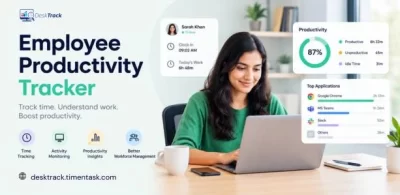
A structured productivity report includes:

  • Department comparisons
  • Daily activity breakdown
  • Application usage summaries
  • Idle time analytics
  • Project time allocation

Data enables informed decisions.

How DeskTrack Helps US Businesses Remove Productivity Leaks

For organizations seeking clarity, DeskTrack offers a complete solution designed for modern US workplaces.

DeskTrack integrates:

  • Advanced productivity tracking software
  • Employee performance tracking software 
  • Intelligent desktop activity tracking
  • Detailed URL tracking software
  • Accurate time tracking software
  • Fully automated Automatic Time Tracking Software capabilities

With DeskTrack, companies can:

  • Identify productivity leaks instantly
  • Analyze meeting overhead
  • Break down idle time
  • Measure switching costs
  • Generate actionable productivity reports
  • Improve working efficiency without micromanagement

Instead of guessing where time goes at work, businesses gain structured, real-time visibility.

Conclusion

Productivity leaks aren’t dramatic; they are minor daily drains.

  • Meetings.
  • Interruptions.
  • Idle gaps.
  • Task switching.

They collectively destroy efficiency. 

US companies don’t need more tools; they need visibility. By using workforce analytics software to understand time utilization, organizations regain control over performance and revenue.

Frequently Asked Questions (FAQ)

productivity-leaks

What are Productivity Leaks?

Ans. Productivity leaks are hidden time losses caused by unnecessary meetings, digital distractions, idle time, and inefficient workflows that drain output.

Why is My Team Busy But Experiencing Decreased Productivity?

Ans.Busy work often involves constant communication, excessive meetings, or frequent task switching rather than high-impact, focused deep work.

How Can Companies Measure Where Time Goes at Work?

Ans. You can use productivity tracking software, time tracking software, and desktop activity tracking to generate detailed, structured productivity reports.

Is Desktop Activity Tracking Legal in the US?

Ans. Yes. It is legal when implemented transparently with clear employee policies and in full compliance with state and federal employment laws.

What is the Benefit of Automatic Time Tracking Software?

Ans. It eliminates manual reporting errors and captures real-time data to provide leadership with objective productivity insights for better decision-making.