An Overview of the Productivity Paradox of 2026
Searching for the best timer app for Mac has never been this complex. The global remote and hybrid work adaptability in 2026 redefines productivity. The market demands context, verification, and actionable insights, gaping manual and advanced automated smart solutions.
The productivity paradox exists: Efficiency-boosting tools often get frustrating, inaccurate, and time-consuming. The matters are more pressing than ever: a freelancer loses billable hours by manually logging time, remote team managers struggle to verify productivity without micromanagement, etc.
In this blog, we will reveal why smart macOS timer apps are now the professional standard. We will help you realize an ideal need-based solution from the top 16 timer apps for Mac.
Why Do You Need to Automate in 2026?
According to market analysis, the shift from manual to automated AI-powered time tracking is significant. These 2 factors, reshaping the productivity software landscape, drive this change.
1. Compliance & Accuracy
Manual logging results in human error. When you must remember to click start/stop, billable minutes are missed. Research clarifies that manual time tracking is 20-30% inaccurate, leading to significant expenses. For instance, a freelancer can skip 8-12 monthly billable hours. Working 40 hours/week at $50/hour this way results in an annual $1600-2400 loss.
This also creates compliance risks. Incomplete time records result in legal exposure for businesses subject to labor laws. Remote work strengthens these concerns, making accurate, verifiable data critical for compliance maintenance and employee-employer protection.
2. Detailed Insights & Context
Users must know what they are working on, requiring seamless integration with the macOS to track apps and URLs. A simple free timer app for Mac calculates 8 work hours. A smart timer shows 4, 2, and 2 design work, meeting, and administrative hours simultaneously; an essential context for identifying productivity obstructions, streamlining workflows, and informed decision-making.
This shift is the reason why only a few timer apps for Mac qualify as modern productivity tools. The remaining are stuck in the past, providing basic tracking functionality without the required intelligence.
Read More: Top 16 Free & User-Friendly Timer Apps for Windows in 2026
Why Manual Mac Timer Apps Cost You
The standard timer app on Mac relies on manual input. You start/stop a timer as you work. Although it’s simple, it leads to inaccurate data, expenses, and missed improvement opportunities.
The 3 Areas Where the Mac Timer Widget Lags
1. Forgotten Timers & Human Errors
Mistakes happen in manual logging. Forgetting to start/stop a timer leads to significant billing inaccuracies. Suppose a freelancer forgets to start the timer daily for 15 minutes. That’s 5 untracked monthly hours, 60 annual hours ($3000 gone). This is the unquantified cost of manual time apps for MacBook.
2. No Insights & Context
A manual time app for MacBook shows how long and not what you worked on. This “no context” makes productivity analysis, improvement, or time-outcome relation impossible. A manager will know that their team worked 160 hours last week. However, they will never know whether those hours were productive.
3. Unreliable Data & Bias
Employees and freelancers often overestimate their productivity. This biased self-evaluation leads to a data-reality mismatch. Employees might report 8 productive hours after spending 2, 1, and 1 hours on meetings, emails, and breaks – leaving only 4 hours of productivity, undermining the reliability of decision-making and analysis.
How Timer Apps for Mac Evolved
The timer app market has upgraded over the past 5 years. The best timer apps for Mac in 2026 vary from the outdated tools.
1. Generation 1: Basic (Pre-2020)
Simple start/stop timers: No context, reporting, or intelligence. For example, the Mac timer widget and third-party timers.
2. Generation 2: Manual Tracking (2020-2023)
These apps let users enter manual time entries, categorize work, and generate simple reports. For example, Clockify and Toggl Track.
3. Generation 3: Smart (2024-2026)
This is the latest generation led by DeskTrack for automated time tracking. Running in the background, these macOS timer apps monitor keyboard and mouse activities, automatically logging work-time using machine learning for categorization. They provide actionable insights, solving the accuracy, context, and bias issues.
DeskTrack represents the peak of this evolution, integrating automated tracking, smart categorization, biometric verification, and advanced reporting.
Comparing the Top 16 Timer Apps for Mac in 2026
We are providing a complete overview of the timer app landscape with a detailed top 16 Mac timer app comparison for 2026. While many offer free versions, only DeskTrack provides the comprehensive reporting necessary for professional streamlining and real productivity insights.
| Software Name | Best For | Paid/Free Plans |
| DeskTrack | Data-backed accountability and actionable productivity insights | $5.99/user/month |
| Toggl Track | Simple client billing and time tracking | $9/user/month |
| Clockify | Minimal budget time tracking | $5.49/user/month |
| Horo | Focused work sessions | Quote on contact |
| Due | Students and deadline-driven work | Quote on contact |
| Be Focused | Pomodoro preferers | $2.99/month |
| The Mac Clock App | Basic timing requirements | Free |
| Timer+ | Tasks that require parallel timing | $0.99 |
| Flow | Deep work sessions | $1.49/month |
| Tyme | Project-based time tracking | $4.67/month |
| Smart Countdown Timer | Users preferring voice/text commands | Free |
| Teramind | Pure time tracking | $13.4/user/month |
| Online Stopwatch | Temporary use on shared computers | Free |
| Time & Date Timer | Particularly, one-off, customizable timing needs with | Free |
| Simple Timer Widget | Quick timer access without opening anything | Free |
| Menu Bar Countdown | Users needing constant visual timer feedback | Free |
1. DeskTrack
DeskTrack is the complete time and productivity management software for Mac.
1.1 Why DeskTrack is the Best Timer App for Mac?
DeskTrack’s core lies in its automatic time tracking and categorization, solving the accuracy, context, and bias issues prevalent in manual timer apps compatible with Mac. Here’s DeskTrack’s USP.
a. Automated Time Tracking
DeskTrack runs uninterrupted in the background, continuously monitoring activities. It tracks keyboard and mouse movements to realize active vs idle time, eliminating the human inefficiency plaguing manual timers.
b. Biometric Verification
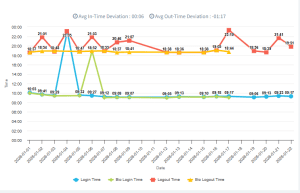
Biometric deviation for measuring physical presence alignment with logged work time is a unique feature of DeskTrack for remote teams. The metrics help users understand whether they are engaged.
It is critical for remote accountability to address the work verification of remote employees. The feature offers an objective, data-backed answer without employee spying or constant monitoring, building trust between employees and employers with labor law compliance.
c. Productivity Scoring & Smart Categorization
DeskTrack smartly classifies your time into productive (example, writing code) and unproductive (example, browsing reels). This is via ML-analysis of app and URL usage, resulting in an honest, data-backed evaluation of focus and productivity instead of self-reported time. DeskTrack generates objective metrics revealing actual work-time utilization. This converts raw time into a trackable, measurable, and business-outcome relatable productivity score.
d. Advanced Reporting
DeskTrack’s real value lies in its reporting. You get 3 levels of reports: Daily, Weekly, and Monthly, each for different insights streamlined to different use cases.
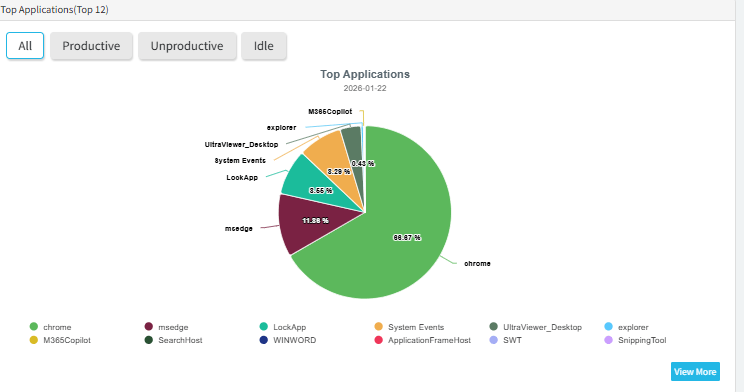
1. Daily Reports
They provide daily granular workday insights. You can see time-consuming apps and sites during productive and break times. This level of detail streamlines workflows by identifying distractions.
2. Weekly Reports
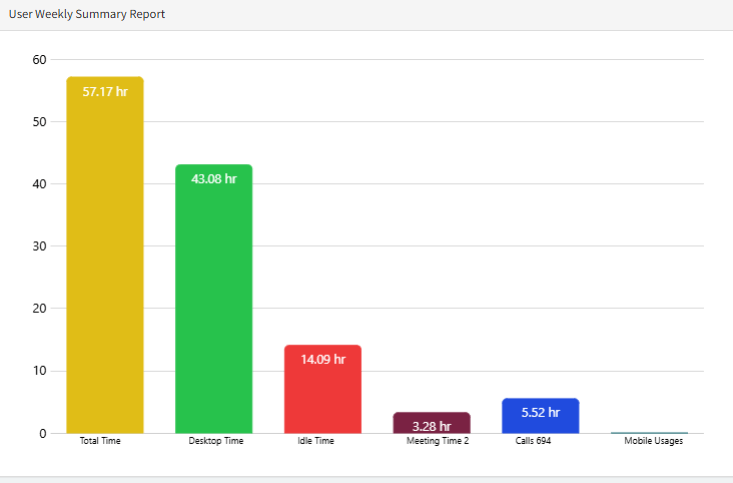
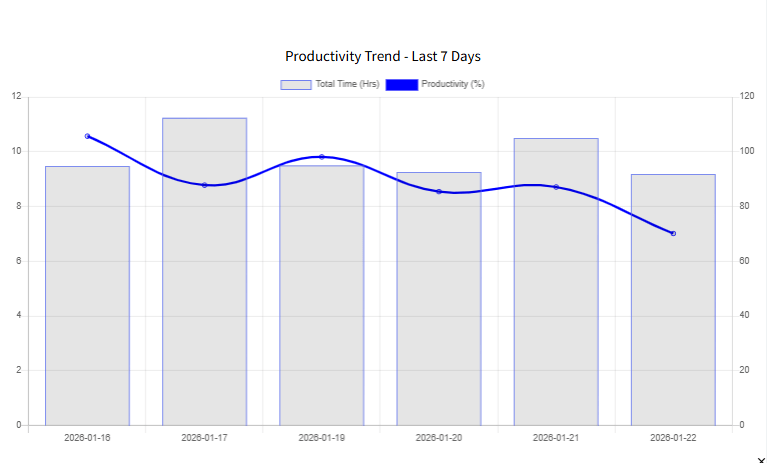
They display trends. You can see varying daily productivity, the most productive days, and performance comparisons. This helps you identify weekly patterns and effectively plan schedules.
3. Monthly Reports
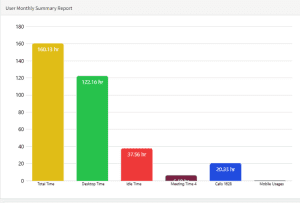
They show strategic overviews, revealing your overall productivity pattern, work-time utilization, and monthly performance comparisons. You share these reports with clients, managers, or use them for personal reviews.
1.2 How the Reports Drive Revenue & Ranking
DeskTrack’s reports convert raw hours data into strategic assets, driving business outcomes.
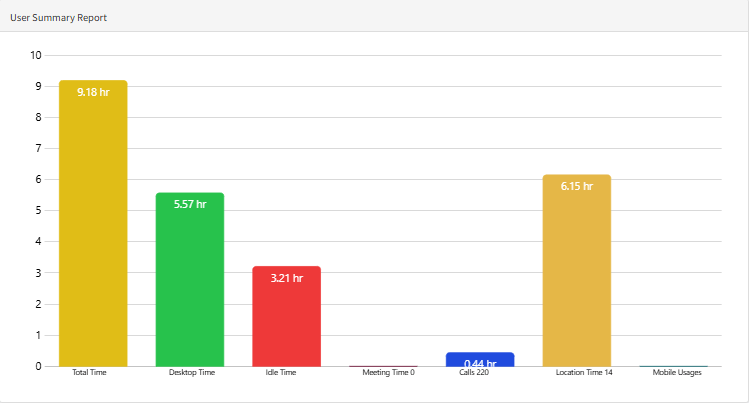
a. Identify Your True Work Profile with the Monthly Summary
DeskTrack provides monthly user summary reports, revealing the entire work profile. This report empowers you to evaluate like a business analyst:
| Metric | DeskTrack’s Insight | Business Value |
| Total Time | System login hours | billing, salary, and compliance baseline |
| Desktop Time | Active hours on Mac (mouse/keyboard activity) | True engagement and focus measurement |
| Idle Time | Inactive hours (no keyboard/mouse activity or time away from your macOS) | Distraction identification or more breaks are required |
| Meeting/call Time | Communication time (Zoom, etc.) | Shows meeting time consumption and helps streamline |
| Productivity Score | Category-based efficiency percentage | A single metric for time-based improvement |
This DeskTrack report lets you visualize your efficiency percentage rising or falling. It enables you to link it to external factors like project deadlines. It’s the best timer app macOS feature for long-term ranking and self-improvement.
Ready to experience the power of automated time tracking?
Start your free 14-day trial of DeskTrack today and receive your first comprehensive Monthly Summary Report. No credit card required.
2. Toggl Track
Key Features: Manual time tracking, project management, team collaboration, and basic reporting
Reporting Capability: Basic
Pros:
- – User-friendly interface
- – Generous free plan with unlimited users
- – Good project and team management features
- – Integrations with popular tools
- – Established platform with a large user base
Cons:
- – Requires manual time entry
- – Limited reporting and analytics
- – No automatic tracking or context capture
- – Prone to human error and bias
3. Clockify
Key Features: Unlimited users, manual time tracking, simple reporting, and basic project management
Reporting Capability: Basic
Pros:
- – Completely free for unlimited users
- – Simple, intuitive interface
- – Good for basic team time tracking
- – Pomodoro timer feature
- – Mobile app available
Cons:
- – Requires manual time entry
- – Limited reporting and analytics
- – No automatic tracking
- – Lacks advanced productivity management features
4. Horo
Key Features: Clean interface.
Reporting Capability: N/A
Pros:
- – Extremely simple and lightweight
- – Beautiful, minimalist design
- – No distractions or unnecessary features
Cons:
- – No reporting or analytics
- – No project or task tracking
- – Limited functionality
- – Not suitable for professional use
5. Due
Key Features: Notifications and countdowns with reminders.
Reporting Capability: N/A
Pros:
- – Persistent, annoying reminders ensure you don’t forget
- – Good for deadline-driven work
- – Simple and effective
Cons:
- – No time tracking or reporting
- – Limited functionality
- – Not suitable for professional time tracking
6. Be Focused
Key Features: Task lists, session history, and Pomodoro.
Reporting Capability: Simple
Pros:
- – Excellent implementation of the Pomodoro technique
- – Task list integration
- – Break reminders
- – Distraction blocking features
Cons:
- – Limited to Pomodoro structure
- – Basic reporting
- – Not suitable for detailed time tracking
- – Limited analytics
7. The Mac Clock App
Key Features: Built-in zero-install timer and stopwatch
Reporting Capability: N/A
Pros:
- – No installation required
- – Always available
- – Simple and reliable
Cons:
- – No tracking or reporting
- – No project or task management
- – Minimal features
- – Not suitable for professional use
8. Timer+
Key Features: Multiple simultaneous timers and customizable labels and notifications.
Reporting Capability: N/A
Pros:
- – Multiple simultaneous timers
- – Customizable labels
- – Clean interface
Cons:
- – No time tracking or reporting
- – Limited functionality
- – Not suitable for professional use
9. Flow
Key Features: Clean user interface.
Reporting Capability: Simple session history
Pros:
- – Beautiful, minimalist design
- – Distraction-free interface
- – Good for focus and deep work
- – Simple session history
Cons:
- – Limited reporting and analytics
- – No project or task tracking
- – Not suitable for detailed time tracking
- – Minimal functionality
10. Tyme
Key Features: Project-based time tracking and detailed reporting
Reporting Capability: Detailed
Pros:
- – Project-based organization
- – Detailed reporting in paid plans
- – Good for project managers
- – Integrations available
Cons:
- – Limited free trial
- – Requires manual time entry
- – Paid plans needed for full features
- – Not as comprehensive as DeskTrack
11. Smart Countdown Timer
Key Features: Voice/text-based input for setting timers.
Reporting Capability: N/A
Pros:
- – Natural language input
- – Hands-free operation
- – Simple and effective
Cons:
- – No tracking or reporting
- – Limited functionality
- – Not suitable for professional use
12. Teramind
Key Features: Digital forensics, telementary, behavior rules, and a customizable BI dashboard.
Reporting Capability: Advanced
Pros:
- Comprehensive monitoring
- Strong compliance and security
- Productivity analysis
- Flexible deployment
- Detailed reporting
Cons:
- High cost
- Complexity
- Resource consumption
- Privacy concerns
- Mac issues
13. Online Stopwatch
Key Features: Web-based.
Reporting Capability: N/A
Pros:
- – No installation required
- – Works in any browser
- – Good for temporary use
Cons:
- – No tracking or reporting
- – Requires an internet connection
- – Limited functionality
- – Not suitable for professional use
14. Time & Date Timer
Key Features: Highly customizable online timer.
Reporting Capability: N/A
Pros:
- – Highly customizable
- – Many appearance options
- – Works in any browser
Cons:
- – No tracking or reporting
- – Limited functionality
- – Not suitable for professional use
- – Requires an internet connection
15. Simple Timer Widget
Key Features: Direct integration with the macOS notification center for No-app open access.
Reporting Capability: N/A
Pros:
- – Quick access from Notification Center
- – No need to open an app
- – Simple and convenient
Cons:
- – No tracking or reporting
- – Limited functionality
- – Not suitable for professional use
16. Menu Bar Countdown
Key Features: Runs in the menu bar
Reporting Capability: N/A
Pros:
- – Always visible in the menu bar
- – Constant visual feedback
- – Simple and effective
Cons:
- – No tracking or reporting
- – Limited functionality
- – Not suitable for professional use
- – Can be distracting
Who is a Timer App for Mac Designed for?
From freelancers to enterprises, macOS timer apps are useful for every unique need. Here’s how they solve each segment’s issues.
1. Freelancers
Freelancers use macOS timer apps to accrue client billing. Basic timer apps are enough for them to track every billable hour and never miss a single dollar.
2. Remote Teams
Remote teams utilize advanced timer apps for Mac to enhance accountability by gaining valuable insights. Managers and team leaders can distinguish between those who are actually working and those who are pretending to be.
3. Small Businesses
Small businesses use the said apps to save costs by improving the work-time utilization efficiency of employees. They use the reports to stay compliant with labor laws and maintain their reputation.
4. Enterprises
Enterprises need automated macOS timer apps, such as DeskTrack, to get advanced productivity analytics, compliance, and data security. They use this data to expand their operations and infrastructure around the world.
Stop Watching the Clock, Start Measuring Success
The timer app landscape has drastically evolved. What once was a simple countdown tool is now a smart productivity measurement platform. Aligning your goals and required insights to your selection is critical when picking your time app for a MacBook. If you need a simple timer, then apps such as Due, Horo, or the built-in Mac clock are enough. However, if you seriously want to:
- Boost your professional ranking
- Increase revenue and conversion
- Gain a competitive edge
- Ensure compliance
- Build trust
Then you need a data-driven automated solution, which only DeskTrack provides. Beyond a simple timer, it’s a complete productivity management platform for transforming data into intelligence. Start measuring productivity with automated intelligence. The future of productivity is automated, smart, and data-driven. In Short, DeskTrack.